Nomad OS Deployment task sequence actions
Nomad support for Configuration Manager OS Deployment.
1E Nomad PBA task sequence actions
Click on a link for more information about a custom task sequence action and its configuration.
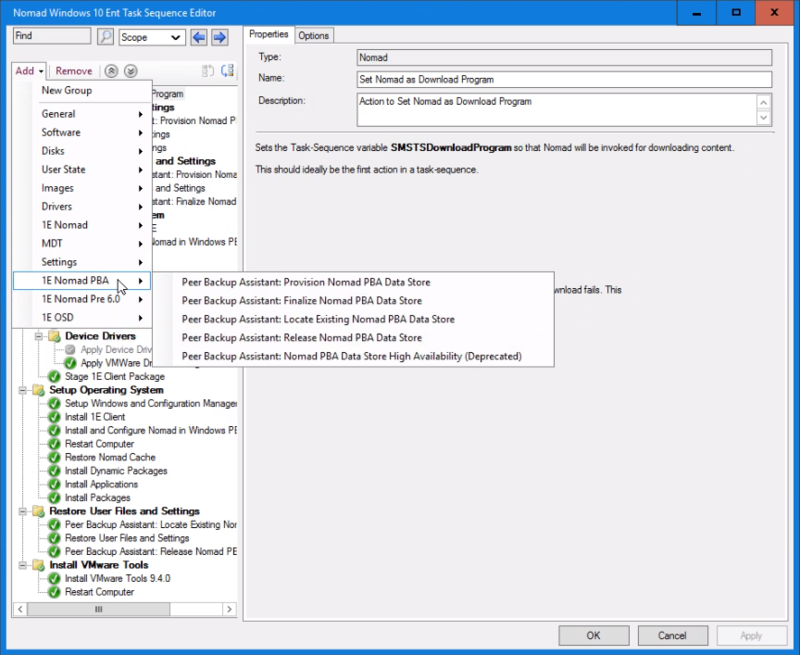
 Peer Backup Assistant: Provision Nomad PBA Data Store
Provisions a PBA data store prior to saving user state using USMT. It is the first step of the Peer backup assistance sequence (USMT Capture User State follows).
This custom action is available in the 1E Nomad PBA task sequence actions.
|
Actions |
Notes |
|---|---|
|
This task:
|
This task sequence action:
If the task sequence variable 1EWSA_USMTSizeInMB is set, the step will use its assigned value when polling. |
Configurable parameters
|
Parameter |
Default value |
Description |
|---|---|---|
|
Name |
Peer Backup Assistant: Provision Content Distribution PBA Data Store |
Name for the custom task sequence action. |
|
Description |
Action to find a PBA data store for saving user state |
Description for the custom task sequence action. |
|
Use Content Distribution's size estimation |
Disabled by default. |
If enabled, the estimation is passed to NMDS_POLL. |
|
Static cache space |
100 |
Estimated cache space in MB required to store the user state. This can either be a number, the default being 100, or the name of a task sequence variable holding the value delimited by '%', e.g. " %USMTEstimate%. |
Peer Backup Assistant: Finalize Nomad PBA Data Store
Closes the connection to the PBA data store after user state is saved with USMT Capture User State.
This step replaces the Peer Backup Assistant: Close Nomad PBA Data Store (deprecated) and the Peer Backup Assistant: High Availability (deprecated) steps. You can continue using the deprecated steps if you have already deployed them, but you cannot modify them. Going forward, we recommend you migrate to this new task sequence step.
This custom action is available in the 1E Nomad PBA task sequence actions.
|
Actions |
Context |
|---|---|
|
When run, this task:
|
This task sequence action:
|
Configurable parameters
|
Parameter |
Default value |
Description |
|---|---|---|
|
Name |
Peer Backup Assistant: Finalize Content Distribution PBA Data Store |
Name for the custom task sequence action. |
|
Description |
Action to close the connection to the Nomad PBA data store after saving the user state. |
Description for the custom task sequence action. |
|
Enable HA |
False |
Enable high availability. If the task sequence variable 1EDisablePBA_HA = True, then High Availability is disabled. This variable is automatically set for Remote WSA deployments. |
|
Minimum |
1 |
The minimum number of PBA data store backups. The number of data stores must be available when PBA-HA starts the backup, else if fails.
|
|
Maximum |
1 |
The maximum number of PBA data store backups.
|
|
Synchronous |
1 |
The number of successful backups to create before moving on to the next task sequence action.
|
Peer Backup Assistant: Locate Existing Nomad PBA Data Store
Finds saved user data, prior to restoring user state using the USMT Restore User State action.
Peer Backup Assistant: Close Nomad PBA Data Store (deprecated) and (usually) OS refresh or OS install on bare-metal actions must be run first. If saving user data was run as a separate task, insert an action in the current task sequence that sets the PBAComputerName TS variable to the same value that is set in the saving task sequence. This identifies the Content Distribution cache in the network where the user data is saved.
This custom action is available in the 1E Nomad PBA task sequence actions .
|
Actions |
Notes |
|---|---|
|
When run, this task:
|
This task sequence action:
|
Configurable parameters
|
Parameter |
Default value |
Description |
|---|---|---|
|
Name |
Peer Backup Assistant: Locate Existing Nomad PBA Data Store. |
Name for the custom task sequence action. |
|
Description |
Action to locate cached data prior to restoring user state. |
Description for the custom task sequence action. |
Peer Backup Assistant: Release Nomad PBA Data Store
Releases saved user data in the Content Distribution cache, after restoring user state with USMT Restore User State.
The USMT Restore User State action must have been run successfully.
This custom action is available in the 1E Nomad PBA task sequence actions.
|
Actions |
Tasks |
|---|---|
|
When run, this task:
|
This task sequence action:
|
Configurable parameters
|
Parameter |
Default value |
Description |
|---|---|---|
|
Name |
Peer Backup Assistant: Release Nomad PBA Data Store. |
Name for the custom task sequence action. |
|
Description |
Action to release the Nomad PBA data store after restoring user state. |
Description for the custom task sequence action. |
Peer Backup Assistant: Close Nomad PBA Data Store (deprecated)
This step has been replaced by Peer Backup Assistant: Finalize Nomad PBA Data Store, Existing deployments will still work, but you cannot modify them. Going forward, we recommend using its replacement.
This step closes the connection after user state is saved by USMT Capture User State. The Peer Backup Assistant: Provision Nomad PBA Data Store and USMT Capture User State actions must have been run.
|
Actions |
Notes |
|---|---|
|
When run, this task:
|
This task sequence action:
|
Configurable parameters
|
Parameter |
Default value |
Description |
|---|---|---|
|
Name |
Peer Backup Assistant: Close Nomad PBA Data Store. |
Name for the custom task sequence action. |
|
Description |
Action to close the PBA data store connection after saving user state. |
Description for the custom task sequence action. |
Peer Backup Assistant: High Availability (deprecated)
This step is deprecated, and you should use the Peer Backup Assistant: Finalize Nomad PBA Data Store instead. Existing deployments will still work, but you cannot modify them. Going forward, we recommend using its replacement.
This step stores additional backup copies of the PBA data store, after the primary data store has been created with Peer Backup Assistant: Provision Nomad PBA Data Store and after the USMT data has been saved and closed with Peer Backup Assistant: Close Nomad PBA Data Store (deprecated).
The following actions must have been run successfully:
-
Peer Backup Assistant: Provision Nomad PBA Data Store.
-
USMT Save User State.
-
Peer Backup Assistant: Close Nomad PBA Data Store (deprecated).
This custom action is available in the 1E Nomad PBA task sequence actions .
|
Actions |
Notes |
|---|---|
|
When run, this task:
|
This task sequence:
|
Configurable parameters
|
Parameter |
Default value |
Description |
|---|---|---|
|
Name |
Peer Backup Assistant: High Availability. |
Name for the custom task sequence step. |
|
Description |
Action to find additional PBA data stores for saving user state. |
Description for the custom task sequence action. |
|
Minimum |
1 |
The minimum number of PBA data store backups. Must be at least 1 and not greater than 6. The specified number (minimum) of data stores must be available when PBA-HA starts backing up the data. If the minimum number of data stores will not respond, then the PBA-HA task sequence step will fail. The minimum should be greater than or equal to the Synchronous value. If the minimum number is less than the Synchronous value, the task sequence may fail even though the minimum number of backups have been done. |
|
Maximum |
1 |
The maximum number of PBA data store backups. Must be at least equal to the minimum and not greater than 6. |
|
Synchronous |
1 |
The number of backups that must be performed successfully before moving onto the next action in the task sequence. Must be 0 or more and not greater than the value set for the maximum. It is possible, but not recommended, to set this value to 0. If this is done, the next action in the task sequence will start immediately, but there will be no guarantee that any backups have been successful. |
1E Nomad Pre 6.0 task sequence actions
Click on a link for more information about a custom task sequence action and its configuration.
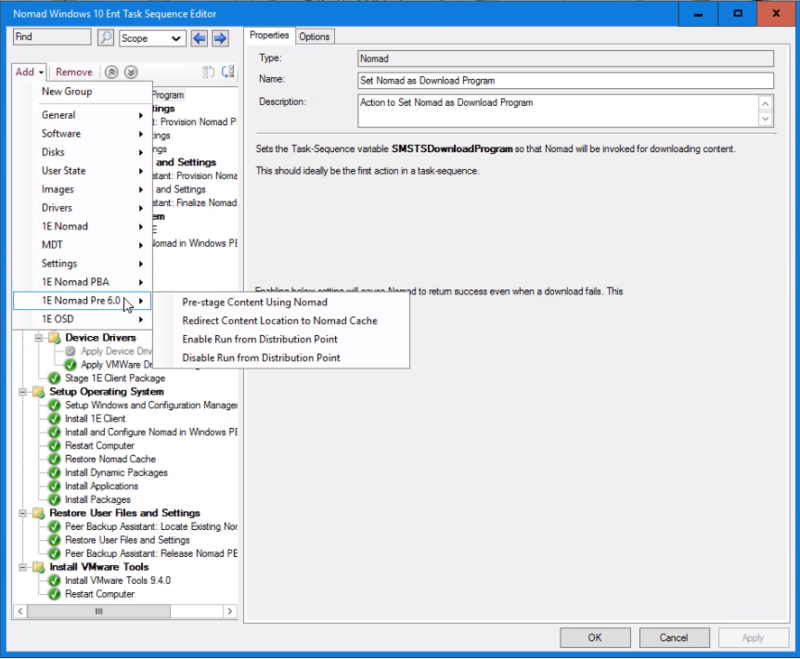
Pre-stage Content Using Content Distribution
Pre-stages content using Content Distribution, either in WinPE or a full Microsoft Windows operating system. It uses the NomadPackageLocator.exe command-line switches tool to locate any locally available copies of content, as set in the References in the custom task sequence action properties. If no local copies are available, it will download the content from the DP and store it locally. It then configures the Task Sequence to use this locally stored content.
We recommend, when using the Pre-stage Content Using Nomad step, that the content is downloaded to the local branch and the task sequence is pointed to the Content Distribution cache that contains it. When using Redirect Content Location to the Nomad Cache (deprecated) this is a requirement as it cannot make use of all the Content Distribution download functionality.
Use Pre-Stage content Using Nomad in preference to Redirect Content Location to the Nomad Cache (deprecated) to make use of all the Content Distribution features. Use the Redirect Content Location to the Nomad Cache (deprecated) if you want to have exactly the same NomadPackageLocator functionality provided in earlier releases of Content Distribution.
While Pre-stage content Using Nomad is running, a progress bar is displayed on the Installation Progress dialog on the target machine:
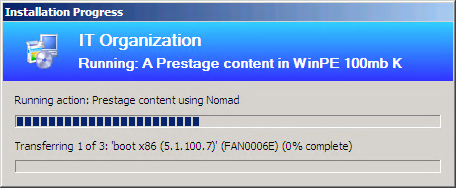
When used in WinPE, the Install and Configure Nomad in WinPE action must be run first.
This custom action is available in the 1E Nomad Pre 6.0 task sequence actions.
|
Actions |
Notes |
|---|---|
|
When run, this task:
|
The following points should be taken into account when using this task sequence action:
|
Configurable parameters
|
Parameter |
Default value |
Description |
|---|---|---|
|
Name |
Pre-stage Content Using Content Distribution. |
The name for the custom task sequence action. |
|
Description |
Action to pre-stage content in WinPE using Content Distribution. |
Sets the description for the custom task sequence action. |
|
Require Nomad |
Enabled by default. |
When this checkbox is checked, it sets a requirement for another Content Distribution client on the same subnet to have the content, if this is not the case the task sequence step will fail. When this checkbox is not checked the task sequence will attempt to continue without using Content Distribution if there is no Content Distribution client on the same subnet with the content. |
|
Show error dialog |
Disabled by default. |
When this checkbox is checked, an error dialog is displayed to the Configuration Manager administrator when the NomadPackageLocator download fails. |
|
Use HTTP |
Enabled by default. |
When this checkbox is checked, NomadPackageLocator uses the HTTP location for the content if it is not available locally. In Configuration Manager 2012, if this option is not enabled when using this task sequence step, all selected packages must be copied to the SMB share on the DP using the Data Access > Copy the content in this package to a package share on distribution points option in the properties of each package, otherwise the download fails. |
|
Use Multicast |
Disabled by default. |
When this checkbox is checked, NomadPackageLocator invokes NomadBranch with multicast enabled. |
|
All references |
Disabled by default. |
When this checkbox is checked, all referenced content is selected (and any added subsequently to the task sequence will be automatically selected). When it is unchecked, all referenced content is deselected. |
|
References |
This field is pre-filled with all content set for downloading in the task sequence. |
This field is pre-filled with all content set for downloading in the task sequence. Checking the checkbox next to each item will set the use of NomadPackageLocator for that content. There is a limit of 255 characters on a task sequence action's command line. If this was exceeded because there are many selected references, a popup dialogue will appear saying so when the Apply or OK is pressed. Either reduce the number of references by creating more, separate, task sequences to pre-stage content, or select the All references checkbox which will use a wildcard for the references. |
Redirect Content Location to the Nomad Cache (deprecated)
This action is deprecated and is currently provided for backwards compatibility only, Use Pre-stage Content Using Content Distribution instead.
This custom task sequence action redirects the task sequence's content location to the Content Distribution cache on another host. Used in either WinPE or a full Microsoft Windows Operating System, it used the Nomad NomadPackageLocator.exe command-line switches tool to locate the content on a Content Distribution cache on the local subnet.
The NomadPackageLocator program sends out a Content Distribution package status request for each of the packages listed in the OSD task sequence it is running within. If any of the content is available on other Content Distribution clients on the local subnet, it updates the path variables in the task sequence to point at the folder location (usually located in the local or remote Content Distribution cache folder). If not, the default path (i.e. the path to the distribution point) is left intact.
Both the Redirect Content Location to Content Distribution Cache and Pre-stage Content Using Content Distribution rely on the fact that the content has been downloaded to the local branch and point the task sequence to the Content Distribution cache that contains the content. Use Pre-stage Content Using Nomad in preference to Redirect Content Location to Content Distribution Cache to make use of all the Content Distribution features. Use the Redirect Content Location to Content Distribution Cache if you require exactly the same NomadPackageLocator functionality provided in earlier releases of Content Distribution.
When used in WinPE, the Install and Configure Nomad in WinPE action must be run first.
This custom action is available in the 1E Nomad Pre 6.0 task sequence actions.
|
Actions |
Notes |
|---|---|
|
When run, this task:
|
This task sequence action:
|
Configurable parameters
|
Parameter |
Default value |
Description |
|---|---|---|
|
Name |
Redirect Content Location to Content Distribution Cache. |
Name for the custom task sequence action. |
|
Description |
Action to redirect content location to Content Distribution cache. |
Description for the custom task sequence action. |
|
Require Nomad |
Enabled by default. |
When this checkbox is checked, the task sequence action fails if the NomadPackageLocator download fails. If this is not checked, the task sequence attempts to download the content by other means if the NomadPackageLocator download fails. |
|
Failover to DP(s) |
Disabled by default. |
When this option is checked, the content download can failover to downloading from the DPs if the NomadPackageLocator fails to find the content cached on the local subnet. |
|
Show error dialog |
Disabled by default. |
When this checkbox is checked, an error dialog is to the Configuration Manager administrator if the NomadPackageLocator download fails. |
|
Force Nomad client |
Blank by default. |
Set the name for a specific Content Distribution client whose cache you want to use. This prevents NomadPackageLocator from polling for a Content Distribution client whose cache contains the content. |
|
Nomad share name |
Blank by default. |
Should only be used if the Content Distribution clients where OSD content has been pre-cached are configured with the Hidden Content Distribution share option set to 0x10. See SpecialNetShare for more information. When the pre-cache Content Distribution client is set to use the hidden share, set the value to NomadSHR$. |
|
Multicast scope |
|
Should only be set if you want the NomadPackageLocator requests to span subnets when trying to locate a package. In this instance, the request is will be multicast and the scope must be set here. This will only work if the network has been configured to allow multicast across subnets. |
|
All references |
Disabled by default. |
When this checkbox is checked, all referenced content will be selected (and any added subsequently to the task sequence will be automatically selected too). When it is unchecked, all referenced content will be deselected. |
|
References |
Pre-filled with all content set for downloading in the Task Sequence. |
Pre-filled with all content set for downloading in the task sequence. Checking the checkbox next to each item will set the use of NomadPackageLocator for that content. There is a limit of 255 characters on a task sequence action's command line. If this was exceeded because there are many selected references, a popup dialogue will appear saying so when Apply or OK is pressed. Either reduce the number of references by creating more, separate, task sequences to redirect content, or select the All references checkbox which will use a wildcard for the references. |
Enable Run from Distribution Point
Used in the following instances:
-
In conjunction with the Pre-stage Content Using Content Distribution action to avoid making a local copy of the Content Distribution share.
-
It is used during the provisioning phase, prior to any package being installed, to enable classic packages to run from the DP. This is so that SMSNomad.exe can be used as an alternative download provider during OSD.
When the Run from distribution point property is no longer required, remove it using the Disable Run from Distribution Point custom task sequence.
This custom action is available in the 1E Nomad Pre 6.0 task sequence actions.
|
Actions |
Notes |
|---|---|
|
When run, this task:
|
This task sequence action:
|
Configurable parameters
|
Parameter |
Default value |
Description |
|---|---|---|
|
Name |
Enable Run from DP. |
The name for the custom task sequence step. |
|
Description |
Action to Enable Run from the DP. |
The description for the custom task sequence action. |
Disable Run from Distribution Point
Reverts the task sequence variables that were set using the Enable Run from Distribution Point custom task sequence action back to their default values.
This custom action is available in the 1E Nomad Pre 6.0 task sequence actions.
|
Actions |
Notes |
|---|---|
|
When run, this task:
|
This task sequence action:
|
Configurable Parameters
|
Parameter |
Default value |
Description |
|---|---|---|
|
Name |
Disable Run from the DP. |
The name for the custom task sequence step. |
|
Description |
Action to Disable Run from Distribution Point. |
Description for the custom task sequence step. |