OutSystems integration
 |
| About OutSystems
OutSystems is a low-code environment intended to simplify the creation and deployment of line of business (LOB) applications, such as healthcare, finance, and customer relationship management (CRM) tools. It allows blocks of functionality to be linked together using conditional workflows, as well as providing building blocks for browser-based UI functionality.
OutSystems fits into the TeamViewer DEX Platform architecture outside the core DEX platform, acting as an external Line of Business (LOB) application layer that integrates into the platform rather than being part of it. OutSystems connects through the same paths used by other client applications.
This means:
-
OutSystems solutions authenticate users via the shared IdP.
-
Users access DEX-enabled functionality consistently across native solutions and OutSystems-built apps.
-
OutSystems UIs can surface DEX-driven actions, insights, or workflows.
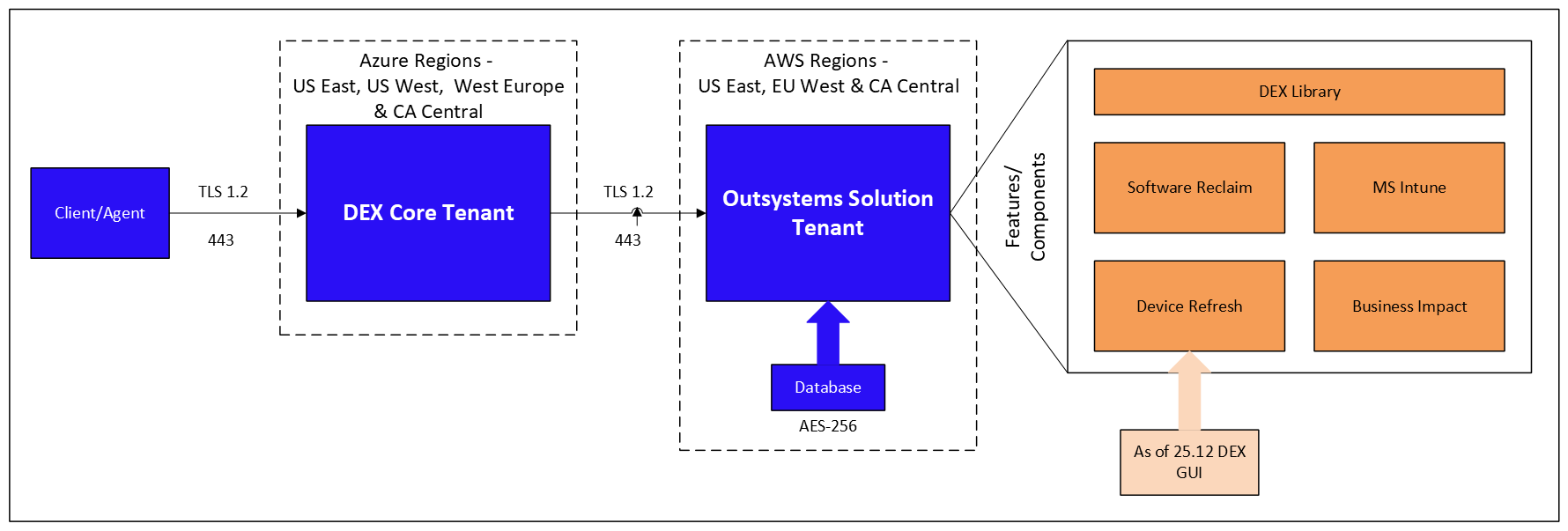
Within this, the OutSystems flow is set up as shown below:
On-premises and SaaS infrastructure
OutSystems can run on your on-premises infrastructure or as a SaaS solution.
For an on-premises installation of the OutSystems platform, you are required to have a separate database server to which you connect your application server(s).
OutSystems applications
Several LOB applications have been developed on the DEX Platform using OutSystems:
-
Device Refresh: The Device Refresh application helps customers cut spending and carbon costs on unused devices while ensuring end users have the correct device for their needs.
-
Software Reclaim: Software Reclaim identifies reclaim opportunities (the uninstallation of software from managed endpoints) to reduce ongoing software costs.
-
Business Impact: Business Impact allows customers to visualize the impact the Platform has on savings, automations, and other key metrics. This can be used to showcase the DEX Platform's value to easily assess its impact and effectiveness.
-
MS Intune: MS Intune monitors critical services and common issues and automatically remediates them.
-
Authentication: The OutSystems LOB applications integrate to the existing DEX Platform's role-based access control (RBAC) subsystem. For the integration to work, a user must exist as a principal on the OutSystems platform. In the DEX Platform, a user must also have one of the following roles:
-
Full Admin
-
Solutions Admin
-
Solutions Core
The user authenticates to the DEX Platform in the usual way, which automatically accesses the OutSystems infrastructure. If the user has not been seen previously, they are automatically created as a principal on OutSystems. Their role in the DEX Platform determines their access rights within the OutSystems solutions.
The OutSystems infrastructure uses an additional sync account to access DEX Platform data on behalf of users. This account employs the standard non-interactive authentication flow and maps to a service principal in the DEX Platform's RBAC with permissions to retrieve data.
-
OutSystems acts as an external integrator, similar to other integrations such as ServiceNow. It has no additional access beyond the standard platform endpoints exposed for integration.
Information collected and stored by OutSystems
Data collected and stored by OutSystems LOB solutions is encrypted at rest within a SQL Server database instance in SaaS environments. These environments are currently hosted in the following regions:
-
Canada Central
-
US East
-
EU West
Data is stored with an associated tenant ID. When retrieved, only the data specific to a particular tenant is shown to the user. This is done through the use of database views. The data stored is as follows:
|
Category |
Field |
|---|---|
|
Device Details |
|
|
Device Responsiveness |
|
|
Device Events |
|