TeamViewer DEX 26.6 release notes
 Schedule
The schedule is subject to change. When changes are made to the original schedule, they are indicated in red. Please check the TeamViewer Status Page for regular updates.
DEX Platform
|
Region |
Date |
Time from (UTC) |
Time to (UTC) |
|---|---|---|---|
|
CanadaCentral1 |
Monday, June 15, 2026 |
8 AM |
12 PM |
|
NorthEurope1 |
Tuesday, June 16, 2026 |
3 PM |
6 PM |
|
WestUS1 |
Wednesday, June 17, 2026 |
8 AM |
11 AM |
|
UKSouth1 |
Wednesday, June 17, 2026 |
6 PM |
9 PM |
|
EastUS1 |
Thursday, June 18, 2026 |
8 AM |
11 AM |
|
WestEurope1 |
Thursday, June 18, 2026 |
5 PM |
8 PM |
Solutions
|
Region |
Date |
Time from (UTC) |
Time to (UTC) |
|---|---|---|---|
|
CA-Central-1 |
Tuesday, June 16, 2026 |
12 PM |
2 PM |
|
EU-West-1 |
Wednesday, June 17, 2026 |
3.30 AM |
5.30 AM |
|
US-East-1 |
Thursday, June 18, 2026 |
11 AM |
1 PM |
This release includes enhancements and fixes for the Platform and Solutions.
Localized User Engagements
What are User Engagements?
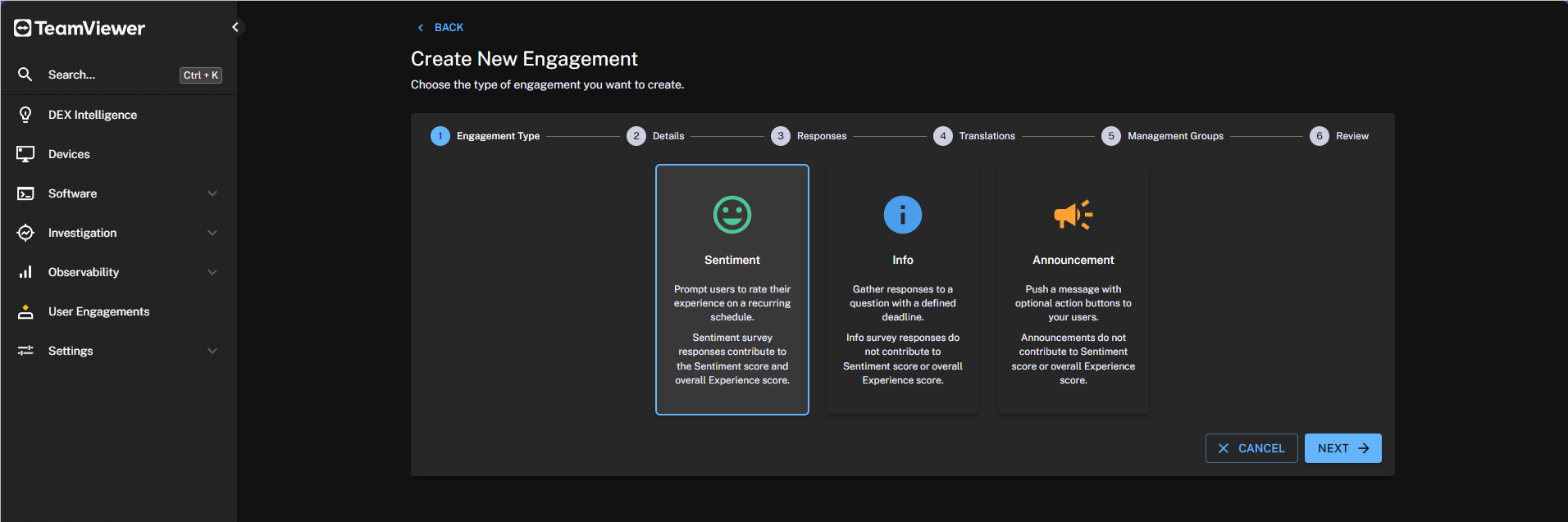
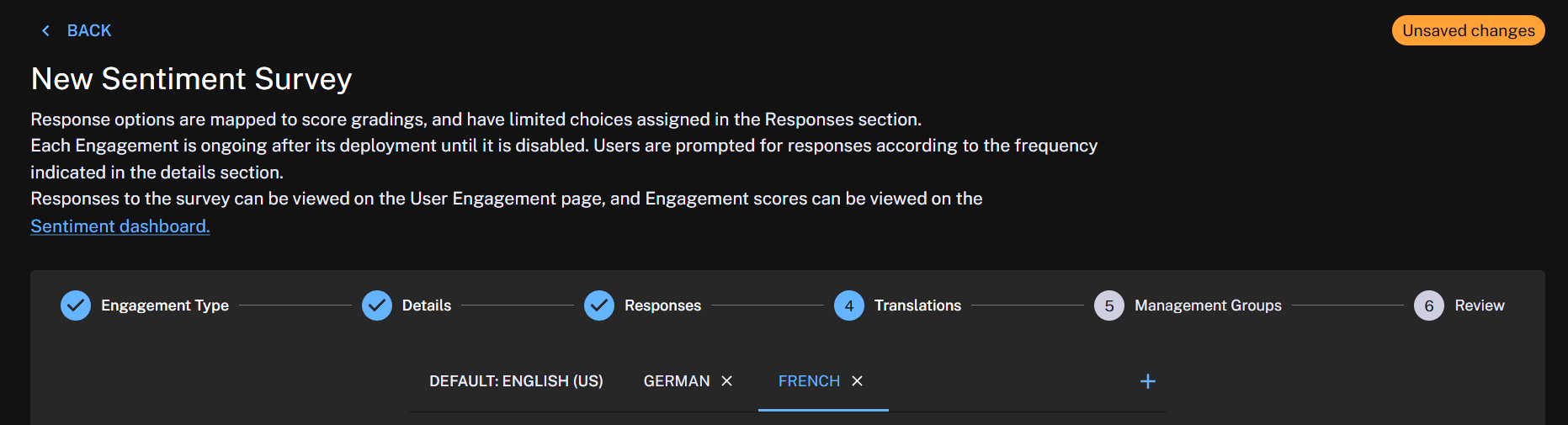
Localized User Engagements allow administrators to create surveys and announcements once and deliver them in multiple languages. Users automatically receive the engagement in the language that best matches their device locale, with predictable fallback behavior when a specific translation is unavailable.
Refer to User Engagement page.
There are three types of User Engagement:
-
Sentiment Surveys: Collect responses that contribute to the overall Sentiment score. Results can be viewed as charts on the Sentiment page.
-
Info Surveys: Provide greater customization than Sentiment Surveys but do not contribute to the overall Sentiment score.
-
Announcements: Are one-way communications used to broadcast information to end users, such as organizational changes, IT news, updates, and other important messages.
Supported languages
-
Chinese
-
English
-
French
-
German
-
Japanese
-
Korean
-
Portuguese
-
Russian
-
Spanish
What’s new?
-
A new User Engagements page is available in the new UI.
-
User engagement language is selected automatically based on the device locale.
-
If the device locale does not match a supported engagement language, the engagement falls back to the configured default language.
-
Announcements now support a default language and additional language translations. Previously, announcements did not include language settings.
-
Organizations can use a single survey across multiple regions by providing translated versions of the same content. In the classic UI, separate surveys were required for each language.
-
Surveys and announcements can continue to be created using the existing functionality in the Experience Analytics module of the classic UI.
-
Administrators can create, update, and delete translated versions of engagement content in the new UI.
-
Engagements can be edited until they are deployed.
-
For survey administrators, responses to predefined answer options are displayed in the survey's default language.
-
User engagements created by administrators are displayed in both Experience Analytics and the new UI.
-
Existing surveys are automatically assigned English as the default language.
Experience module management group access controls
The Experience module now supports management group–based access control, enabling administrators to restrict visibility based on assigned management groups.
Users can view only the data, dashboards, and management groups they have permission to access. Filtering is applied automatically across Experience dashboards and views according to the user's assigned management groups. This enhancement provides more granular visibility control and strengthens role-based access management within Experience. Refer to Requirements.
Tia Reporting management group access controls
Tia Reporting now supports management group–based access control, allowing reporting visibility to be restricted based on assigned management groups.
Users can view and report only on data associated with the management groups they have permission to access. Natural language reports, filters, and dashboards automatically respect management group restrictions. This enhancement provides more granular reporting governance and helps ensure users access only the data relevant to their role and operational responsibilities. Refer to Observability.
Consumer API enhancement
A new Consumer SDK API endpoint, /Consumer/Responses/Latest/{ruleId}, is now available to retrieve the latest response to a policy for a specified rule. Results support filtering, sorting, and batch retrieval.
What's Coming?
TeamViewer DEX for Mobile (Android)
This feature will be available soon through an Early Access program. To register your interest, contact your Customer Success Manager (CSM) to arrange a session with the Product team.
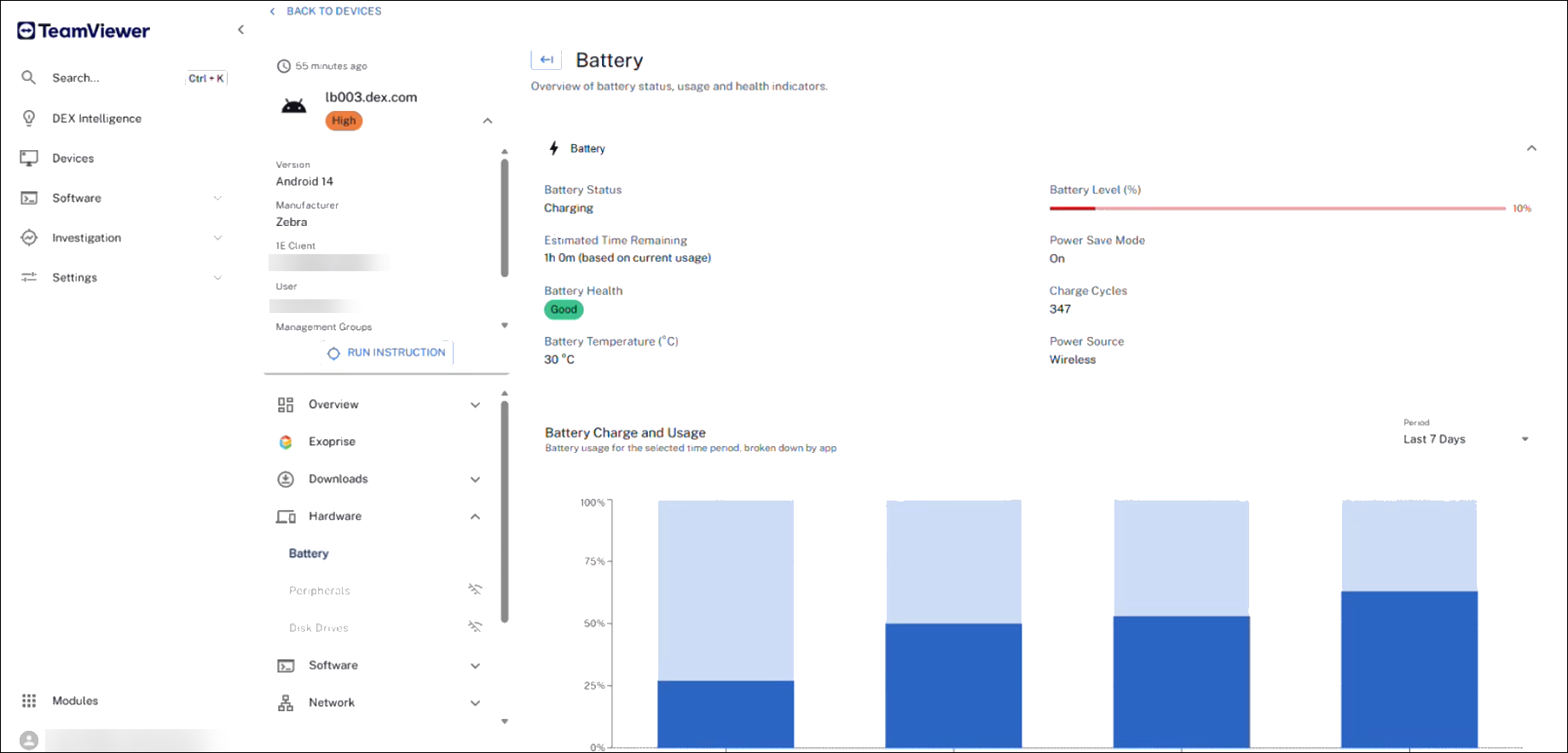
TeamViewer DEX for Mobile extends Digital Employee Experience management beyond Windows, macOS, and Linux endpoints, bringing mobile devices into the same unified experience. By closing visibility gaps often left by traditional MDM solutions, it provides actionable insights into battery health, resource pressure, network quality, application sprawl, and user-impact signals, all through a single pane of glass.
With mobile devices integrated alongside other managed endpoints, organizations can benefit from consistent reporting, investigation, and remediation workflows across their entire device estate. Gain deeper visibility into hardware and software inventory to identify application drift, and move from guesswork to data-driven decision-making with detailed battery health and degradation insights. This helps optimize refresh cycles, reduce downtime, and maximize the value of mobile device investments.
Versions and support
Applications and tools
Please review the list of supporting applications and tools, as it may change with each release. Associated resources can be downloaded from the TeamViewer Support Portal.
|
Applications and tools |
Updated with this release |
Versions supported with this release |
|---|---|---|
|
Client Deployment Assistant |
|
26.5.0.2 |
|
TIMS |
|
26.5.0.24 |
|
Content Distribution Tools |
|
26.3.0.11 |
|
PXE Everywhere |
|
26.1.0.4 |
|
1E SDK |
|
26.6.0.6239 |
|
1E Toolkit |
|
24.7.0.2 |
|
Product Pack Deployment Tool |
|
24.12.0.12256 |
|
1E PowerShell Toolkit |
|
1.2.34.0 |
|
DataSync Agent |
|
1.3.0.28 |

Other improvements and fixes
|
Type |
Product/Client |
Issue ID |
Summary |
|---|---|---|---|
|
Sentiment Surveys |
DEX Platform |
PLAT-21816 |
We resolved an issue that prevented Sentiment Survey results from appearing in the Device view. |
|
Device View |
DEX Platform |
PLAT-28305 |
We fixed an issue where the Delete option in the Device View was not working. Refer to Devices. |
|
Endpoint Troubleshooting |
DEX Platform |
PLAT-28350 |
We fixed an issue where instructions received an incorrect scope when the user did not have Infrastructure > Read permissions. |
|
Solutions |
Business Impact |
DEXSOL-2115, DEXSOL-2185 |
Within Business Impact, the Rule Occurrence section now uses a bar graph instead of a bubble chart. Additional UI enhancements have been implemented to improve page load performance and usability. Refer to Business Impact. |
|
Solutions |
Business Impact |
DEXSOL-2027 |
A new ServiceNow Event option has been introduced in Business Impact Settings within API Management. This enhancement provides clear visibility into ServiceNow event integration capabilities, enabling users to seamlessly create and close events. Refer to ServiceNow Event. |
|
DEX Intelligence |
DEX Platform |
PLAT-26933 |
We fixed an issue where DEX Intelligence was not displaying graphs within the Troubleshoot option. |
|
Device Experience Metrics |
DEX Platform |
PLAT-29448 |
We fixed an issue to prevent the gauge/pie chart from overlapping the card's content on the device experience metrics page. |
|
Management Group rules |
DEX Platform |
PLAT-28653 |
Four new management group rule attributes have been added. These do not rely on the Software Catalog:
Refer to Management Groups rules. |