TeamViewer DEX Core
TeamViewer DEX Core enables other ServiceNow business applications, such as TeamViewer DEX Service Catalog Connect, TeamViewer DEX ITSM Connect, TeamViewer DEX Virtual Assistant, TeamViewer DEX CMDB Connect, and the Service Graph Connector for TeamViewer DEX, to deliver business benefits to your organization. These benefits are powered by the TeamViewer DEX Platform.
- TeamViewer DEX Core is a prerequisite and provides reusable functionality across multiple TeamViewer DEX business applications.
-
It is a utility that enables TeamViewer DEX ServiceNow business applications to integrate with the extensible capabilities of the Platform, such as modern architecture, automation, endpoint management, and real-time inquiry and response features.
- Communication between ServiceNow business applications and the Platform is done through the TeamViewer DEX Core APIs.
- TeamViewer DEX Core is a custom scoped ServiceNow application with multi-domain and multi-tenant capabilities.
- TeamViewer DEX Core has no licensing costs. It is available to download from the ServiceNow app store and can be installed on any supported ServiceNow instance.
To install the TeamViewer DEX Core, refer to the Installation guide.
Architectural Diagram
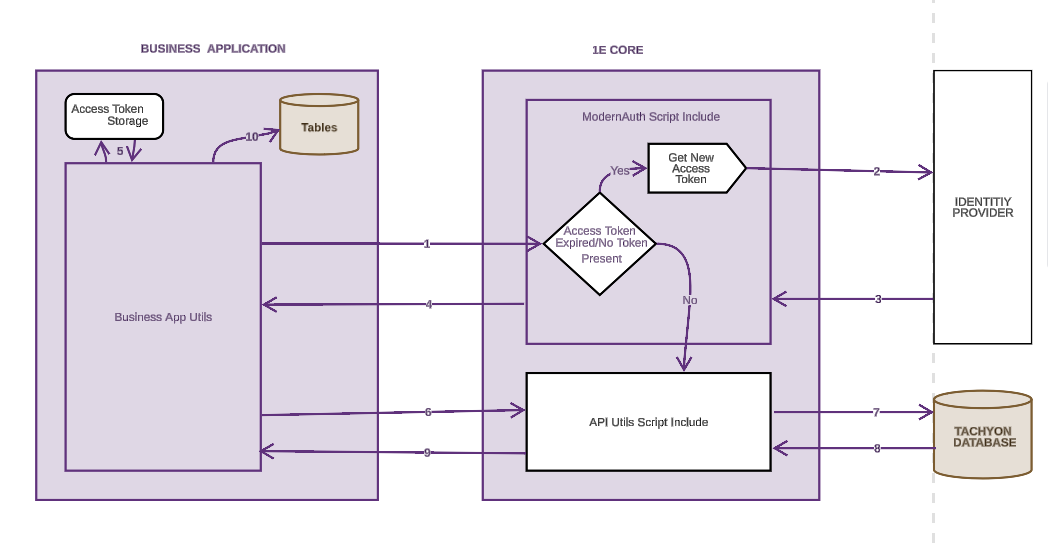
ServiceNow supports the client assertion grant flow. This requires presenting the JSON Web Token (JWT) to the authentication endpoint, retrieving back the token, and providing this token along with outgoing API calls. This token has a limited lifespan and requires renewal. The below diagram guides you on how to access the token flows when modern authentication is enabled in TeamViewer DEX Core.
-
The ServiceNow business application initiates a request to retrieve the access token from TeamViewer DEX Core.
-
If the token is either invalid or absent, then a new request is sent to the Platform to issue a new token. Otherwise, an API call including the access token is made to the Platform database (if a MID Server is used, then this new request is sent through MID Server and the property to use MID Server from OAuth is set to true).
-
The Platform issues a new access token to TeamViewer DEX Core after validating the request through the identity provider (IdP), such as Microsoft Entra ID or Okta.
-
This token is now passed to the requested business application.
-
The token is stored in the business application for future API calls.
-
The business application raises a request along with the token to TeamViewer DEX Core.
-
TeamViewer DEX Core makes an API call to the Platform database along with this token.
-
Platform provides access to the protected resource in TeamViewer DEX Core.
-
TeamViewer DEX Core processes the response received from Platform and passes onto the business application.
-
The response is stored in the business application tables.