Software usage
SGC for 1E provides a preview of the software installed on the end user devices and allows you to manage the software based on usage.
Software Installations page
This page has information about all the software installed on the end user devices. To navigate to the Software Installations page, type cmdb_sam_sw_install.list table name in the filter navigator and press enter. This opens up the Software Installations page in a new tab, as shown in the picture.
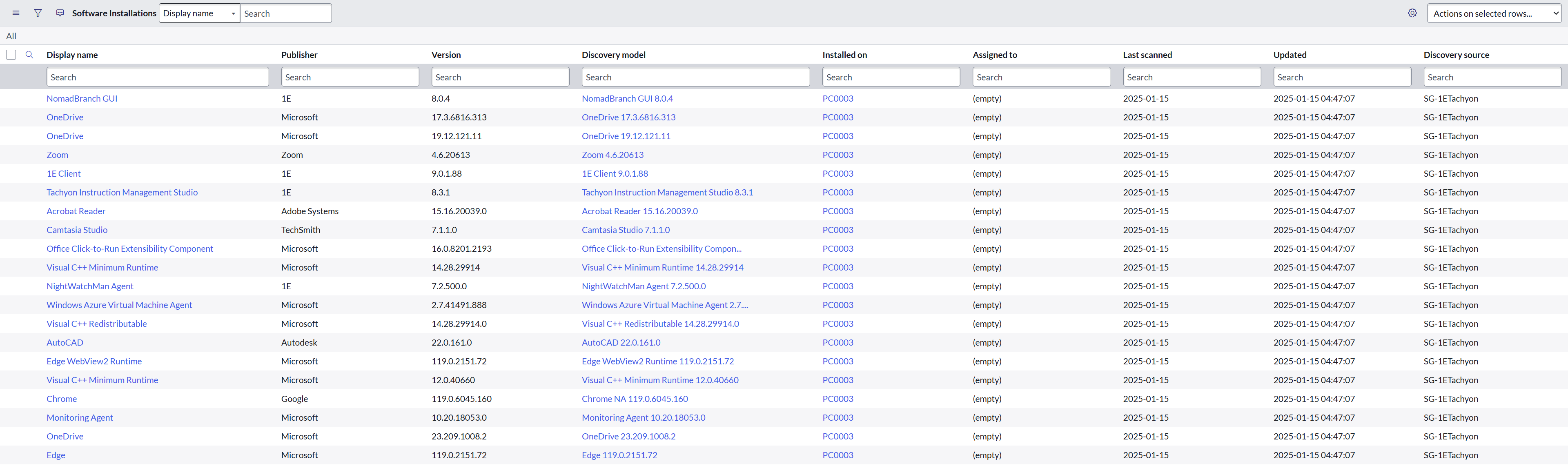
The table has defined fields that display details of installed software like:
-
Display Name
-
Publisher
-
Version
-
Discovery Model
-
Installed on
-
Assigned to
-
Discovery Source
-
Updated
-
Last Scanned
-
Last Used
The Last Used field in the Software Installation table is currently available only for customers using the 1E Platform on-premises.
SAM Usage table
You can populate the Software Asset Management (SAM) Usage table using existing Software Installation records. This feature enables better tracking of software usage across the organization and supports more accurate license compliance and optimization.
To enable this feature, perform the following tasks:
-
Set the system property x_1e_cmdb_connect.enableSoftwareUsage to true.
-
Create a custom field, and set the system property x_1e_cmdb_connect.set_usage_category to the name of the custom field. This will populate the usage category in the Software Usage table.
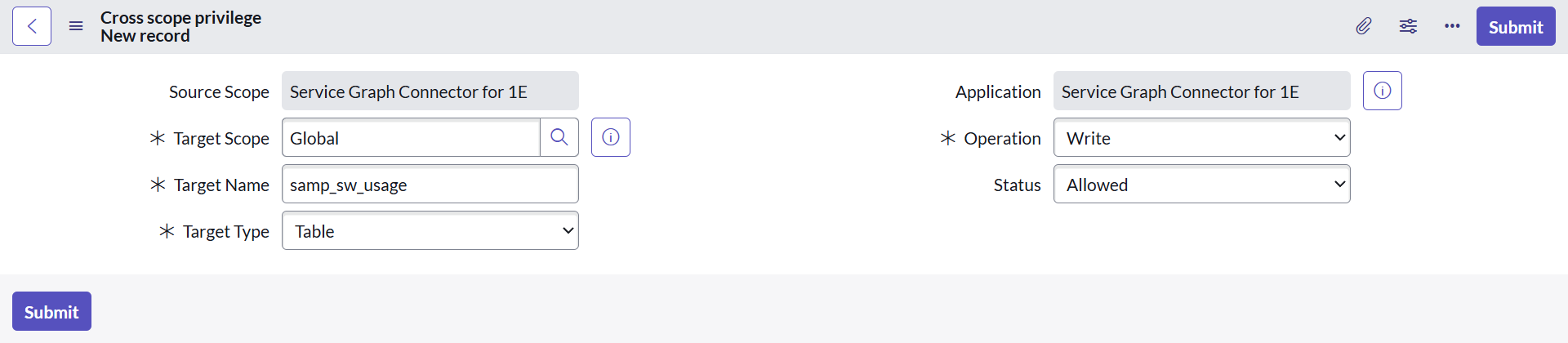
Verify your cross-scope privilege access and check if you have write permission for the samp_sw_usage table. If you do not have cross-scope privilege access, create a new one as described below:
-
In your ServiceNow instance, navigate to System Applications > Application Cross-Scope Access from the ServiceNow navigation pane.
-
To create a new record, click New to define a new access rule and fill in the required details as shown in the picture below.
-
Click Submit.
Remove software
SGC for 1E has a feature to Remove software with the help of scheduled job and display them in a table for future reference. This feature runs a scheduled job that removes the record(s) for the software(s) that has been already removed/uninstalled by the end user from their device. Hence, updates the Software Installation table respectively and places the record into Remove Software table.
The Last Scanned date field mentioned above in the Software Installation is of specific importance. If a particular record of Software is not scanned in the last two days, then the scheduled job defined under Scheduled Jobs to enable Remove Software removes that software record from the above table. The default value is set to 2 days and is configurable in x_1e_cmdb_connect.DaysToKeepSwData system property.
The software removed is added to the Removed Software table.
Removed Software page
To navigate to the SG-Tachyon_Remove_Softwares page, type x_1e_cmdb_connect_sg_tachyon_removed_software.list table name in the filter navigator and press enter. This opens up the SG-Tachyon_Remove_Software page.
This page has the cumulative list of all the software that are removed from the end user devices so far.
The table has the following defined fields:
-
Removed from
-
Display name
-
Publisher
-
Version
-
Edition override
-
Discovery Source
-
Last Scanned
-
Created
 Frequently Asked Questions (FAQs)
Click a question below to learn more about Software Usage and common setup questions.
Executable remap and usage appear as null for some software
This scenario explains the expected behavior when an executable mapping is changed from one Vendor/Title to another and why usage information may appear as null for the original software record.
Background
Executable usage events are attributed based on the currently active executable mapping.
When an executable mapping is modified, all future usage attribution follows the new Vendor/Title mapping rather than the historical mapping that existed when the software was originally discovered.
Scenario
-
An executable is initially mapped to Vendor A/Title A
-
Devices report Vendor A/Title A as installed software.
-
The executable mapping is later changed to Vendor B/Title B.
-
The executable continues to generate usage events from those devices.
Why this may appear inconsistent
After the executable is remapped, the following conditions may coexist:
-
The machine still shows Vendor A/Title A as installed software.
-
Usage events generated by the executable are evaluated against the active mapping (Vendor B/Title B).
As a result:
-
Usage is no longer attributed to Vendor A/Title A.
-
The LastUsedDateTimestamp for Vendor A/Title A may remain null.
-
This behavior is expected because the installed software record and the active executable mapping no longer align.
Attribution Rule (Key Logic)
Usage is attributed only when both of the following conditions are met:
-
An executable usage event is received.
-
The software matching the currently mapped Vendor/Title is installed on the same machine.
Practical Outcomes
Case 1: Only Vendor A/Title A is installed
Condition:
The executable mapping has been changed to Vendor B/Title B, but the machine only has Vendor /Title A installed.
Result:
-
Usage is not attributed to Vendor A/Title A.
-
LastUsedDateTimestamp for Vendor A / Title A may remain null.
Case 2: Vendor B/Title B is also installed
Condition:
The machine contains both Vendor A/Title A and Vendor B/Title B.
Result:
-
Usage is attributed to Vendor B/Title B.
-
Usage-related fields, including LastUsedDateTimestamp, are updated for Vendor B/Title B.
Case 3: Vendor B/Title B is Not Installed Anywhere
Condition:
Usage events are received, but no machine has Vendor B/Title B installed.
Result:
-
Usage events are received successfully.
-
No installation match exists for attribution.
-
No software record is updated with usage information.
Installation date is newer than usage date
This scenario explains why the LastUsedDateTimestamp can sometimes appear older than the software Installation Date.
Background
Certain applications, such as Microsoft Edge, receive periodic updates through operating system or application update mechanisms.
When these updates are installed, the software inventory may report a refreshed installation date for the application, even though the application itself has existed on the device for a long time.
As a result, the installation date can become more recent than the last recorded usage date.
Example
Consider the following timeline:
|
Date |
Activity |
|---|---|
|
January 1, 2026 |
User installs Microsoft Windows. Microsoft Edge is installed as part of the operating system. |
|
January 5, 2026 |
User launches and uses Microsoft Edge. |
|
January 31, 2026 |
A new Microsoft Edge update becomes available. |
|
February 7, 2026 |
User installs the Edge update. |
|
After February 7, 2026 |
User has not launched Edge since the update was installed. |
|
Next inventory collection |
Software inventory is collected and reported by the Client. |
Observed Behavior
At the time of inventory collection:
-
The Installation Date reflects the recent Edge update installation date.
-
The LastUsedDateTimestamp reflects the last time the user actually launched Edge.
-
Since Edge has not been used after the update, the usage date remains older than the installation date.
Expected Outcome
This behavior is expected and does not indicate an issue with usage tracking.
The installation date may be newer than the LastUsedDateTimestamp when:
-
A software update refreshes the reported installation date.
-
The application has not been launched since the update was installed.
This scenario is commonly observed with applications that receive frequent automatic updates, such as web browsers and other operating system components.