1E ITSM Connect
 |
| Integrate the Platform with your IT service management (ITSM) solution to automate incident response, streamline workflows, and enable real-time endpoint actions directly from service desk processes. This guide explains how 1E ITSM Connect links ITSM platforms with endpoint automation to improve operational efficiency, accelerate issue resolution, and enhance the digital employee experience.
Integration between the Platform and the ServiceNow ITSM (Information Technology Service Management) module is enabled using the 1E ITSM Connect app, which is available for download from the ServiceNow app store and can be installed on any ServiceNow instance.
-
1E ITSM Connect now works with TeamViewer DEX Core, which provides connectivity to the Platform and other core features for the ServiceNow applications. Refer toPrerequisites.
-
Instruction approval is now done in ServiceNow by ServiceNow users and not inside of the Platform using a proxy Platform user. Refer toAdd the TeamViewer DEX ITSM Connect app proxy user to Platform.
-
Checkbox to configure if approval is needed/not needed for instruction. ServiceNow Admin can choose which instructions require approval.
-
Application settings and API configuration pages merged into one and called APP Configuration.
App Menu in Application Navigator
ServiceNow provides an application navigator that enables users to navigate from one screen to another easily. To use 1E ITSM Connect, first install it from ServiceNow app store and then search for 1E ITSM Connect in the application navigator. The menu is shown below:
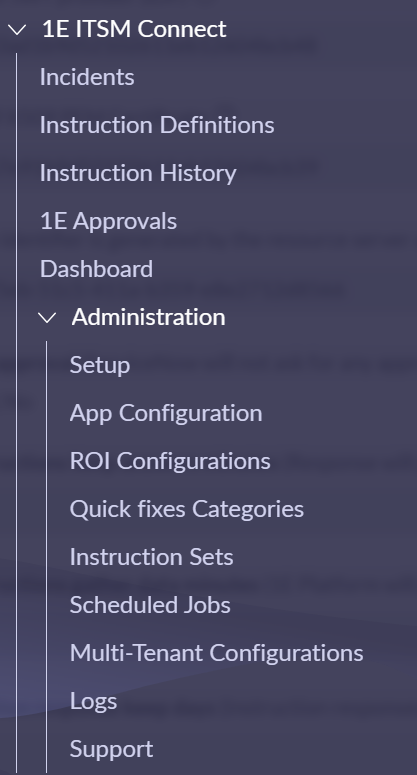
Here's an overview of the 1E ITSM Connect menu items and the roles needed to access each page:
|
Item |
Description |
Roles needed to view the Item's page |
||
|---|---|---|---|---|
|
1E ITSM Connect app roles |
ServiceNow roles |
|||
|
Incidents |
|
Displays a list of incidents. |
Any of the following:
|
|
|
Instruction Definitions |
|
Displays a list of available 1E instructions. |
Any of the following:
|
|
|
Instruction History |
|
Displays a history of previously run instructions. |
Either of the following:
|
|
|
1E Approvals |
|
Displays the instruction approval records generated from ServiceNow. |
Either of the following:
|
|
|
Dashboard |
|
Displays the pre-configured reports. |
Either of the following:
|
|
|
Administration
|
Setup |
Displays guided setup to configure the application. |
n/a |
|
|
App Configuration |
Displays the App Settings screen. |
|
|
|
|
ROI Configurations |
Displays a list of all the ROI configurations that generate reports given on the Dashboard. |
|
|
|
|
Quick fixes Categories |
Displays a list of all the Quick fixes categories. |
|
|
|
|
Instruction Sets |
Displays a list of all instruction sets. |
|
|
|
|
Scheduled Jobs |
Displays a list of any scheduled jobs specific to this app. |
|
|
|
|
Multi-Tenant Configurations |
Displays the settings screen for multi-tenant instances |
|
|
|
|
Logs |
Displays the app specific logs. |
n/a |
|
|
|
Support |
Displays information on how to contact TeamViewer Support Portal. |
|
|
|