Content Distribution architecture
Understand the Content Distribution architecture, including peer-to-peer content sharing, master elections, pre-caching workflows, SSD functionality, and required network ports for enterprise deployments. This reference explains how Content Distribution optimizes software delivery across Configuration Manager environments while reducing WAN traffic and improving deployment efficiency.
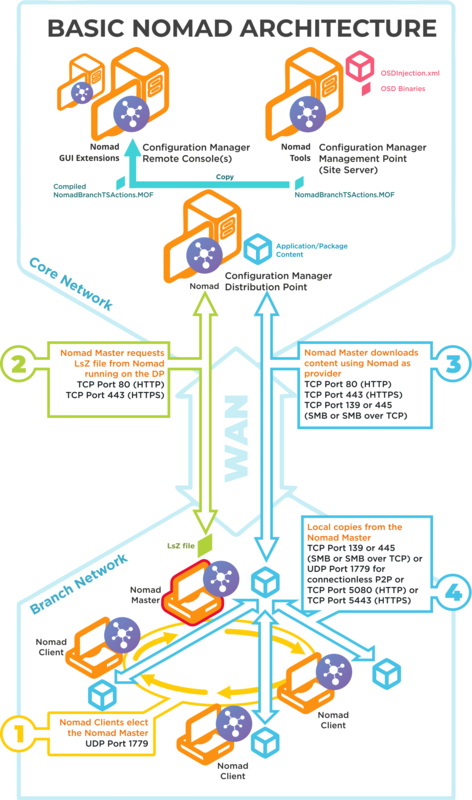
Basic Content Distribution architecture
Click image to enlarge.
|
Ports |
Notes |
|---|---|
|
UDP 1779 |
Step 1 By default, Content Distribution uses UDP Port 1779 to communicate during the election process for determining the master on a subnet. The Content Distribution installer will automatically add NomadBranch.exe,NomadPackageLocator.exe and PackageStatusRequest.exe to the list of excepted programs in the native Windows Firewall. The default value for the port may be changed at install time using the MODULE.NOMAD.P2PPORT installer property or post-installation by changing the P2P_Port registry value. If you change the default port, you must ensure all Content Distribution clients communicate using the same port. The Content Distribution port (by default UPD Port 1779) must be open on all wireless access points to facilitate Content Distribution peer-to-peer communications. Not all vendors enable this port by default, please refer to the specific device vendor's documentation for details on how to enable ports on each WAP device. |
|
TCP 80 (HTTP) TCP 443 (HTTPS) |
Step 2 Content Distribution Master requests LSZ file from Content Distribution running on the DP. |
|
TCP 80 (HTTP) TCP 443 (HTTPS) TCP 139 (SMB) TCP 445 (SMB over TCP) |
Step 3 Content Distribution Master downloads content using Content Distribution as provider. This communication depends on how the DP is configured. It may be one of the following:
For Configuration Manager the default setting is HTTP or HTTPS. |
|
TCP 139 (SMB) TCP 445 (SMB over TCP) UDP 1779 (used for connectionless P2P) TCP 5080 (HTTP) TCP 5443 (HTTPS) |
Step 4 Local copies from the Content Distribution master. The recommended way to facilitate Content Distribution cache access is to enable Windows File and Print Sharing. If this is not feasible on your network environment you can configure Content Distribution to use different means to access network shares, see Content Distribution Cache for more details on configuring this option. Connections may use one of the following:
|
Content Distribution pre-caching architecture and ports
Click image to enlarge.
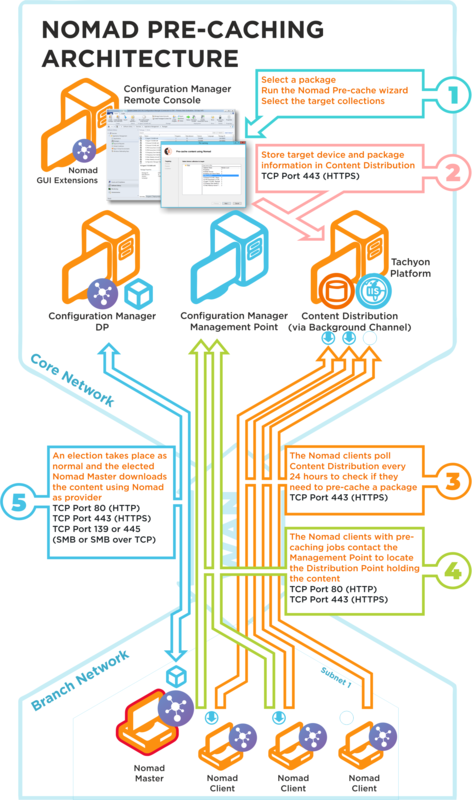
The Content Distribution pre-caching uses the following ports in its communications. If a site server is configured to use custom ports, pre-caching will use those ports to communicate with a management or distribution points. To ensure high-availability, pre-caching falls back to next available site server if it fails to communicate with a management or distribution point.
|
Ports |
Description |
|---|---|
|
N/A |
Step 1 Choose a package and run the Content Distribution pre-caching wizard, selecting the target device collection. This step does not require any port configuration but the Content Distribution Configuration Manager console extensions must be installed in the Configuration Manager Console. |
|
TCP 80 (HTTP) TCP 443 (HTTPS) |
Step 2 The Content Distribution pre-caching wizard stores the target device and package information in the Platform. |
|
TCP 80 (HTTP) TCP 443 (HTTPS) |
Step 3 The Content Distribution clients, where the pre-cache feature has been enabled, poll the Platform every 24 hours to see if they need to pre-cache some content. This takes the form of pre-caching notifications that tell the Content Distribution clients they need to process a download job to fetch the specified content. |
|
TCP 80 (HTTP) TCP 443 (HTTPS) |
Step 4 The Content Distribution clients, with pre-caching notifications, contact the Management Point to locate the Distribution Point that holds the content. This may use HTTP or HTTPS depending on how the Management Point is configured. |
|
TCP 80 (HTTP) TCP 443 (HTTPS) TCP 139 (SMB) TCP 445 (SMB over TCP) |
Step 5 A Content Distribution Master election takes place and the elected master processes the job by downloading the pre-cache content using Content Distribution as provider. This is then distributed locally to the Content Distribution peers that also require the pre-cached content. This communication depends on how the DP is configured. It may be one of the following:
For Configuration Manager the default setting is either HTTP or HTTPS. |
Content Distribution SSD architecture and ports
Click image to enlarge.
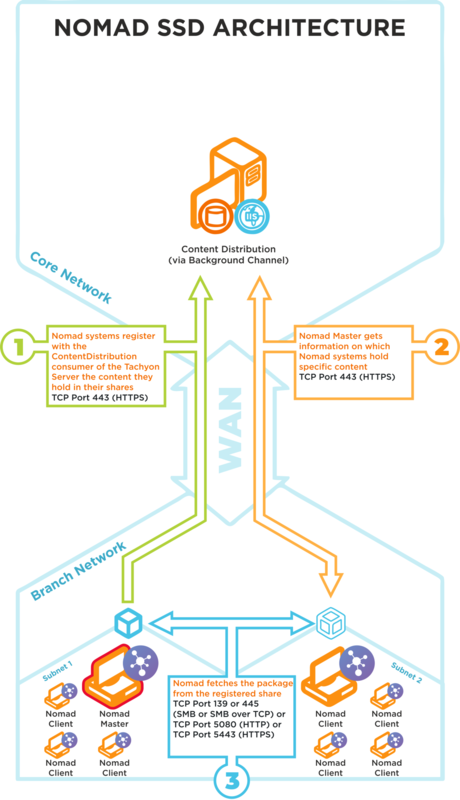
Content Distribution SSD uses the following ports in its communications:
|
Ports |
Notes |
|---|---|
|
TCP 80 (HTTP) TCP 443 (HTTPS) |
Step 1 Content Distribution systems on the branch site register in Content Distribution the content they hold in their shares |
|
TCP 80 (HTTP) TCP 443 (HTTPS) |
Step 2 Content Distribution Masters get information on which Content Distribution systems hold specific content |
|
TCP 80 (HTTP) TCP 443 (HTTPS) TCP 139 (SMB) TCP 445 (SMB over TCP) |
Step 3 Content Distribution Master fetches a package from the registered Content Distribution share on a neighboring subnet |
We recommend that the latest version of Platform is available in your environment to support this feature, refer to Requirements for more details.