TeamViewer DEX 26.10 release notes
 Schedule
The schedule is subject to change. When changes are made to the original schedule, they are indicated in red. Please check the TeamViewer Status Page for regular updates.
DEX Platform
|
Region |
Date |
Time from (UTC) |
Time to (UTC) |
|---|---|---|---|
|
CanadaCentral1 |
Monday, October 5, 2026 |
8 AM |
12 PM |
|
WestEurope1 |
Monday, October 5, 2026 |
2 PM |
5 PM |
|
NorthEurope1 |
Tuesday, October 6, 2026 |
3 PM |
6 PM |
|
WestUS1 |
Wednesday, October 7, 2026 |
8 AM |
11 AM |
|
UKSouth1 |
Wednesday, October 7, 2026 |
6 PM |
9 PM |
|
WestUS2 |
Thursday, October 8, 2026 |
7 AM |
10 AM |
|
EastUS1 |
Thursday, October 8, 2026 |
8 AM |
11 AM |
Solutions
|
Region |
Date |
Time from (UTC) |
Time to (UTC) |
|---|---|---|---|
|
CA-Central-1 |
Tuesday, October 6, 2026 |
12 PM |
2 PM |
|
US-East-1 |
Thursday, October 8, 2026 |
11 AM |
1 PM |
|
EU-West-1 |
Friday, October 9, 2026 |
3.30 AM |
5.30 AM |
This release includes enhancements and fixes for the Platform and Solutions.
Application Network Monitoring data
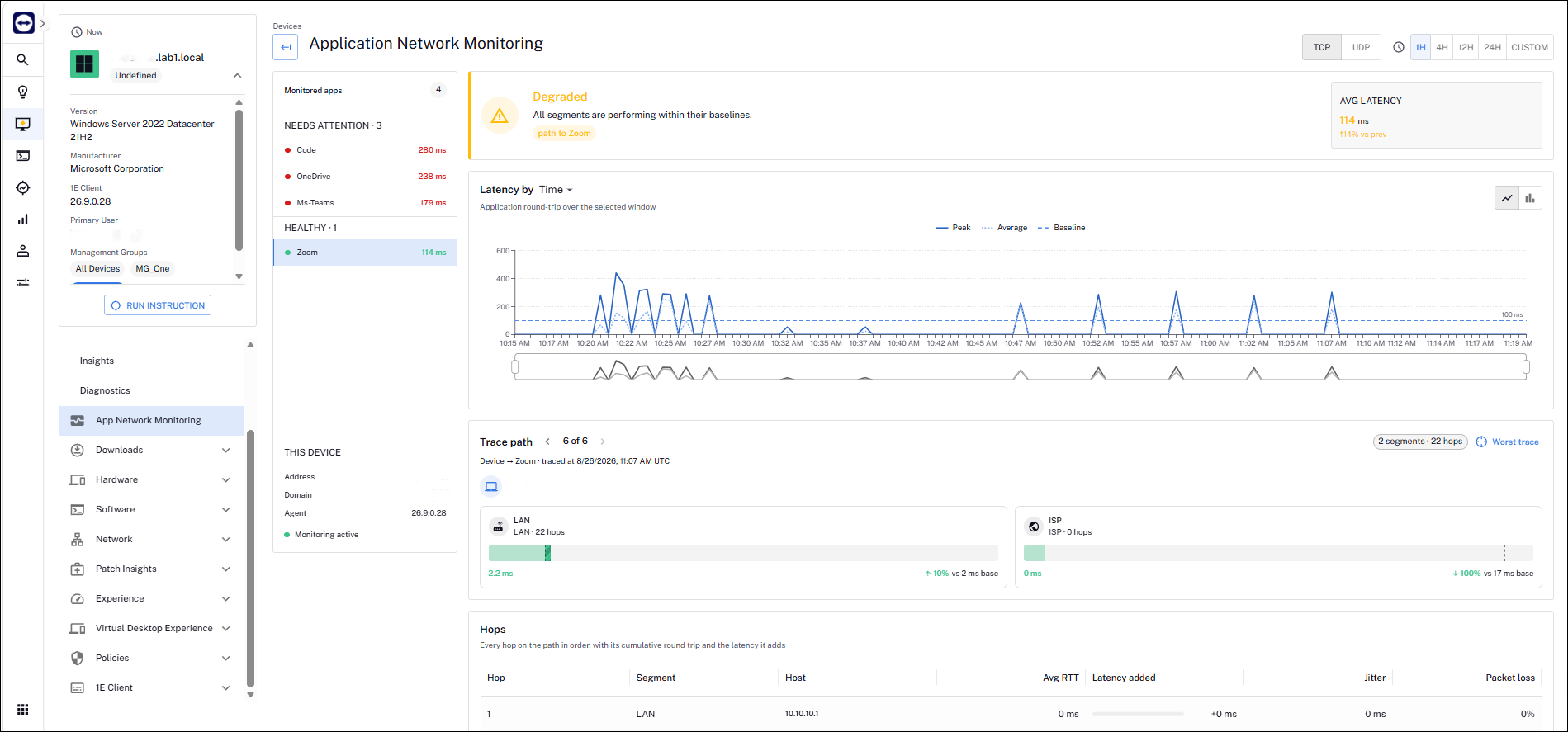
Native Application Network Monitoring is now available in the DEX platform, replacing the Exoprise iframe RUM integration that previously relied on the Exoprise backend and agent now run in a native 1E Client module, removing the need for external Exoprise services, agents or browser extensions. Refer to Application Network Monitoring (ANM).
-
Deeper visibility: view application-level performance with hop-by-hop latency analysis.
-
Faster troubleshooting: correlate network, application and device data to find root cause.
-
Integrated experience: access diagnostics natively in DEX, with no iframe or context switching.
For Application Network Monitoring to work correctly, download and deploy new and updated product packs from the Hub.
The following Product Pack needs to be updated:
Product Pack: 1E-Explorer-TachyonAgent
Instruction: 1E-Explorer-TachyonAgent-Set1EClientAgentConfig
These are new product packs that need to be deployed:
Product Pack: 1E-Tachyon-Platform
Instruction: 1E-TachyonPlatform-ANM-AppNetworkTcpData
Product Pack: 1E-Tachyon-Platform
Instruction: 1E-TachyonPlatform-ANM-AppNetworkUdpData
Availability
Available to customers with an Exoprise or Enterprise Plus license. Requires 1E Client 26.9 or higher.
For steps to enable the feature, refer to Application Network Monitoring (ANM).
Software Inventory and Software Reclaim
This release makes software inventory data easier to organize, analyze and act on.
Software labels
Software administrators can now add a custom label to normalized software titles. Labels can hold up to 50 alphanumeric characters, spaces and | pipe symbols, so you can group and filter software by region, business owner, unique software identifier or any attribute that matters to your organization. The Label field can also be added as an optional column in software inventory views, to support custom sorting, filtering and saved views.
Average Price for Software Reclaim
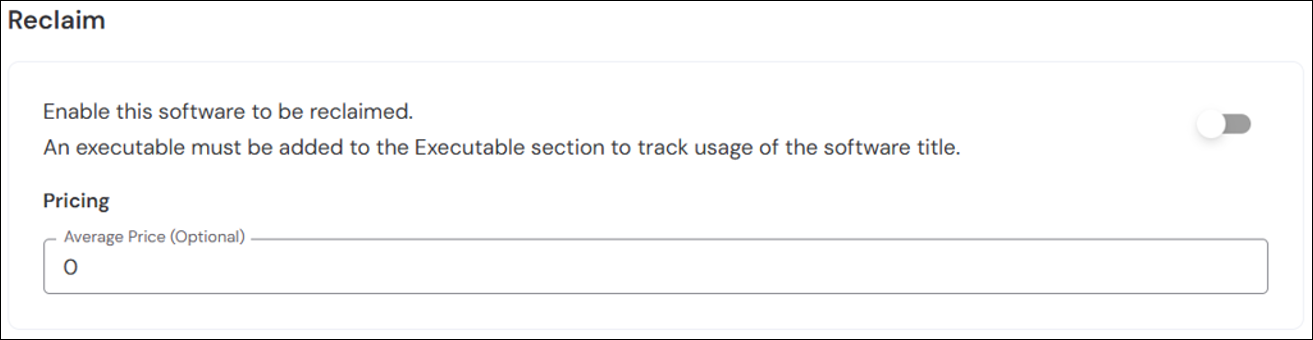
Once a software title is enabled for reclaim, you can now set an optional Average Price (in USD) in the Software Reclaim section of the software details. This gives you a specific baseline price for calculating potential cost savings. If no average price is set, the calculation uses the version-specific pricing defined under License Attributes.
Last inventory scan time in Databricks Delta Sharing
The ScannedTime column has been added to the inventory_device_software table (and vw_software_by_device view) in Databricks Delta Sharing. It shows the date and time a software title was last inventoried on each device, making it easy to tell whether a title is currently installed or was previously detected and later uninstalled.
Coming soon
New UI early access
The new DEX UI brings all Platform capabilities together in a single, modern experience with improved navigation, a refreshed design, and enhanced dashboards. Early access is available to a limited group of customers. To register your interest, contact your Customer Success team.
The 1E Client now supports macOS 27 Golden Gate, ensuring compatibility with Apple's latest operating system and enabling management and monitoring of macOS 27 Golden Gate devices through the TeamViewer DEX Platform.
Versions and support
Applications and tools
Please review the list of supporting applications and tools, as it may change with each release. Associated resources can be downloaded from the TeamViewer Support Portal.
|
Applications and tools |
Updated with this release |
Versions supported with this release |
|---|---|---|
|
Client Deployment Assistant |
|
26.9.0.5 |
|
TIMS |
|
26.9.0.35 |
|
Content Distribution Tools |
|
26.3.0.11 |
|
PXE Everywhere |
|
26.1.0.4 |
|
1E SDK |
|
26.6.0.6239 |
|
1E Toolkit |
|
24.7.0.2 |
|
Product Pack Deployment Tool |
|
24.12.0.12256 |
|
1E PowerShell Toolkit |
|
1.2.34.0 |
|
DataSync Agent |
|
1.4.0.44 |
Enhancements and fixes
|
Enhancement or Fix |
Product/Client |
Issue ID |
Summary |
|---|---|---|---|
|
Fix |
Platform |
PLAT-28058 |
Fixed an issue where Tia reporting could incorrectly list devices by operating system. |
|
Fix |
Platform |
PLAT-29173 |
Fixed an issue that could intermittently cause the Observability section to fail to load with a 500 error. |
|
Fix |
Endpoint Troubleshooting |
PLAT-31280 |
We fixed an issue in endpoint troubleshooting where unsupported filter operators, such as Does not contain, Is any of, Is empty, and Is not empty, were available in the UI and returned inaccurate results when filtering instruction responses. These unsupported options have been removed from the filter dropdown to ensure all available filter criteria return valid and expected results. |
|
Fix |
DEX Intelligence |
PLAT-35434 |
We fixed an issue in Intelligence where filtering insights by Tags, or selecting an item under Top Impacted Tags, resulted in a 422 platform error and prevented the insights list from displaying. Insights now filter correctly across Tags and all associated columns. |
|
Fix |
DEX Intelligence |
PLAT-31847 |
We fixed an issue in Intelligence where viewing insight details or selecting data points on the insight graph displayed a No data available message on the Impact tab. This occurred when device management group names contained special characters, causing cache lookup failures that prevented impacted device data from loading. |
|
Enhancement |
Inventory Insights |
PLAT-33197 |
We introduced the ability to add a custom label to normalized software titles within Inventory Insights. Users can assign custom metadata (up to 50 alphanumeric characters, spaces, and | pipe symbols) to individual software titles, enabling flexible categorization and internal reference tracking. In addition, the Label field can be added as an optional column in software inventory views to support custom sorting, filtering, and saved views. |
|
Enhancement |
Software Reclaim |
PLAT - 31272 |
We introduced an optional Average Price field (in USD) under the Software Reclaim section within software details. This allows administrators to configure a specific baseline price for normalized software titles to calculate potential cost savings in Software Reclaim. If an average price is not explicitly set, the calculation falls back to version-specific pricing defined under License Attributes. |
|
Enhancement |
Platform |
PLAT - 33236 |
We added the last software inventory scan timestamp (ScannedTime) to software inventory data views (such as inventory_device_software / vw_software_by_device). This enables customers accessing data via Databricks and Delta Sharing to track exactly when a device last uploaded its software inventory, making it easy to determine whether a software title is currently installed on an endpoint or was previously detected and later uninstalled. |
|
Enhancement |
Inventory Insights |
PLAT - 34995 |
We updated table column headers across Inventory Insights, specifically on the Normalized software, Non-normalized software, and Reported software pages, renaming the Installations column to Installed Devices accompanied by the standard devices icon. This improves UI consistency and clarity across the DEX platform when viewing device installation counts, while preserving the detailed Installations side drawer view. |
|
Enhancement |
Platform |
PLAT - 35010 |
We enhanced Device Refresh rule configuration to support multi-event AND conditions and weighting logic for triggering Refresh statuses. Administrators can now configure multiple mandatory events that must all be satisfied together, or assign weights to individual events to evaluate a combined threshold before triggering a Refresh status, providing greater control than single-event triggers. |