Planning for 1E Client
 |
| Plan deployment of the TeamViewer DEX Platform 1E Client by selecting modules, dependencies, and certificates based on your infrastructure and enabled solutions.
1E Client modules
All modules can be optionally enabled during deployment of the 1E Client or after deployment by using the configuration file.
1E Client contains client features and modules for the Platform, Shopping, WakeUp, Content Distribution and PXE Everywhere clients. You can optionally enable and configure clients during and after installation. Unless otherwise stated, modules are only available on Windows computers. Refer to Supported platforms.
|
Feature/module |
Description |
Infrastructure dependencies |
|---|---|---|
|
1E Client |
This is the main service that determines which features and modules are enabled, including uninstallation of legacy versions of the 1E Client listed below. Refer to 1E Client settings. Must be enabled on each end-user device to provide Real-time and Inventory features to support the following Platform applications: Endpoint Troubleshooting, Experience Analytics (including User Sensitivity), Endpoint Automation, Patch Success, Application Migration, and AppClarity. Also required to support integration with NightWatchman and Content Distribution. Supports Windows and non-Windows devices. Refer to Platform features of the 1E Client. |
See Common client requirements. Full 1E infrastructure, including Master and Response Stacks. See infrastructure section in Platform client requirements. |
|
Content Distribution client |
1E Client module which replaces the NomadBranch client to support Nomad 7.0 and later, as well as 1E client's use of the Content Distribution content download feature. Must be enabled on each end-user device to provide bandwidth-efficient download of content for 1E clients, as well as Configuration Manager clients. It is optionally used by PXE Everywhere. Refer to Content Distribution 1E Client settings. |
1E infrastructure, including Master and Response Stacks. Refer to Platform module requirements. |
|
PXE Everywhere Agent |
1E Client module which replaces the PXE Everywhere Agent to support PXE Everywhere 4.0 and later. Enabled on as may end-user devices as possible to provide a lightweight PXE service that responds to PXE requests on their local subnet. Refer to Platform features of the 1E Client. |
PXE Everywhere Central must be installed. Refer to Platform module requirements. You can also configure PXE Everywhere to support environments that use DHCP Snooping. |
|
Shopping client |
Must be enabled on each end-user device to support access to the Shopping web portal. Refer to Shopping 1E Client settings. |
Shopping Central website and Shopping Receiver services are required. Refer to Platform module requirements. |
|
WakeUp client |
1E Client module which replaces WakeUp Agent to support WakeUp Server 7.2.500 and later. This version contains hotfixes. Must be enabled on each end-user device to support Wake-on-LAN and Configuration Manager policy refresh. Also integrates with Shopping policy refresh, and with 1E NightWatchman Agent for power management. Refer to Wakeup 1E Client settings |
NightWatchman Management Center server and at least one WakeUp Server are required. Refer to Platform module requirements. |
Localized Client Real Time Control Centre (RTCC)
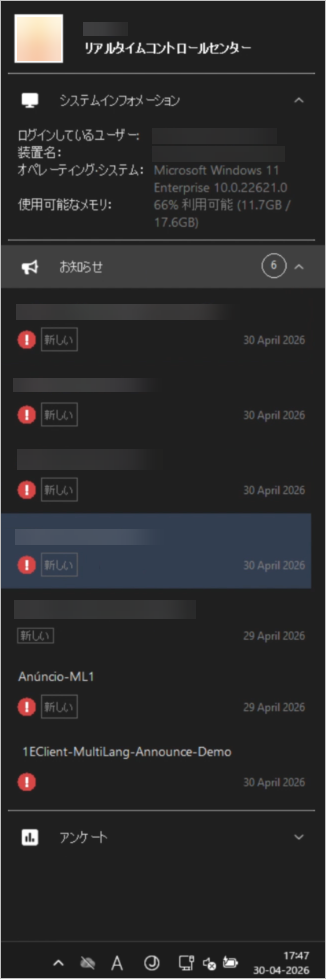
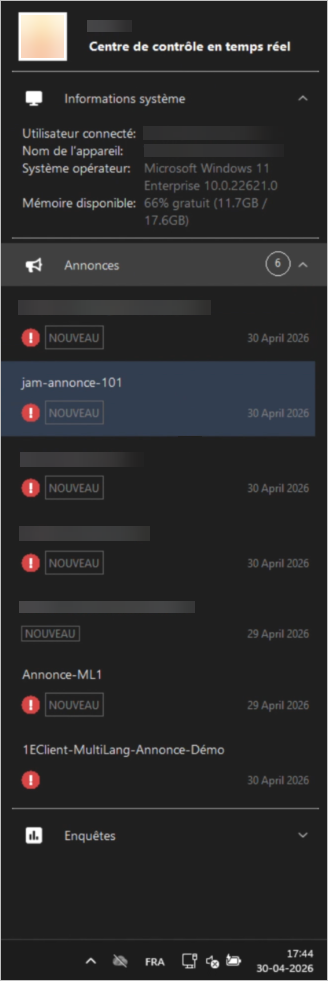
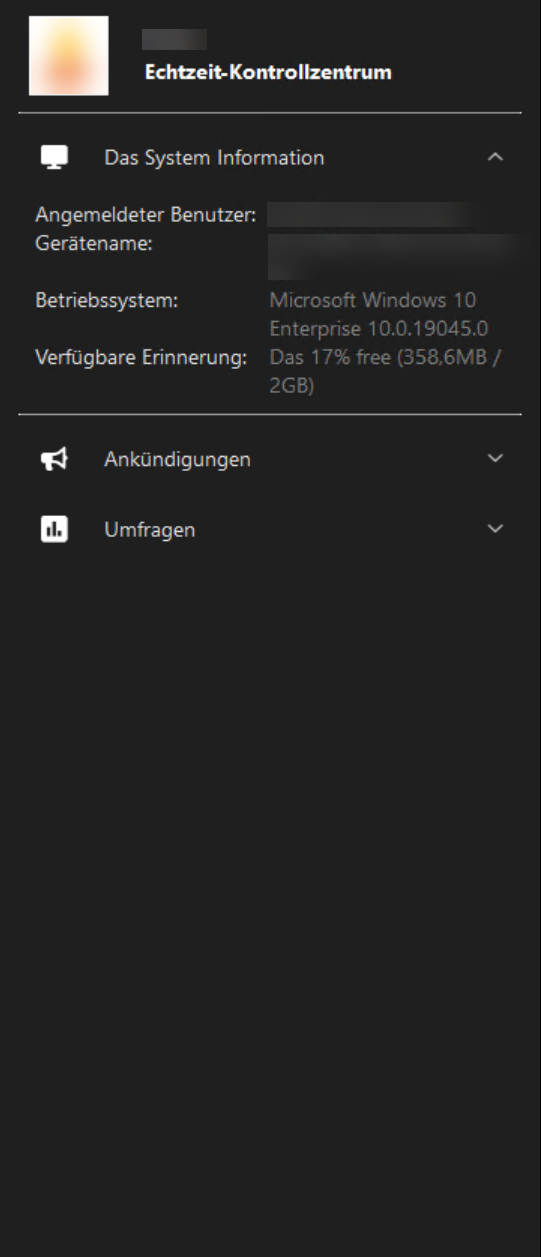
The Client Real Time Control Center (RTCC) is localized in nine supported languages by default, with no manual file deployment required. The UI language is based on the device locale.
-
The 1E Client installer includes language-specific XML configuration files for macOS and Windows for all nine supported languages.
-
The 1E Client automatically detects the device locale and displays the UI in the corresponding language. No additional configuration is required.
-
The 1E Client first selects the most specific language and region match available, then falls back to the language-only match, and finally to English.
-
A configuration flag controls whether locale-based translations are enabled. By default, the flag is set to false, so existing custom translation files and current locale handling remain unchanged. When the flag is set to true, the 1E Client uses the locale-driven translation files and fallback behavior. This allows administrators to enable the feature without affecting existing deployments.
-
Customer-provided translations are still supported. If you have already deployed custom XML translation files for the UI, the 1E Client continues to use those files instead of the installer-provided defaults. Existing customizations are not overwritten. If no custom translation files are present, the installer-provided files are used automatically.
This feature is disabled by default. Existing deployments are unaffected unless an administrator explicitly enables it.
Configuring localization settings
Use the following settings to enable locale-based translations and configure fallback language behavior for multilingual surveys. These settings are not available as 1E Client installer properties.
Both localization settings are configured after installation by using the 1E-Explorer-TachyonAgent-Set1EClientAgentConfig instruction..
-
Module.Interaction.ModernLocalization:
Use this setting to enable or disable locale-based translations for Interaction content. The ModernLocalization configuration flag controls whether locale-based translations are enabled. You must set this value to true after installation by using the appropriate instruction. Refer to Module.Interaction.ModernLocalization and Module.Interaction.Port.
-
Module.Interaction.TranslationFallbackLanguage:
Use this setting to specify the fallback language for multilingual surveys. The fallback language setting is configured using the 1E-Explorer-TachyonAgent-Set1EClientAgentConfig instruction. This setting is not available as a 1E Client installer property, so you must run the instruction after installation to configure the preferred fallback language by setting Module.Interaction.TranslationFallbackLanguage. Refer to Module.Interaction.TranslationFallbackLanguage.
The fallback language applies only to multilingual surveys displayed in the Interaction UI. For all other Interaction UI elements, English is used as the default fallback language
Multilingual surveys only work with the 26.6 release or later. Refer to TeamViewer DEX 26.6 release notes.
Configure Client settings:
Use the client instruction 1E-Explorer-TachyonAgent-Set1EClientAgentConfig.xml to update Client configuration settings.
This instruction is included with 1E-Explorer-TachyonAgent DEX Pack which is provided in the Platform installer zip file. Download the DEX Pack from TeamViewer DEX Hub, and use the 1E Product Pack Deployment Tool (PPDT) to upload it to your Platform.
The instruction updates Client configuration settings and restarts the service after a short random delay. This delay helps prevent large numbers of clients reconnecting to the DEX Platform at the same time.
-
%agentconfig% specifies the configuration property to update.
-
%agentconfigvalue% specifies the value to assign to the property.
Module.Interaction.TranslationFallbackLanguage is supported in Client 26.5 and later.
Supported languages
|
Code |
Language |
|---|---|
|
zh |
Chinese |
|
en |
English |
|
fr |
French |
|
de |
German |
|
ja |
Japanese |
|
ko |
Korean |
|
pt |
Portuguese |
|
ru |
Russian |
|
es |
Spanish |