Implementing a 1E DMZ Server


Learn how to implement a 1E DMZ Server to support internet-facing clients. This guide covers the two-stage setup process, firewall considerations, and best practices for deploying Switch and Background Channel components in a secure DMZ environment.
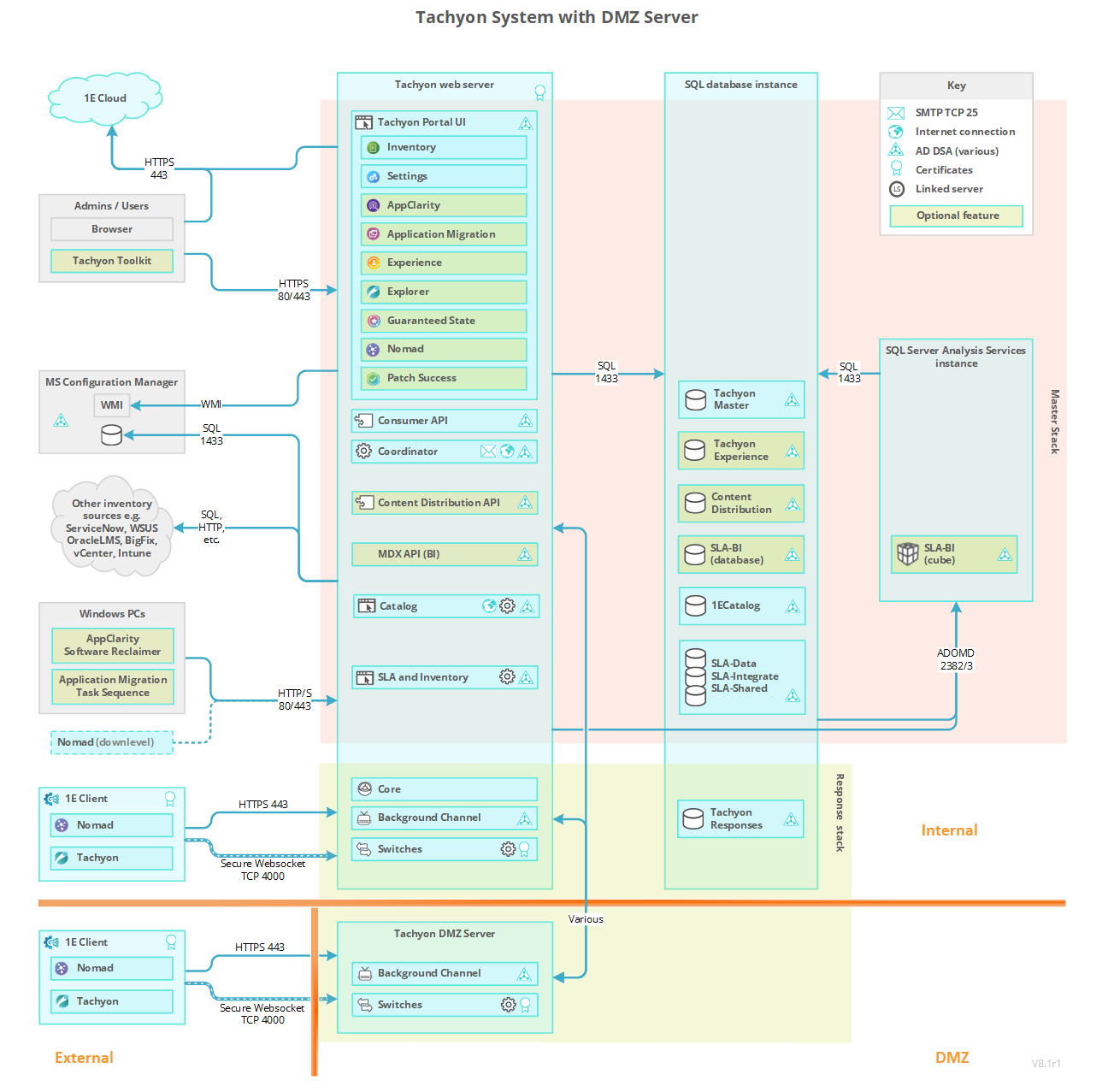
Enabling 1E to support devices that are external to your company network is done by slightly extending the default single-server architecture. To enable external 1E Client devices to interact with 1E , the DMZ requires at least one Background Channel and at least one Switch.
The Responses Stack handles communications between Master Stack and 1E Client devices. The Background Channel and Switch components handle the direct communication with clients, the Core processes the information in both directions between the Master Stack and the Switches.
Assumptions
The steps given on this page assume:
-
If the 1E DMZ Server is domain-joined, it is either in the same domain in which the internal 1E Server resides or there is a two-way trust between domains.
-
The 1E DMZ Server will host only 1E Switch and Background Channel components and is installed in a DMZ.
-
1E is already installed on the internal (corporate) network, with clients successfully using the internal Response Stack Switch and Background Channel, which the DMZ Server will connect to.
In our example, the DMZ Server has only one Switch, and the internal 1E Server is a single-server configuration with Master and Response Stacks. If your system has different requirements, contact 1E for advice.
Client devices will be configured to swap between being on the internal network and being external to the network and therefore will communicate with the internal 1E Server when connected internally and the external 1E DMZ Server when accessing externally (for example Internet). Client devices must have the appropriate certificates installed. Refer to Certificate requirements.
 Communications ports
The 1E communications ports between the 1E Master Server and the 1E DMZ Server must be opened, as illustrated in the picture. Refer to Communication ports.
The web server certificate on the DMZ Server needs to reference at least one CRL Distribution point that uses HTTP. These CRL DPs are likely to be in the internal network, and the firewall will need to allow the DMZ server to access these internal servers. 1E Server Setup will warn you if the certificate does not reference a CRL Distribution point that uses HTTP, but does not tell you if it cannot connect to the CRL DP, and will allow installation to proceed.
Preparation
In the following summary and configuration steps, we use the following terminology:
-
Relevant internal servers
-
Any internal server which hosts a 1E Server component that communicates with any DMZ Server.
-
Typically this will include the servers which host the Coordinator, the Consumer API, and any Core bound to a DMZ switch that is registered in the dbo.SwitchToCoreApi table in the TachyonMaster database.
-
The example diagrams and steps refer to only one internal server, but there may be separate servers for Master Stack (with Coordinator and Consumer API) and Response Stack (with Core).
-
-
DMZ Server
-
Any server that has 1E Server components installed that is not on the internal network (that is, outside of the corporate network).
-
This includes a 1E DMZ Server (which has one or more Switches and a Background Channel).
-
You must ensure the following before installation of 1E on a DMZ Server.
|
Component |
Description |
|---|---|
|
Master Server |
Is installed and verified with internal 1E clients:
|
|
DMZ internal and external firewall |
Configured correctly. Refer to Communication ports. |
|
DMZ Server |
The DMZ Server is provisioned. Although a DMZ Server does not have all 1E components, all prerequisites must be met in order for 1E Server Setup to run. In particular, the following must be prepared before installation. For more detail about each requirement, click on the relevant link.
|
|
Each DMZ Server requires its own web server certificate. Refer to Certificate requirements |
|
|
IIS to host the Background Channel application, and Windows Authentication role if the server is domain joined and has a trust relationship with the domain that Master Stack is configured to use. |
|
|
Test devices |
Test devices with the client installed, and at least one is connected to the internal network; another is connected to the external network. |
Certificate requirements
1E Server certificate requirements are defined in Certificate requirements.
Implementing a 1E DMZ Server installation has the following additional certificate requirements for the internal server(s) as well as the 1E DMZ Server itself.
Relevant internal servers
|
Type |
Additional certificate requirements |
Where used |
|---|---|---|
|
1E Server certificate |
The Certificate requirements require the 1E Server DNS Name FQDN and computername FQDN to be present in the certificate. However, it has an additional requirement to separate communications between internal and external Switches:
|
This is the usual 1E website certificate. A DMZ Server installation has additional needs to allow Switches on the DMZ Server to communicate with:
|
|
1E Consumer API client certificate |
The client certificate on the 1E Master Stack has the following requirements:
You will need the thumbprint for this certificate. In our example, this is 95dfcc47c31c8bf201104da27ba8a6d792e83665. |
Used by the 1E Master Stack (Consumer API) to perform client authentication with the Background Channel on the DMZ Server. Required only if certificate authentication is used instead of domain authentication. This certificate is only used if your DMZ Server is not domain-joined, or does not have a two-way trust between your internal domain and your DMZ domain. |
DMZ Server
|
Type |
Additional certificate requirements |
Where used |
|---|---|---|
|
DMZ Server certificate |
The Certificate requirements are valid with regard to trust, usage, enhanced key usage, the private key, and revocation. However, as this is an externally reachable certificate, it is not recommended that the computername FQDN is present in the certificate. As such, the certificate must meet the following requirements:
Optionally, it may also contain a Subject Common Name Field (subject:commonName) that is unique within the organization that identifies the certificate. |
Used by the Switch(es) and Background Channel to secure communication to clients. |
|
DMZ Server client certificate |
The client certificate on the 1E DMZ Server has the following requirements:
|
Used by Switch(es) to perform client certificate authentication with its assigned Response Stack (Core). |
Certificate trust
For each of the following scenarios, ensure you import the CA certificate(s) of the trust chain into the server's Local Machine's Trusted Root Certification Authority or Intermediate Certification Authorities stores (as appropriate).
-
Relevant internal servers must trust the DMZ Server certificate therefore you must import the CA certificates used by the DMZ Server into the CA stores on the relevant internal servers.
-
DMZ Server must trust the relevant internal server certificate(s), therefore you must import the CA certificates used by the relevant internal server(s) into the CA stores on the DMZ Server.
-
The DMZ Server must also trust client certificates, therefore you import the CA certificates used by clients into the CA stores on the DMZ Server.
The HTTP CDP referenced in any certificate, including imported CA certificates, must be reachable by the DMZ Server.
If the certificates on the DMZ Server and the internal 1E servers are from different issuing CAs, then:
-
Obtain the certificates (public keys only) for all the intermediate CAs, up to and including the Root CA of the internal 1E Server's Web Server Certificate, and add them to the corresponding CA stores on the DMZ Server. If you do not do this, the Switch on the DMZ Server will not be able to start because it won't be able to trust the Core API on the relevant internal server.
Similarly, if the certificates on the DMZ Server and client authentication certificates on external clients are from different issuing CAs, then:
-
Obtain the device's intermediate and root CA certificates, and add them to the corresponding CA stores on the DMZ Server.
-
Windows devices will need the 1E DMZ Server's intermediate and root CA certificates to be added to their CA stores.
-
Non-windows devices will need the 1E DMZ Server's intermediate and root CA certificates to be added to their certificate store (that is either KeyStore or cacert.pem file, depending on the method used to store certificates).
Installation steps for a 1E DMZ Server
1E Server Setup provides a two-stage process to install a new DMZ Server:
-
Run Setup Maintenance on the Response Stack server (specifically the server that hosts the Core which the DMZ Server will connect to) to prepare the Response server and its database, and store details in an ini file.
-
Run Setup to install the DMZ Server using the prepared ini file.
The two-stage process and its ini file are required because setup is unable to communicate through the DMZ firewall. In previous versions of 1E , the first stage required complex manual configuration.
To upgrade a DMZ Server, you only need to run setup on the DMZ Server, you do not require the ini file.
You should not start Stage 1 until you are also prepared to complete Stage 2. This is because Stage 1 1E reconfigures to think the DMZ Server already exists and is working before Stage 2 completes the process. This may cause the following problems:
-
1E will attempt to send instructions to the Switch in the DMZ, and will log an error because such Switch is not yet installed. The error is harmless and will not prevent the instruction from being sent to other existing Switches, but you should be prepared to see the error message in the Log without being alarmed.
-
You will not be able to upload any new instructions which contain resources. If you try to upload an instruction definition that contains resources, the Consumer API will try to upload the resources to all Background Channels, including the one in the DMZ. This will, of course, fail, and it will cause the Consumer API to revert the changes made to all other Background Channels and return an error result.
-
You will not be able to deploy a Policy, because Policies also require one or more files to be uploaded to all Background Channels, which will be reverted when the DMZ Server fails to update.
If for any reason you are unable to complete Stage 2, you can revert the Stage 1 changes by using Undo in DMZ Server form in the 1E Server Setup Maintenance screen.
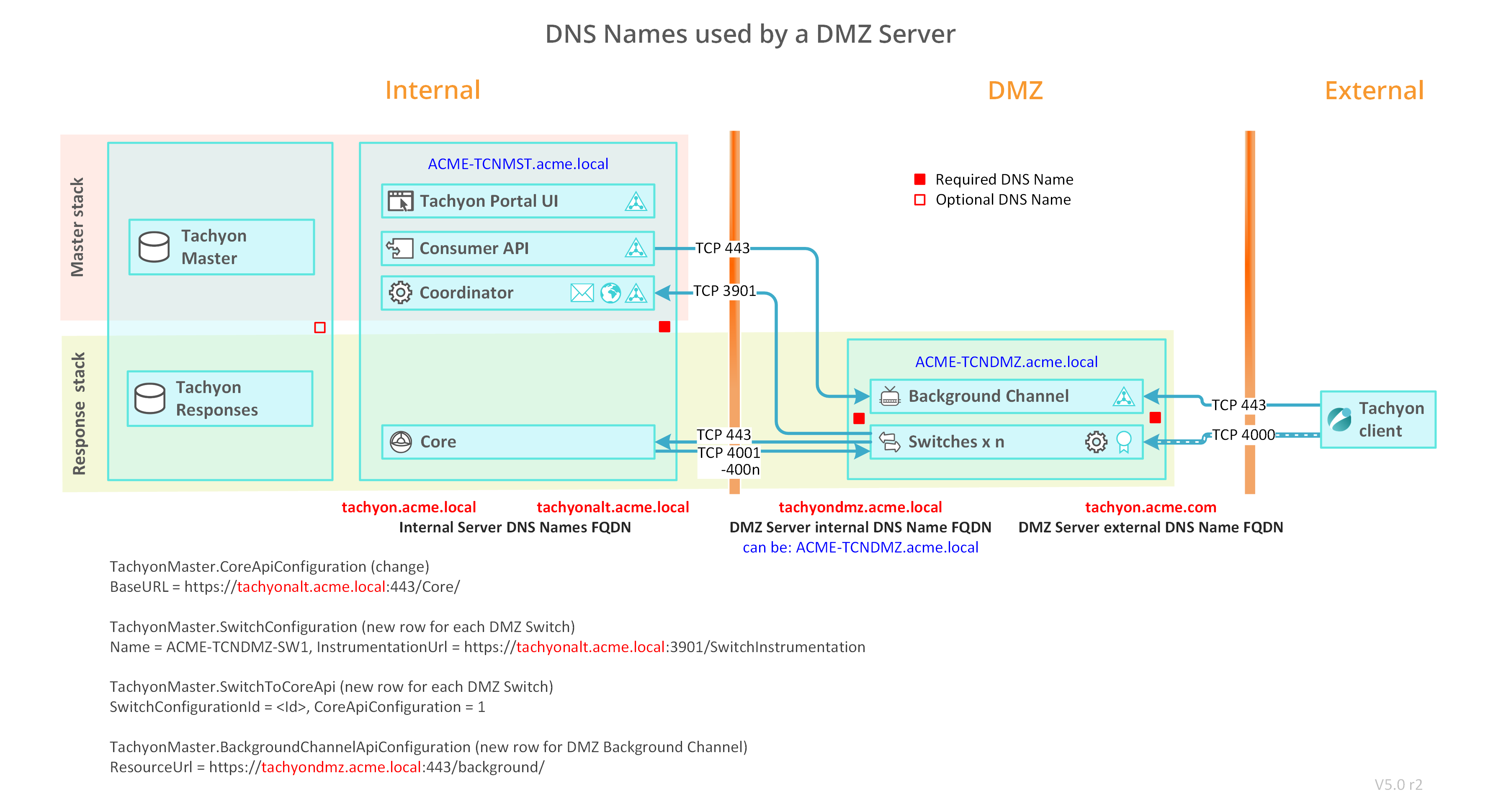
To illustrate the following detailed steps we use the ACME network with two servers.
DNS names
Use the following table to help map the DNS names used in your environment with the name used in the steps below.
|
Server |
DNS Name references |
DNS Name examples |
DNS Names used in your environment |
|---|---|---|---|
|
The internal 1E Server The diagram shows only relevant components of Master Stack and Response Stack |
1E Server computername FQDN |
ACME-TCNMST.acme.local |
|
|
1E Server DNS name FQDN |
1E.acme.local |
1E.acme.local |
|
|
1E Server Alternate DNS name FQDN |
1Ealt.acme.local |
1Ealt.acme.local |
|
|
The external 1E DMZ Server |
DMZ Server computername FQDN |
ACME-TCNDMZ |
|
|
DMZ Server internal DNS Name FQDN |
1Edmz.acme.local |
|
|
|
DMZ Server external DNS Name FQDN (Internet) |
1E.acme.com |
|
Detailed installation steps
Proceed through the following sections in the order they appear, using the headings as a guide to identify where each set of actions should be performed.
Internal 1E Server (Master and Response Stacks) and internal 1E client(s)
Install the internal 1E Server, with Master and Response Stacks, and ensure it works by running the tests described in Verifying.
DMZ Server
Ensure Preparation steps are complete. You must ensure the following before installation of 1E on a DMZ Server.
-
The 1E Master Server is installed and verified with internal clients.
-
Ensure the certificate(s) used on the internal server(s) already meet the additional requirements for implementing a DMZ Server. 1E Server Setup does not check these requirements.
-
The documentation below assumes this has a Master Stack and Response Stack on the same server.
-
A Response Stack is required in order to provide the Core component that will be used by the remote DMZ Server. Internal clients are not required to use the Switch and Background Channel of this Response Stack.
-
-
The DMZ internal and external firewall are configured correctly. Refer to the Communication ports.
-
The DMZ Server is provisioned. Although a DMZ Server does not have all 1E components, all prerequisites must be met in order for 1E Server Setup to run. In particular, the following must be prepared before installation. For more detail about each requirement, click on the relevant link.
-
-
The DMZ Server requires two DNS Names, even if the DMZ Server is configured with one network interface. Two network interfaces are required to prevent response traffic from clients to server, and from server to Core, using the same network interface.
-
A DMZ Server internal DNS Name so that the internal 1E Server can connect to the DMZ Server. The documentation below assumes this DNS Name exists, but it can alternatively be the server's computer name FQDN.
-
A DMZ Server external DNS Name so that Internet devices can connect to the DMZ Server, which is the name included in the client configuration for Switch and Background Channel settings (1E Client configuration file). This DNS Name is not necessarily for the actual IP Address(es) of the external network interfaces if DMZ firewall, Network Address Translation (NAT), or other routing is employed.
-
Both DNS Names must be included in the Web server certificate. Refer to Certificate requirements
-
If DMZ Server is domain-joined, both DNS Names require an HTTP class Service Principal Name (SPN) registered on the DMZ Server's computer$ account. Refer to Service Principal Names.
-
-
-
The DMZ Server should have an internal network interface, and an external network interface for each Switch, in order to keep Core and Switch traffic apart. This recommendation is for performance reasons when supporting over 500 devices.
-
If an internal interface is not used, then the external interface will use both DNS Names.
-
If using two interfaces:
- The internal interface will use the internal DNS Name, and the external interface(s) will use the external DNS Name. This is the assumption made in the configuration steps below.
- Internal and external interfaces will typically be on different subnets.
- Ensure your network routing is configured to route outgoing traffic using the internal interface. You may need to configure a persistent route, for example using the same steps described in Configuring a persistent route for SQL traffic.
-
- Each DMZ Server requires its own web server certificate. Refer to Certificate requirements.
- Windows Server roles and features
IIS to host the Background Channel application.
Windows Authentication role if the server is domain joined and has a trust relationship with the domain that Master Stack is configured to use.
-
Test devices with the client installed.
-
At least one is connected to the internal network; another is connected to the external network.
-
-
-
If the certificates on the DMZ Server and the internal 1E servers are from different issuing CAs, then:
-
Obtain the certificates (public keys only) for all the intermediate CAs, up to and including the Root CA of the internal 1E Server's Web Server Certificate, and add them to the corresponding CA stores on the DMZ Server. If you do not do this, the Switch on the DMZ Server will not be able to start because it won't be able to trust the Core API on the relevant internal server.
Similarly, if the certificates on the DMZ Server and client authentication certificates on external clients are from different issuing CAs, then:
-
Obtain the device's intermediate and root CA certificates, and add them to the corresponding CA stores on the DMZ Server.
-
Windows devices will need the 1E DMZ Server's intermediate and root CA certificates to be added to their CA stores
-
Non-windows devices will need the 1E DMZ Server's intermediate and root CA certificates to be added to their certificate store (that is either KeyStore or cacert.pem file, depending on the method used to store certificates).
Internal 1E Server (Response Stack)
On the internal 1E Server (Response Stack) add an alternate HTTPS binding to the 1E website. In our example this is https://1Ealt.acme.local:443
You may have already created an alternate HTTPS binding when installing the Response Stack server. The Response Stack server is the server you have already installed that hosts the Core component. This will have been installed when installing a Single-Server with all components, or a dedicated Response Stack server. If you need to add the binding, then use the manual steps below.
Remember this binding for steps 5, 8 and 21.
-
On the internal 1E Server, open IIS Management Console.
-
Expand Sites and right-click on the 1E website.
-
Under the Edit Site actions, click Bindings.
-
Click Add.
-
Select type https.
-
Set the Host name to the 1E Server Alternate DNS Name, see table above.
-
Enable Require Server Name Indication.
-
Select the SSL certificate to be the same certificate as the existing HTTPS binding, ensuring it is the certificate with SAN entries for 1E Server DNS Name FQDN and 1E Server Alternate DNS Name FQDN.
-
Click OK to save, and Close.
Internal 1E Server (Response Stack)
On the internal 1E Server (Response Stack): On the server that hosts the Core component - which the DMZ Server will connect to - run 1E Server Setup and go to the Maintenance screen, and click on Add DMZ Server...
This is the first stage of using 1E Server Setup to install a DMZ Server. It prepares the Response server and its database, and stores configuration details in a <DMZ Server computername>.ini file in the Setup folder. You will need to copy this file to the DMZ Server.
When you click on Ok, Setup validates the configuration details. Any serious errors will prevent Setup from going ahead, and any warnings will cause a dialog to be presented to ask for confirmation about whether you want to continue. The ini file is only saved or updated after a successful validation, or warnings have been accepted.
After this moment, 1E will "think" that you have a DMZ Server, even though you have not yet installed it, this means:
-
1E will attempt to send instructions to the Switch in the DMZ and will log an error because such Switch is not yet installed. The error is harmless and will not prevent the instruction from being sent to other existing Switches, but you should be prepared to see the error message in the Log without being alarmed.
-
You will not be able to upload any new instructions which contain resources. If you try to upload an instruction definition that contains resources, the Consumer API will try to upload the resources to all Background Channels, including the one in the DMZ. This will, of course, fail, and it will cause the Consumer API to revert the changes made to all other Background Channels and return an error result.
-
You will not be able to deploy a Policy, because Policies also require one or more files to be uploaded to all Background Channels, which will be reverted when the DMZ Server fails to update.
The Undo button will allow you to undo the changes written to the database so that your server will not think anymore that you have a DMZ Switch and Background Channel. This can be useful if you find an error in your configuration or if you need to revert the changes to avoid the errors mentioned above or if you wish to uninstall your DMZ Server. If you need to do this after you have already closed the form, you can re-open it and reload the information by using the Import button.
|
Parameter |
Description |
|---|---|
|
DMZ Server computername. |
The computername of the DMZ Server. It is used to ensure you are preparing the correct DMZ Server, and prepare the Switch configuration in the TachyonMaster database. The computername is the value returned when you run the command cmd /k hostname on the DMZ Server. |
|
DMZ Server internal DNS Name FQDN - reachable from internal network. |
The DNS Name FQDN and port that the internal 1E servers will use to connect to the DMZ Server through the DMZ firewall. In our example this is 1Edmz.acme.local and default port 443. In most cases, your DMZ Server will have dual network connections, one for your intranet and another for the Internet. Here, you need to provide a DNS Name that resolves to the IP address of the internal network connection. It will be used by the Consumer API for posting information to the Background Channel in the DMZ, and the Core connecting to the DMZ Switch(es). When you install the DMZ Server, this DNS Name FQDN will be used for the alternate HTTPS binding and exist as a SAN in the binding certificate. |
|
DMZ Server external DNS Name FQDN - reachable from the Internet. |
The DNS Name FQDN and port that clients will use to connect to the DMZ Server, and the port used by the Background Channel. In our example this is 1E.acme.com and default port 443. This DNS Name FQDN should be the one that the clients on the Internet use for connecting to the DMZ server. The DMZ Tool will save it to the .ini file; when the file is read by Setup in the DMZ, it will be used for pre-configuring the corresponding entry in the Web configuration page. In most cases, your DMZ Server will have dual network connections, one for your intranet and another for the Internet. Here, you need to provide a DNS Name FQDN that clients use to connect to the Background Channel using the external network connection. When you install the DMZ Server, this DNS Name FQDN will be used for the main HTTPS binding, and exist as a SAN in the binding certificate. The 1E installer only configures a single address in IIS. If your DMZ server is dual-ported, meaning that it uses a different address for the internal network and the external network, only the latter will be automatically configured in IIS during installation in the DMZ. You will need to manually add the internal address in the IIS configuration. |
|
Number of Switches to install in the DMZ. |
The number of Switches you will install on the DMZ Server. By default it will be 1, but you need to increase the value if you expect to have more than 50,000 clients connecting to this DMZ server. Add one Switch for every 50,000 clients. |
|
Comma-deimited list of Switch IP Addresses. |
Enter as many IP Addresses as the number of Switches that you specified above. In our example we have one Switch which has an IP Address 10.10.200.2 Each Switch listens for clients on its own network interface with its own IP Address. Each IP Address is for an external connection of the Switch to the Internet. If you are using reverse-NAT in your external router, then this is the IP Address as seen by the DMZ Server, not as seen from the Internet. By default, each Switch listens on port 4000. If you need to change the port, you must do this manually after installation, contact 1E for guidance. When you later run Setup on the DMZ Server to complete Stage 2, the Switch configuration allows you to select the IP Addresses for the Switches, and you must visually verify that the addresses match the ones that you selected here, and in the same order as they appear on the screen. The order is important because each Setup stage independently assigns a numeric name to each Switch, Setup stage 1 stores names in the database, and Setup stage 2 stores the same names in the Switch Host configuration file on the DMZ Server. This information is stored in the SwitchConfiguration table of the TachyonMaster database, and is read by the Switches on the DMZ Server when they start up. Therefore, a Switch will fail to start if the DMZ Server does not actually have a network interface with the expected IP Address. |
|
Authentication - DMZ Server is member of a domain that trust the internal Master Stack server. |
Check this checkbox if your DMZ Server will be a "member of a trusted domain" - that is, it will be joined to a domain that has a two-way trust with the domain of your internal 1E servers. If the DMZ Server and internal servers trust each other, then Setup will configure them both to use Windows Authentication for incoming and outgoing connections. If you do not select the option, then Setup will configure the servers to authenticate to each other by means of certificates, and you will need to provide thumbprints below. |
|
Thumbprint of client certificate sent by the Consumer API on Master to Background Channel on DMZ Server. |
This text box is enabled if you did not select "member of a trusted domain". You should enter here the thumbprint of a certificate that is installed in the Master Stack server. It should be enabled for Client Authentication, contain a private key, and be accessible to the Consumer API. This certificate will be presented by the Consumer API to the Background Channel in the DMZ when the Consumer API sends any changes to the Background Channel. In our example, this is 95dfcc47c31c8bf201104da27ba8a6d792e83665. The service account under which the Consumer API is running (by default, NT Authority\Network Service) will need to have read access on the private key of this certificate. The DMZ configuration tool will automatically grant this permission if you are running it on the same machine where the Consumer API is installed. If you are running it in a remote Response Stack, you will need to grant this permission manually at the Master Stack. |
|
Thumbprint of client certificate sent by Background Channel on DMZ Server to ContentDistribution service. |
This text box will only be enabled if you did not select "Member of a trusted domain". This field is optional. You only need to enter this value if you are installing the ContentDistribution service in your internal network, and you want the Background Channel in the DMZ to act as a Proxy so that external clients can reach the internal server. In our example, this is 25fe00fce6240c9260e614eb95680fb6f3ddf06a. If you are using this feature, then you should enter here the thumbprint of a certificate that is installed in the DMZ server. It should be enabled for Client Authentication, contain a private key, and be accessible to the Background Channel. This certificate will be presented by the Background Channel to the ContentDistribution service in the intranet when its internal Proxy needs to forward any packets to the internal server. |
Internal 1E Server (Response Stack)
On the internal 1E Server (Response Stack), restart all Switches and confirm they are working.
-
Restart the 1E Tachyon Switch Host service.
-
Ensure all internal Switches are running.
-
In Endpoint Troubleshooting , confirm that at least one internal client is connected.
Internal 1E Server (Master and Response Stacks) and internal 1E client(s)
Ensure that everything is still working by running the tests described in Verifying.
However, remember that 1E thinks your DMZ Server is live, although it is not. This means:
-
1E will attempt to send instructions to the Switch in the DMZ, and will log an error because such Switch is not yet installed. The error is harmless and will not prevent the instruction from being sent to other existing Switches, but you should be prepared to see the error message in the Log without being alarmed.
-
You will not be able to upload any new instructions which contain resources. If you try to upload an instruction definition that contains resources, the Consumer API will try to upload the resources to all Background Channels, including the one in the DMZ. This will, of course, fail, and it will cause the Consumer API to revert the changes made to all other Background Channels and return an error result.
-
You will not be able to deploy a Policy, because Policies also require one or more files to be uploaded to all Background Channels, which will be reverted when the DMZ Server fails to update.
DMZ Server
On the 1E DMZ Server 3
-
Use Services.msc to confirm 1E Switch Host service is running. If it is stopped then there is an issue with all the Switches.
-
Check the number of Switch log files, and review their contents. There should be one log file for each Switch, plus Switch.Host.log
-
Use IIS Manager to confirm the presence of the 1E website, which contains only the Background web application. Check the binding to confirm all the bindings exist that were specified in the Website configuration screen.
If you wish, you can manually delete the default HTTP binding.
Internal 1E Server (Response Stack) and DMZ Server
Copy existing Background Channel content from the internal 1E Server to the 1E DMZ Server.
-
Copy the content (minus the web.config file) from each of the following directories on the internal 1E Server (Response Stack) to the equivalent directory on the DMZ Server. This is the default location.
%PROGRAMDATA%\1E\Tachyon\Content
%PROGRAMDATA%\1E\Tachyon\Installers
%PROGRAMDATA%\1E\Tachyon\PolicyDocuments
%PROGRAMDATA%\1E\Tachyon\Updates
Only the initial copy of the content is required. From this point on, the Consumer API will maintain the content of the Background Channel on the 1E DMZ Server.
PolicyDocuments can be omitted. When you click on the Deploy button in 1E Endpoint Automation (in step 27), then all policies will be regenerated and automatically copied to all registered Background Channels (see step 7 for registration of DMZ Server). If any source directory is empty then it means you have not tested that feature when verifying the internal 1E system in Step 1. This is not critical at this stage, but you should re-check later.
Internal 1E portal , 1E Server (Response Stack) and DMZ Server
Verify that the internal 1E Server can upload content to the Background Channel on the 1E DMZ Server:
-
Connect to the 1E website and open the Settings application and navigate to Instruction sets
-
Delete the Verification instructions.
-
Verify that %PROGRAMDATA%\1E\Tachyon\Content\1E-TachyonPlatform-VerificationStage2 is removed from the internal Response Stack and DMZ servers.
-
Upload the Verification Instructions.
-
Verify that %PROGRAMDATA%\1E\Tachyon\Content\1E-TachyonPlatform-VerificationStage2 is recreated on the internal Response Stack and DMZ servers.
DMZ Server and external 1E client(s)
Verify an external client can connect to the 1E DMZ Server Switch.
Change the client configuration (1E Client configuration file) to point at both the internal 1E Server and the 1E DMZ Server. This assumes you want client devices to be able to switch between internal and external access. If you prefer, you can simply enter details only for the 1E DMZ Server.
-
Edit the %PROGRAMFILES%\1E\Client\1E.Client.conf file.
-
Modify the Switch configuration property.
-
In our example this would be: Switch=tachyon.acme.local:4000;tachyon.acme.com:4000
-
-
Modify the BackgroundChannelUrl configuration property.
-
In our example this would be: BackgroundChannelUrl=https://tachyon.acme.local:443/Background/;https://tachyon.acme.com:443/Background/
-
-
Ensure the test device is connected to the external network and not the internal network, then review the 1E.Client.log to confirm the platform client connects.
-
Browse to the 1E website and start the Explorer application, and confirm the external test device is online.
Internal 1E portal and external client(s)
Run verification steps (Verifying) to verify an external 1E client can download content from the 1E DMZ Server Background Channel.
-
Browse to the 1E website and open the Endpoint Troubleshooting application.
-
Run the verification stage 1 and 2 and confirm a successful response is received from the external client.
The verification stage 2 Action confirms that content can be downloaded by the platform client.
Internal 1E portal and external client(s)
Verify the external client can receive Policy updates.
-
Open the Endpoint Automation application in a browser.
-
Click Administration, then click Policies.
-
Select an existing enabled policy that will affect the client and then click Disable.
-
Click Deploy.
-
Check the 1E Client log on the external client to verify that it has successfully received a message to fetch new policy, and that the policy download from the Background Channel has been successful.
You do not need any policies defined in 1E Endpoint Automation for this step to take effect. Pressing Deploy will create an empty policy. This step is required if you are making use of 1E.