Communication ports


This guide details port requirements for core components, firewall rules, and secure communication setup across internal and DMZ environments.
Connections diagram
The diagram shows connections for 1E and its applications. It includes connections from clients and administration workstations, and outgoing connections to inventory sources, and to Microsoft Endpoint Configuration Manager that is optionally used by some applications. It does not show connections for WakeUp, NightWatchman Enterprise, or Shopping, which have their own back-end servers. Their connection diagrams can be found in their documentation.
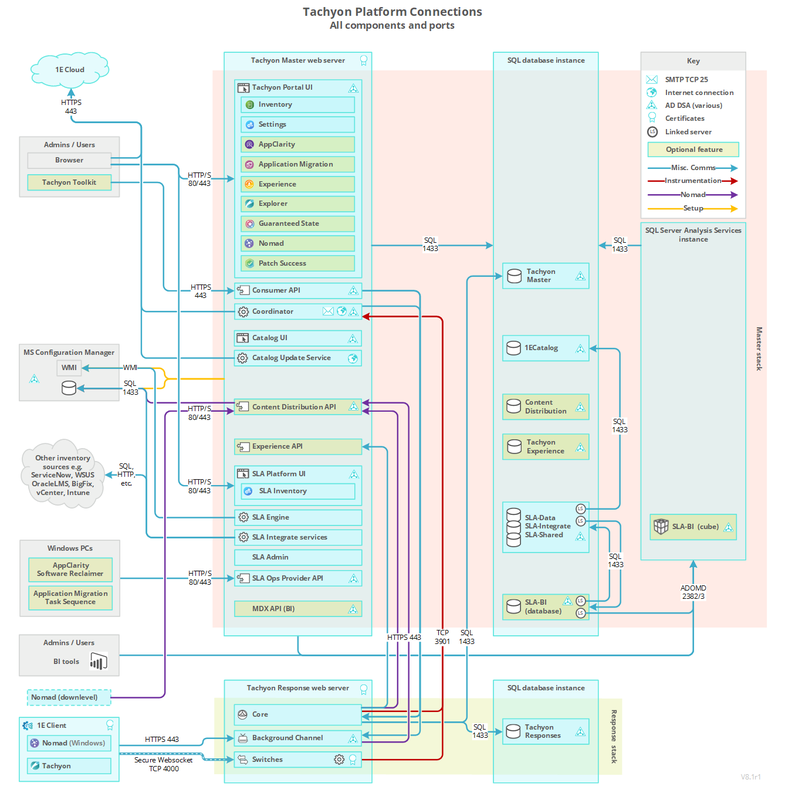
 Firewall requirements for a Single-Server
The following table lists firewall requirements for a single-server where Tachyon Master Stack and Response Stack are installed on the same server. The table assumes a remote SQL Server hosting TachyonMaster and TachyonResponses databases. Each 1E component described in the table has at least one output and/or input. For each 1E component with output, there is a matching input.
Firewalls normally protect against incoming traffic from remote devices, however, the table below also includes outgoing connections. The table does not include internal communications within the Server. In addition to but not included in the table are various ports that 1E uses to communicate with Microsoft services, including Certificate Services and Active Directory. The Coordinator Workflow service queries AD for email details; the Consumer API queries AD for security details.
Port requirements are not provided here for Content Distribution, Shopping and WakeUp modules of the 1E Client. Only the ports used by the client feature of the 1E Client are listed. If Content Distribution is being used by the client on Windows computers, it has additional port requirements of its own, which are not changed by 1E.
Additional ports may be required if 1E instructions need to connect to non-1E content sources. There may be additional requirements if the environment has had default security settings changed.
1E Servers
|
Device |
Port |
Protocol |
Direction |
Usage |
Configurable |
|---|---|---|---|---|---|
|
1E Server (Master Stack) |
TCP 443 |
HTTPS |
Incoming |
Console browser connections to Tachyon Portal UI Console browser connections to SLA Platform UI Console browser connections to 1E Catalog UI Consumer connections toCatalog API Consumer connections to Consumer API Consumer connections to SLA Operations Provider API |
Yes, during installation. In the Website Configuration panel in 1E Server setup. Refer to HTTPSIISPORT. Setup installs other components using the same settings as 1E Server. |
|
1E Server (Master Stack) |
TCP 80 |
HTTP |
Incoming |
Console browser connections to SLA Platform UI Console browser connections to 1E Catalog UI Consumer connections toCatalog API Consumer connections to SLA Operations Provider API |
Yes, during installation. In the Website Configuration panel in 1E Server setup. Refer to HTTPSIISPORT. Setup installs other components using the same settings as 1E Server. |
|
1E Server (Response Stack) |
TCP 443 |
HTTPS |
Incoming |
Client retrieving content from the Background Channel. |
Yes, during installation. In the Website Configuration panel in 1E Server setup. Refer to HTTPSIISPORT. |
|
1E Server (Master Stack) |
TCP 443 |
HTTPS |
Outgoing |
1E Coordinator service contacting the 1E Cloud License Service via an Internet connection. 1E Catalog Update service contacting the 1E Cloud Catalog Service via an Internet connection. |
The port used to connect to the 1E Cloud Services is not configurable. |
|
1E Server (Master Stack) |
TCP 6002 |
WebSocket (ws) |
Incoming Outgoing |
Integrate Agent service connecting to the Integrate Manager Web API to get connector jobs |
Yes, configurable after installation. Integrate Agent component is not shown on the diagram, and installation on remote systems is not supported. |
|
1E Server (Response Stack) |
TCP 4000 |
WebSocketSecure (wss) |
Incoming |
Client receiving instructions from and sending compressed responses to the 1E Switch. |
Switch ports are not configurable using the Server installer. A Switch port can be changed post-installation, by configuring the value in the Port column for the relevant Switch in the SwitchConfiguration table in the 1E Master database. If the Switch port is changed after deploying 1E Client (with 1E features enabled) then the corresponding Switch port must be updated in each Client's configuration file. Clients initiate and maintain a WebSocket Secure connection to a Switch, which the Switch uses to communicate back to the clients. |
|
1E Server (Master Stack) |
TCP 25 |
SMTP |
Outgoing |
1E Coordinator service sending two-factor authentication emails. 1E Coordinator service sending workflow emails. |
Yes. In this version of 1E, SMTP Authentication is not configurable using the Server installer. The default is anonymous authentication. However, it can be changed post-installation. Refer to Changing the SMTP Host configuration. |
|
1E Server (Master Stack) |
TCP 1433 |
TDS |
Outgoing |
1E Web Site application pools (Portal, Consumer API) communicating with SQL Server. SLA Platform Web Site application pools (Admin, CoreExternal, Platform) communicating with SQL Server. 1E Coordinator service communicating with SQL Server. Catalog services and application pool communicating with SQL Server. 1E Catalog Update service communicating with SQL Server. |
Not configurable from Setup. In the Database Servers panel in 1E Server setup you can select a SQL Server instance. The instance can be installed using a non-standard port. However, selecting an instance that uses a non-standard port will not change the port used by the 1E Installer, and installation will fail. If you require the use of a non-standard port on a Default SQL Server instance, contact 1E for guidance on a manual workaround. If using a Named Instance that is set to its default configuration where the server automatically chooses a random port (or if you manually configured the instance to use a fixed port), then the SQL Browser service needs to be enabled to let the 1E Server determine the port in use. You will need to open UDP port 1434 used by the SQL Browser. Refer to SQLSERVER_MASTER. |
|
1E Server (Master Stack) |
TCP 1433 |
TDS |
Outgoing |
Inventory connectors fetching data from sources that use SQL Server. |
Configurable in various Connectors. Refer to Connectors page. |
|
1E Server (Master Stack) |
TCP 135 and 445 (initially) |
WMI (DCOM) |
Outgoing |
SCCM WMI Server provider connection to Configuration Manager. Content Distribution connection to Configuration Manager used by the Content Distribution Sync feature. |
Not configurable. Refer to Provider configuration page and Content Distribution. |
|
1E Server (Response Stack) |
TCP 1433 |
TDS |
Outgoing |
1E Web Site application pools (Core and Core Internal) communicating with SQL Server (mainly uncompressed responses). |
Not configurable from Setup. See the comments above for the 1E Server (Master Stack). Refer to SQLSERVER_RESPONSES. |
|
SQL Server (TachyonMaster database) |
TCP 1433 |
TDS |
Incoming |
1E Web Site application pools (Consumer API, Portal) communicating with SQL Server. 1E Coordinator service communicating with SQL Server. 1E Web Site application pools (Core) communicating with SQL Server. |
Not configurable from Setup. See the comments above for the 1E Server (Master Stack). Refer to SQLSERVER_MASTER. |
|
SQL Server (TachyonResponses database) |
TCP 1433 |
TDS |
Incoming |
1E Web Site application pools (Core and Core Internal) communicating with SQL Server (mainly uncompressed responses). |
Not configurable from Setup. See the comments above for the 1E Server (Master Stack). Refer to SQLSERVER_RESPONSES. |
1E Clients
|
Device |
Port |
Protocol |
Direction |
Usage |
Configurable |
|---|---|---|---|---|---|
|
Clients |
TCP 4000 |
WebSocket Secure (wss) |
Outgoing |
Client receiving instructions from and sending compressed responses to the Tachyon Switch. |
Yes. Refer to 1E Client settings. Switch=<SwitchName>:<SwitchPort> Anything other than port 4000 requires a 1E Server with a Switch using the same port number. Clients initiate and maintain a WebSocket Secure connection to a Switch, which the Switch uses to communicate back to the client. |
|
Clients |
TCP 443 |
HTTPS |
Outgoing |
Client retrieving content from the Background Channel. |
Yes, during installation. Refer to 1E Client settings. BackgroundChannelUrl=https:/<1EplatformFQDN>:<port>/Background |
|
Clients |
TCP 7766 |
HTTPS |
Outgoing and Incoming |
Communication between the 1E Client service and 1E Client UI. |
Yes, during installation. Refer to 1E Client settings MODELE.INTERACTION.PORT=<port> |
|
Browsers |
TCP 443 |
HTTPS |
Outgoing |
Browsers connection to the Tachyon Portal (Explorer, Settings, and other applications). Browser connection to the SLA Platform UI. Browser connection to the Consumer API. |
Anything other than port 443 requires the port number to be included in the browser URL when connecting to the 1E portal, API or SLA Platform UI. |
|
Browsers |
TCP 80 |
HTTP |
Outgoing |
Console browser connections to the 1E Catalog UI |
Anything other than port 80 requires the port number to be included in the browser URL when connecting to the 1E Catalog UI. |
Firewall requirements for a remote Catalog Web Server
The following table lists firewall requirements when the Catalog Web Server is on a different server than the 1E Server. This can happen if 1E Server is installed in an environment that already has a 1E Catalog server installed to support Application Migration or AppClarity.
|
Device |
Port |
Protocol |
Direction |
Usage |
Configurable |
|---|---|---|---|---|---|
|
1E Server (Master Stack) |
TCP 80 |
HTTP |
Outgoing |
Consumer connections to the Catalog API |
Yes, requires manual configuration of 1E Server if not using default port 80. |
|
Catalog Server |
TCP 80 |
HTTP |
Incoming |
Console browser connections to the 1E Catalog UI Consumer connections to the Catalog API |
Yes, during installation. See 1E Catalog installer properties. |
|
Catalog Server |
TCP 443 |
HTTPS |
Outgoing |
1E Catalog Update service contacting the 1E Cloud Catalog Service via Internet connection. |
The port used to connect to the 1E Cloud Services is not configurable. |
|
Catalog Server |
TCP 1433 |
TDS |
Outgoing |
Catalog services and application pool communicating with SQL Server. 1E Catalog Update service communicating with SQL Server. |
Yes, during installation. See 1E Catalog installer properties. |
|
SQL Server (1E Catalog database) |
TCP 1433 |
TDS |
Incoming |
1E Catalog application pool communicating with SQL Server. 1E Catalog Update service communicating with SQL Server. |
Yes, during configuration of the SQL Server instance. |
|
Browsers |
TCP 80 |
HTTP |
Outgoing |
Console browser connections to the 1E Catalog UI |
Yes, during installation. See 1E Catalog installer properties. |
Firewall requirements for a remote 1E Response Stack
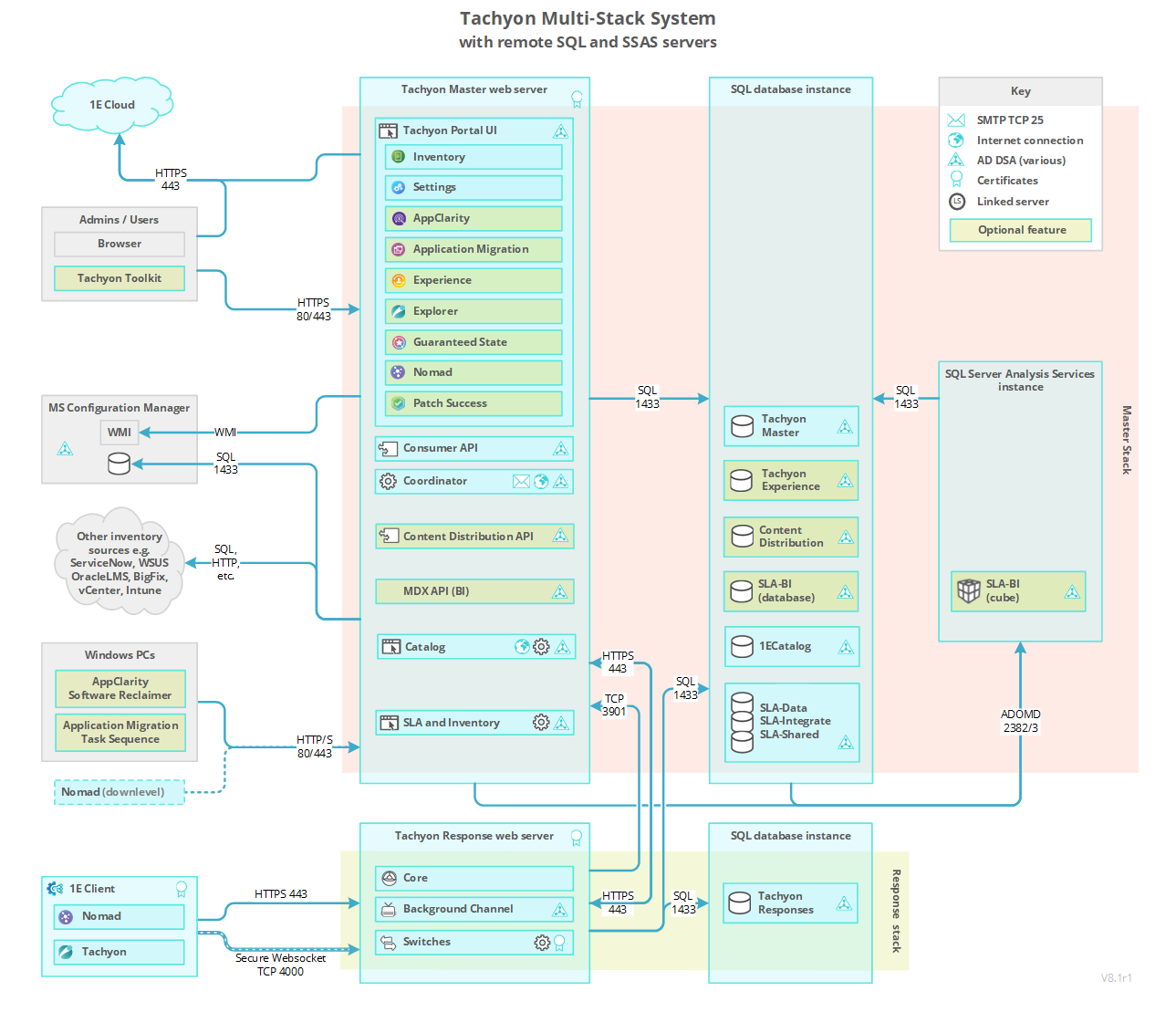
The following table lists firewall requirements when using a 1E Response Stack that is remote from the 1E Master Stack, which is additional to the ports required for a Single-Server. Each 1E component described in the table has at least one output and/or input. For each 1E component with an output, there is a matching input.
|
Device |
Port |
Protocol |
Direction |
Usage |
Configurable |
|---|---|---|---|---|---|
|
1E Server (Response Stack) |
TCP 443 |
HTTPS |
Incoming |
1E Coordinator Workflow service on the remote Master Stack connecting to the Core on a remote Response Stack Consumer API on the remote Master Stack connecting to the remote Background Channel on a remote Response Stack Consumer API on the remote Master Stack connecting to the Core on a remote Response Stack |
Yes, during the installation of the Response Stack. In the Website Configuration panel in 1E Server setup. Refer to HTTPSIISPORT. The Consumer API connection to the Core is only used for remote Response Stacks. |
|
1E Server (Master Stack) |
TCP 3901 |
WebSocket (ws) |
Incoming |
1E Switches sending instrumentation data to the Instrumentation module in the Coordinator on the Master Stack 1E Web Site Core application pool sending instrumentation data to the Instrumentation module in the Coordinator on the Master Stack |
Yes, but contact 1E for advice. |
|
1E Server (Response Stack) |
TCP 3901 |
WebSocket (ws) |
Outgoing |
1E Switches sending instrumentation data to the Instrumentation module in the Coordinator on the Master Stack 1E Web Site Core application pool sending instrumentation data to the Instrumentation module in the Coordinator on the Master Stack |
Yes, but contact 1E for advice. |
|
SQL Server (TachyonMaster database) |
TCP 1433 |
TDS |
Incoming |
1E Web Site Core application pool on a remote Response Stack communicating directly with the Tachyon Master database |
Not configurable from Setup. In the Database Servers panel in 1E Server setup you can select a SQL Server instance. The instance can be installed using a non-standard port. However, selecting an instance that uses a non-standard port will not change the port used by the 1E Installer, and installation will fail. If you require the use of a non-standard port on a Default SQL Server instance, contact 1E for guidance on a manual workaround. If using a Named Instance that is set to its default configuration where the server automatically chooses a random port (or if you manually configured the instance to use a fixed port), then the SQL Browser service needs to be enabled to let the 1E Server determine the port in use. You will need to open UDP port 1434 used by the SQL Browser. Refer to SQLSERVER_MASTER. |
|
1E Server (Response Stack) |
TCP 1433 |
TDS |
Outgoing |
1E Web Site Core application pool communicating directly with the remote 1E Master database |
Not configurable from Setup. See the comments above for SQL Server (TachyonMaster database). Refer to SQLSERVER_MASTER. |
Firewall requirements for a 1E DMZ Server
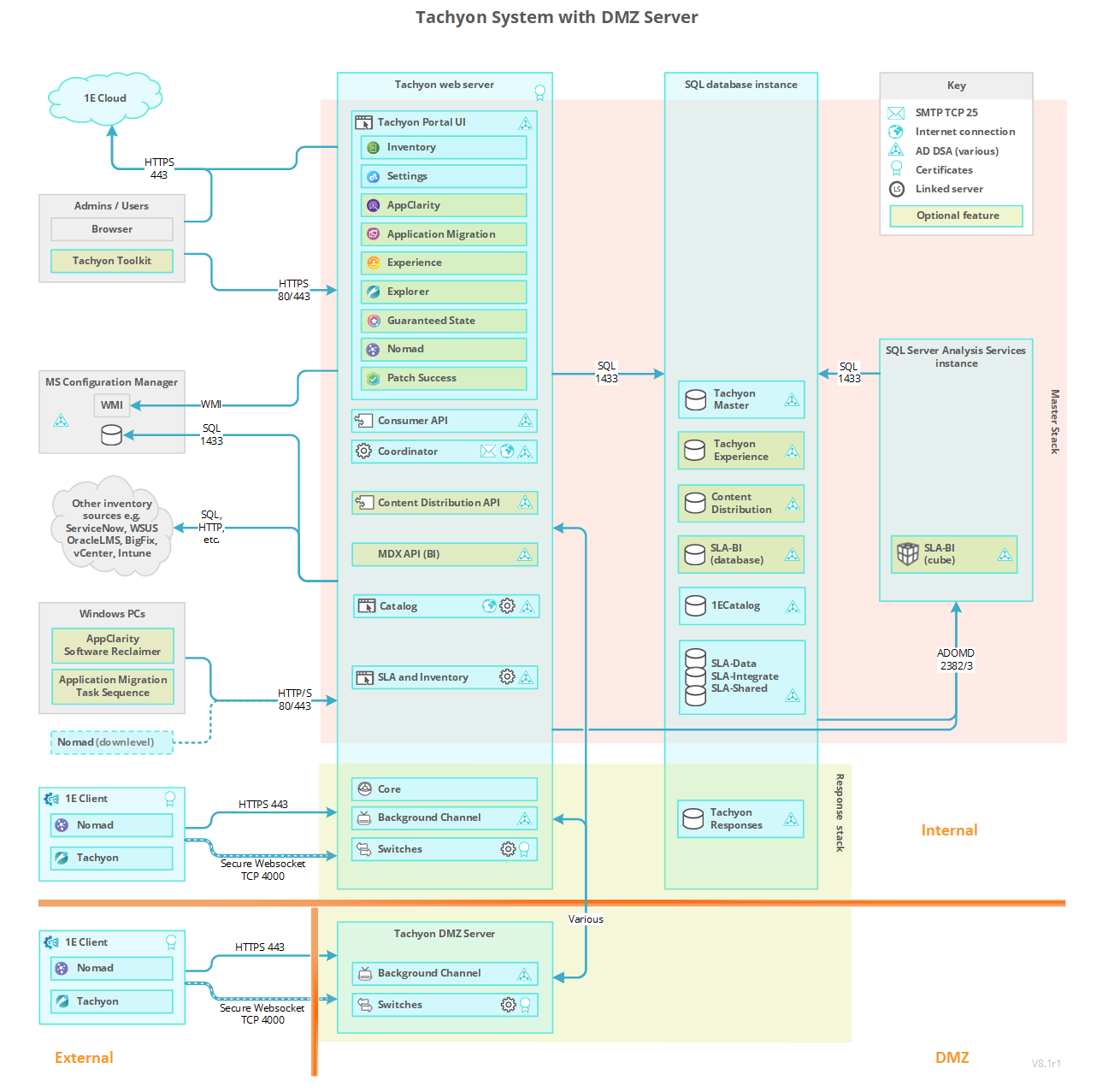
The following table lists the subset of ports needed when hosting 1E Switch and Background Channel components on a DMZ Server to support devices external to the network. Each 1E component described in the table has at least one output and/or input. For each 1E component with an output there is a matching input.
The table does not cover port requirements when using ADFS and SAML tokens to authenticate clients. In this documentation we just provide details of the simplest option, which uses certificates for client authentication. For details of how to configure 1E to support the more complex implementations, contact 1E.
If the server is a domain joined server it needs to be able to access Microsoft services, including Certificate Services and Active Directory. If the server is not domain joined (a workgroup server) you will need to manually install its Web Server certificate. In both cases you will also need to ensure that the server is able to validate the certificate, including accessing the certificate's remote CRL Distribution Point.
|
Device |
Port |
Protocol |
Direction |
Usage |
Configurable |
|---|---|---|---|---|---|
|
DMZ Server |
TCP 443 |
HTTPS |
Incoming |
Internet-facing client retrieving content from the Background Channel. Background Channel receiving content from the Consumer API on the Master Stack. |
Yes, during installation. In the Website Configuration panel in 1E Server setup. Refer to HTTPSIISPORT. |
|
DMZ Server |
TCP 443 |
HTTPS |
Outgoing |
The Switch forwards compressed responses from the Internet-facing client devices to the Core on the Response Stack. |
Yes, during installation. In the Website Configuration panel in 1E Server setup. Refer to HTTPSIISPORT. |
|
DMZ Server |
TCP 3901 |
WebSocket (ws) |
Outgoing |
1E Switches sending instrumentation data to the Instrumentation module in the Coordinator on the Master Stack. |
Yes, but contact 1E for advice. |
|
DMZ Server |
TCP 400n |
TCP |
Incoming |
Each Switch (from 1 to n) listens for prompts (pokes) from the Core on the Response Stack forwarding workflow commands. Each Switch requires its own port to be registered in the Core. |
If the value for the Switch port has been changed, the port you need to open should be the Switch client port + 1. For example, if a Switch client port is 4000 then Switch poke port is 4001. |
|
DMZ Server |
TCP 4000 |
WebSocket Secure (wss) |
Incoming |
Internet-facing client requesting instructions from and sending compressed responses to the 1E Switch. |
Switch client ports are not configurable using the Server installer. A Switch client port can be changed post-installation, by configuring the value in the Port column for the relevant Switch in the SwitchConfiguration table in the 1E Master database. Clients initiate and maintain a WebSocket Secure connection to a Switch, which the Switch uses to communicate back to the client. |
|
DMZ Server |
TCP 80 |
HTTP |
Outgoing |
See note above about accessing the certificate's remote CRL Distribution Point. |
|
|
1E Server (Response Stack) |
TCP 443 |
HTTPS |
Incoming |
The Core receives compressed responses forwarded by the Switch. |
Yes, during installation. In the Website Configuration panel in 1E Server setup. Refer to HTTPSIISPORT. |
|
1E Server (Master Stack) |
TCP 443 |
HTTPS |
Outgoing |
The Consumer API on the Master Stack sends content to the Background Channel. |
Yes, during installation. In the Website Configuration panel in 1E Server setup. Refer to HTTPSIISPORT. |
|
1E Server (Response Stack) |
TCP |
TCP |
Outgoing |
The Core on the Response Stack prompts each Switch on the DMZ Server. |
Switch client ports are not configurable using the Server installer. A Switch client port can be changed post-installation, by configuring the value in the Port column for the relevant Switch in the SwitchConfiguration table in the 1E Master database. If the value for the Switch client port has been changed the port you need to open should be the Switch client port + 1. For example, if Switch client port is 4000 then Switch poke port is 4001. |
|
1E Server (Master Stack) |
TCP 3901 |
WebSocket (ws) |
Incoming |
1E Switches sending instrumentation data to the Instrumentation module in the Coordinator on the Master Stack. |
Yes, but contact 1E for advice. |
|
Internet-facing clients |
TCP 443 |
HTTPS |
Outgoing |
Internet-facing client retrieves content from the Background Channel. |
Yes, during installation. Refer to 1E Client settings. |
|
Internet-facing clients |
TCP 4000 |
WebSocket Secure (wss) |
Outgoing |
Internet-facing client requests instructions from and sends compressed responses to the Tachyon Switch. |
Yes. Refer to 1E Client settings. There must be a matching Switch using the same port. Clients initiate and maintain a WebSocket Secure connection to a Switch, which the Switch uses to communicate back to the client. |
Internal server communications
The following is a list of ports used within the 1E Platform, and not listed in the Single-Server table above, and as such should not affect firewall requirements. Some of these are listed in the DMZ table above.
|
Port |
Protocol |
Usage |
Configurable |
|---|---|---|---|
|
TCP 3900 |
WebSocket (ws) |
Tachyon Switch registering with the Switch Host |
Yes, post-installation, but not recommended. Contact 1E for advice. The following may be configured during installation:
|
|
TCP 3901 |
WebSocket (ws) |
Tachyon Web Site Consumer API application pool requesting instrumentation data. Tachyon Web Site Core application pool sending instrumentation data. Tachyon Web Site Core Internal application pool sending instrumentation data. Tachyon Coordinator Workflow service sending instrumentation data. Tachyon Switch sending instrumentation data. |
|
|
TCP |
TCP |
A prompt (poke) from the Core forwarding workflow commands to each Switch (from 1 to n). Each Switch requires its own port to be registered in the Core. |
|
|
TCP 443 |
HTTPS |
Tachyon Switch retrieving instruction definitions from the Core Tachyon Coordinator Workflow service connections to the Core Consumer API connections to the Background Channel Consumer API connections to the Tachyon Coordinator Workflow service |
|
|
TCP 80 |
HTTP |
Tachyon Switch forwarding responses to the Core Internal (fast) - but a Switch on a DMZ server will use 443 HTTPS instead. |
|
|
TCP 8081 |
HTTPS |
Tachyon Web Site Consumer API application pool issuing workflow commands to the Tachyon Coordinator Workflow service |
|
|
TCP 6002 |
HTTP |
SLA Integrate Agent service connecting to the SLA Integrate Manager Web API to get connector jobs. |
|