Glossary


 Platform glossary
|
Term |
Definition |
|---|---|
|
1E Client |
Client features are provided by the 1E Client. The 1E Client includes client features and modules for other 1E products including 1E. 1E enables rapid response to Instructions using the client, which supports the retrieval of information, running actions and device tagging. The client can also be extended to support additional features. The client connects to the Switch and the Background Channel. |
|
1E content |
1E content is files, such as scripts, associated with a particular Instruction via their which the client will download when it performs that Instruction. Extensibles normally in the form of DLLs on Windows, which the client will download when it self-updates. This allows additional client functionality to be deployed. 1E content is downloaded on demand via the Background Channel. |
|
1E Master Stack |
A 1E Master Stack is part of a 1E System. There is one 1E Master Stack that all the 1E Response Stacks communicate with. A 1E Master Stack contains the following components:
|
|
1E Portal |
The 1E Portal is the home page for 1E applications. |
|
1E Instruction Runner |
This feature is the graphical user interface part of the Configuration Manager Extensions which is included in the 1E Toolkit. It is a mini UI version of Endpoint Troubleshooting. It is an example of a 1E Consumer and should not to be confused with the 1E Run Instruction utility. |
|
1E Role |
1E roles are used to implement Role-base access control (RBAC) and assign permissions to users and restrict access to areas of Endpoint Troubleshooting and ability to use instructions in Instruction Sets .The roles may be system roles or custom roles related to specific Instruction Sets. |
|
This command-line utility is included in the 1E Toolkit and is targeted at 3rd party integration, and can be used by scripts. It is an example of a 1E Consumer and is used by the Configuration Manager Extensions which is also available in the 1E Toolkit. Tachyon.RunInstruction.exe is deprecated in 1E Platform 9.1, the Authentication Proxy requirement has been removed from the 1E Toolkit, which now works as is, and can be accessed directly using the 1E Platform URL. You can also use the 1E PowerShell Toolkit to run instructions in addition to Endpoint Troubleshooting, refer to PowerShell Toolkit. |
|
|
1E Server |
A 1E Server is any server on which a 1E Server component is installed. The following are 1E Server components.
A 1E Server can have one or more Switches. |
|
1E Stack |
There are two types of Stack: Master Stack and Response Stack. Every 1E system has a single Master Stack, which provides web services for 1E applications. Master Stack components are typically all installed on a single Master Server. 1E real-time features require Response Stacks, which are made up of one or more Response Servers. A DMZ Server is an example of a Response Server. Each Response Stack has at least one Background Channel for sharing resources, and a single Core component that supports an associated set of up to five Switches. Switches are the primary mechanism for rapidly requesting and retrieving responses from the clients. As each Switch can handle up to 50,000 devices there is a limit of 250,000 devices per Response Stack. Higher numbers can be achieved if you contact 1E for guidance. Switches may be local or remote to the other components in the Response Stack. Databases for 1E, Catalog, Content Distribution, Experience, SLA and BI, are installed on SQL Server database instance(s) that may also be local or remote to their respective Master and Response servers. It is also possible for multiple Response Stacks to share the same Responses database. The Cube used by Patch Success (SLA-BI) is installed on a local or remote SQL Server Analysis Services (SSAS) instance. For more details about architecture and components, refer to 1E Architecture, and Architectural requirements. |
|
1E System |
At the top-most level, a 1E System consists of 1E Server components, grouped into 1E Stacks, and a set of clients that are deployed onto the devices that you want to manage. In addition, a system can have one or more Consumers (the built-in Consumer is Endpoint Troubleshooting). 1E System is also a system role, used by 1E for service an equivalent account to perform 1E system operations. |
|
1E Toolkit |
The 1E Toolkit is a collection of the following tools, which can be installed on a Windows computer for use by a User who has appropriate permissions.
The toolkit is available from the TeamViewer Support Portal Portal. |
|
1E User |
A domain account that is authorized to access Endpoint Troubleshooting portal and/or the 1E Administration pages. Authorization is achieved by adding the AD account or group and assigning it to a role. |
|
Action |
An Action is a specific type of Instruction that is sent to client devices which can be used to modify the state of the target device. For example, setting a registry key, killing a process, deleting a file. Whereas a Question is an Instruction that requests information from the target device, but does not change its state. Generally an Action needs to undergo an approval process before it is sent. |
|
Agent |
Agent is the old name for the client. The Agent has been replaced by the 1E Client which provides client features and modules for 1E products including 1E. |
|
Agent Language |
The Agent language is an interpretive programming language that is executed by the client in the form of an Instruction payload. Instructions, and their payload, are based on Instruction definitions which are stored in the TachyonMaster database. Definitions are uploaded into the database from the Administrator console by dragging and dropping one or more Instruction Definition files, a DEX Pack or ZIP file containing Instruction Definition files. The language, called SCALE, uses Agent modules and methods and is documented in the SDK. |
|
Agent Provider |
A plug-in component for the 1E Client which communicates with an external component, such as an operating system facility (for example Windows registry) or a service-provider application (for example Content Distribution). 1E Client modules use Providers to get their work done. Examples:
|
|
All Instructions Approver |
This is a 1E system role which allows assigned users to approve actions for all Instruction Sets . Users can approve unless the action was requested by themselves. |
|
All Instructions Questioner |
This is a 1E system role which allows assigned users to ask questions and view responses for all Instruction Sets; use custom properties. |
|
All Instructions Viewer |
This is a 1E system role which allows assigned users to view Instructions and responses for all Instruction Sets. |
|
Audit information log |
The Audit information log page displays audit information related to installation, permissions, Instruction set and consumer related operations carried out using the Endpoint Troubleshooting and Settings applications. Refer to Monitoring menu. |
|
Auto-curation is a Catalog function and refers to the automated process of creating match rules in 1E Catalog. These match rules are neither created by the customer not by the 1E curation team. The rules are created in the customer's local 1E Catalog copy using automated logic built by 1E. |
|
|
Background Channel |
The Background Channel allows the 1E client to download resources via HTTPS without loading the Switch. This means the client can still receive and process Instructions while downloading. From version 2.0 onwards, the client can use Content Distribution for these downloads. The Background Channel is a web application on the 1E Server Website and offers the following features:
|
|
Bandwidth Protection |
Displays the total time that Content Distribution backed off when downloading content to protect end-user bandwidth. |
|
Bandwidth Protection % |
Bandwidth Protection shown as a percentage of downloads. This is the result of the Bandwidth Protection Time column dived by the Active Download Duration and multiplied by 100. |
|
Bandwidth Protection Time |
Duration the client backed off from downloading to save download bandwidth. 1E Content Distribution slows down downloads when needed to keep enough bandwidth available for important business tasks. This helps prevent it from using too much bandwidth and disrupting normal work. This metric is not visible by default, you can select it usingSelect Columns. |
|
Client Activity Record |
This is a client feature, also known as inventory, previously known as Historic Data Capture. This feature captures data from a number of sources on the client device, encrypts and stores in compressed form on the client device. Raw and summarized (aggregated) data is stored and can be queried using Instructions. Refer to 1E Client settings. |
|
Client module |
A plug-in component for the 1E Client that encapsulates business logic. Modules consist of Methods, which can be invoked by SCALE. These Modules and their Methods provide a platform-independent API, generally avoiding any platform-specific references such as Windows, Linux, or Android. Examples:
|
|
Column filters |
Some tables contain a column filter that lets you easily filter the information displayed in the table. |
|
Column Picker |
Using column picker Where the column picker control is shown. |
|
Column sorts |
Some tables contain column sorts that let you easily re-order the information displayed in the table. |
|
Configuration Manager Extensions |
The Configuration Manager Extensions currently include:
This feature is included in the 1E Toolkit. Documentation for installing and using the Configuration Manager Extensions will be available soon. |
|
Consumer |
A Consumer is any application that connects to and uses the Consumer API. An example is the Endpoint Troubleshooting application. |
|
Consumer API |
The Consumer API is a documented set of API endpoints provided by a web application on the 1E Web Server called Consumer. It is referred to as the Consumer API in order to avoid confusion with 1E Consumers, which are 'consumers' of the API. The Consumer API is a web application on the 1E Server Website, actually named Consumer, and provides the following:
|
|
Consumer requests |
A Consumer sends requests to the Consumer API. |
|
Coordinator Instrumentation module |
The Coordinator Instrumentation module is part of the Coordinator Service on the 1E Server which processes instrumentation data from the following components:
And responds to requests for instrumentation data from the Consumer API. |
|
Coordinator Service |
The Coordinator Service has two modules:
|
|
The Coordinator Workflow module is part of the Coordinator Service on the 1E Server that provides the following:
|
|
|
Core |
The Core is a 1E Server web component that does the following:
|
|
Core Internal |
Core Internal is the part of the Core which allows fast internal communication with the Switch using HTTP instead of HTTPS, restricted to the Switch server's local IP Address only. |
|
Custom Properties |
Full Administrator can manage the custom properties using the Properties page in Endpoint Troubleshooting. The only custom property type available after installing the 1E server is Coverage tags, further types may be added during installation of other Consumers. |
|
1E roles that define which Users have access to which Instruction Set. These roles can be modified in the Administration pages by users assigned to the Full Administrator role. |
|
|
Device tags can be used when setting the coverage for a particular question so that only client devices with a particular tag name and value get the question. The names and values of Device tags must be pre-configured by a Full Administrator before setting them on a client device using Device tag actions.
Refer to Tagging client devices. |
|
|
DEX Pack |
DEX Packs contain Instructions or other things which extend the capabilities of 1E. DEX Packs which are required to support 1E features out-of-the-box are provided in the 1E Platform zip. Refer to DEX Packs reference. There are two types of DEX Packs: Classic Product Packs: Classic DEX Packs contain Instructions (actually Instruction Definition files) for use in Endpoint Troubleshooting and other 1E applications. Classic DEX Packs can be uploaded into 1E using either of the following methods:
Either method requires an Instruction Set Administrator to configure permissions for accessing the Instructions. Integrated Product Packs:
|
|
DNS Name |
DNS Name FQDN is the term used in this documentation to represent the name of a 1E Server. Typically a 1E Server will have only one DNS Name, which will be the CNAME or an (A) Host record that uniquely represents a server's IP Address. 1E normally recommends using a CNAME record. In a 1E system, each 1E Server will have a DNS Name FQDN. In a single-Switch installation the Switch is on the same server and uses the same DNS Name. When a Response Stack has more than one Switch, each Switch has its own IP Address, so you can choose if it will share the same DNS Name, or if each will have its own DNS Name. The 1E Server certificate must have: Copy
tachyon.acme.com is an Alias record. tachyon.acme.local is a CNAME record. foo.example.com is a (A) Host record. |
|
Edition based product |
Defined as a product that has at least one edition for a specific major version. |
|
Endpoint Automation application |
Endpoint Automation application is used to ensure endpoint compliance to enterprise IT policies. It is an example of a Consumer application. |
|
Endpoint Troubleshooting application |
The Endpoint Troubleshooting application is the web portal used by users and administrators. It is an example of a Consumer application. It is a web application on the 1E Server Website and provides the following:
|
|
Event Subscription |
A type of Instruction that can be sent to the client. An Event Subscription tells the client to monitor an arbitrary event source for a period of time (defined by the Instruction's TTL), to capture events as they occur and to report them back using the Switch. |
|
Exact match |
Is when source VTV matches exactly a catalog VTV. If its an edition based product then it’s the source VTVE matches exactly catalog VTVE. |
|
Filters |
There are two kinds of filter. Question filters are used to reduce the responses from the clients; View filters reduce the information displayed in Endpoint Troubleshooting on the Responses page. |
|
FQDN |
Fully Qualified Domain Name. This is the complete domain name for a specific IP-connected device, and is unique within the network and unambiguous. The FQDN consists of two parts: the hostname and the domain name. For example tachyon.acme.com. |
|
Freeform tags may be used to set properties on client devices that can subsequently be used in Freeform tag questions. They cannot be used when defining the coverage for a question. Freeform tags can be set with arbitrary names and values that are defined only when running a Freeform tag action. In 1E log files, Freeform tags are also known a non-scopable tags. Refer to Device tags. |
|
|
Full Administrator |
This is a 1E system role which has the combined rights of all the other system roles. |
|
Full match |
Is when the source VTV does not match a catalog VTV directly, but matches the source VTV via a match rule. If its an edition based product that the source VTV or VTVE matches a catalog VTVE via a match rule. |
|
Group Administrator |
This is a 1E system role which allows assigned users to create, modify and delete Management groups and modify their membership. |
|
Historic Data Capture |
The old name for Client Activity Record. |
|
Instruction is the generic term used to describe Questions and Actions. An Instruction is sent to one or more clients, and will yield one or more responses. |
|
|
Instruction Definitions |
Instruction Definitions are retrieved from the Core by the Switch. They define the type and functionality of the Instructions and are used to control the clients to respond in the appropriate way. |
|
Instruction Definition Files |
Instruction Definition files are XML format files that contain definitions for Instructions and any associated resources. |
|
Instruction Runner |
This feature is the graphical user interface part of the Configuration Manager Extensions which is included in the 1E Toolkit. It is a mini UI version of Endpoint Troubleshooting. It is an example of a 1E Consumer. It should not to be confused with the 1E Run Instruction utility available in the 1E Toolkit. |
|
Instruction Sets |
Instruction Sets provide a way of organizing Instructions and setting permissions on those Instructions. They can be created, modified and deleted from the 1E Administration console. |
|
Instrumentation data |
Each of the 1E components creates instrumentation data that can be used to display how the 1E system is performing. |
|
JSON Provider |
This is an internal provider within the 1E agent library, used to deserialize and return a JSON string as a data table. Analogous to the Windows specific PowerShell Provider. |
|
Legacy OS |
In this documentation, Windows XP, Vista and Windows Server 2003 are referred to as legacy OS. Microsoft has withdrawn support for Windows XP and Windows Server 2003, but 1E includes Vista in this list because it is not significantly used by business organizations. For details of limitations and additional considerations for these OS, refer to Supported platforms. |
|
l.h.s |
Left hand side of match rule , i.e. the source VTVCE of the match rule. |
|
License file |
1E will provide you with a Tachyon.lic license file that defines the applications, tools, and features your 1E System is able to use, for how long, and how many devices it supports, this may be an evaluation or subscription license.
|
|
License Service |
The License Service is hosted in the cloud by 1E. |
|
Master Stack |
A 1E Master Stack is part of a 1E System. There is one Master Stack that all the Response Stacks communicate with. A Master Stack contains the following components:
|
|
Method |
Methods are documented in the SDK. |
|
Normalization is a Platform function that refers to the process of finding (or not finding) a match rule in 1E Catalog, then deduplicating and rationalizing the information using Platform logic, and publishing the information on the 1E Catalog UI. Partial Matching for example does not have a match rule in 1E Catalog but it’s still normalized and published on the UI using Platform logic. |
|
|
Number of Version parts |
How many different parts of the version number there are – e.g. 1.2.3 , number of version parts is 3. |
|
Partial match |
The source Vendor and Title match the Catalog Vendor and Title. |
|
Partial Version match |
the conditions are fulfilled (see below) whereby the lowest version number for a specific major.minor is returned as a match |
|
Patch Insights application |
Patch Insights application is used to report on and ensure successful patching of your enterprise. |
|
Permissions |
How the Role-Based Access Control feature assigns Users to Roles, providing access to Instruction Sets and Administration pages. |
|
The client stores information in Persistent Storage which it needs each time it starts. For example the last processed Instruction. A hash value of each item of information is stored in the registry, which the client uses to ensure it trusts each item. Persistent storage includes a local database that is compressed and encrypted in a way that ensures a very low impact on device performance and security. This database is used to store data for the Client Activity Record feature. |
|
|
PowerShell Provider |
This is a Windows specific internal provider within the 1E agent library. It provides functionality to execute powershell.exe from a fixed location System32\WindowsPowerShell\v1.0 on a PowerShell .sp1 script and return the result. Some earlier versions of Windows (such as Windows XP) do not support PowerShell. |
|
Product pack deployment tool |
A tool for uploading DEX Packs, refer to 1E Product Pack Deployment Tool (PPDT). |
|
Providers |
Providers can be used by applications to leverage external tools to perform specific operations. For example the reclaim provider enables software to be uninstalled, thereby extending the functionality of the platform to include uninstallation. |
|
Question |
In 1E a Question is a specific type of Instruction that requests information from client devices. The information is returned to 1E as responses. |
|
Report Refresh |
You can refresh reports from individual AppClarity screens as well as using Settings. Where this is available you can do this by using the refresh icon next to the Last Refreshed box:
|
|
Response |
The data resulting from a client executing an Instruction. |
|
Response Stacks |
A Response Stack is part of a 1E System. This is where one or more Response Stacks talk back to a single 1E Master Stack. Multiple Response Stacks are necessary when additional Switches are required for scale, security or for geographic or other network reasons. Each Switch can handle 50000 devices, so each Response Stack can handle a maximum of 250000 devices. Each Response Stack has the following components:
A Response Stack will typically host Switches and Background Channel using the same DNS Alias. |
|
Role |
1E roles are used to implement Role-base access control (RBAC) and assign permissions to users and restrict access to areas of Endpoint Troubleshooting and ability to use Instructions in Instruction Sets .The roles may be system roles or custom roles related to specific Instruction Sets . |
|
Role-Based Access Control |
Also known as RBAC. This is a general term for assigning users to roles which allow them access specific features of 1E. Roles can be assigned to AD users and groups added in the Administration Security page. A role can be either of the following:
|
|
Run Instruction utility |
This command-line utility is included in the 1E Toolkit and is targeted at third party integration, and can be used by scripts. It is an example of a 1E Consumer. It is used by the Configuration Manager Extensions which is also available in the 1E Toolkit. |
|
SCALE - Simple Cross-platform Agent Language for Extensibility, is a powerful, concise programming language that is cross-platform and supports SQL SELECT commands for data manipulation. Refer to SDK documentation. |
|
|
SDK |
The SDK describes the following and refer to Writing instructions in the PDF version of the SDK documentation
|
|
Securable |
Refers to an item that may be secured by using RBAC. |
|
This is the account used to run 1E Setup (and the MSI installer) when installing or upgrading a 1E Server. The account is automatically defined as a 1E admin user with limited rights which cannot be edited (called a system principal). The installation account only has sufficient rights to add other users, assign them to roles, and install 1E applications. The users and roles created by the installation account are then used for ongoing use and management of 1E. If you need the installation account to have additional roles or be a Full Administrator, then the recommended approach is:
When installing a 1E Server, the account must be an Active Directory domain account with various rights on the 1E Server and the SQL Server instance. For more detail see 1E Server Installation Account. For a new installation, only the Server installation account is able to use the Endpoint Troubleshooting and assign user rights to other users and groups. Once these other users or groups have been assigned, then the Server installation account can be optionally disabled in AD pending future updates and upgrades. The Server installation account is a system principal and cannot be deleted or granted additional rights; it is able to manage additional users and groups, create and edit custom roles, which are then used for ongoing use and management of the system. However, the account may be included in any AD security group assigned to a 1E system or custom role. |
|
|
Server Instructions |
A special type of Instruction, which cannot be run in Endpoint Troubleshooting. They are for internal use only, run on the server, and used to carry out on-demand or scheduled processing of data across various datasources, such as SQL databases. For example, the Dashboards app uses them to populate tiles and charts with data from the TachyonMaster and Experience databases. They are also called server-side Instructions, to differentiate them from client-side Instructions which run on client devices. |
|
Settings application |
Settings application is used to configure 1E system and application settings. It is an example of a 1E Consumer application. |
|
Single-server installation |
A single-server installation is where all 1E Server components are installed on the same Web Server, with one to five Switches, and SQL Server either local or remote. A single-Switch installation is the simplest configuration. More than one Switch requires additional hardware resources. If SQL Server is remote then it is also referred to as a split-server configuration. Best performance is achieved using a local SQL Server installation. |
|
Single-Switch installation |
A single-Switch installation is a type of single-server installation which has only one Switch. This is the simplest 1E Server configuration. |
|
SMTP gateway |
Systems such as the 1E Server connect to the gateway in order to send emails. Also known as SMTP relay. |
|
Stack |
There are two types of Stack: Master Stack and Response Stack.
|
|
Switch |
The Switch component on the 1E Server provides the following:
On the 1E Server, the Switch Host service is responsible for managing all the local Switches The Switch configuration is stored in the SwitchConfiguration table of the TachyonMaster database. This includes the number of slots and workers used by the Switch which controls the maximum number of devices that can be managed by each Switch. A Switch restart will fail if the Switch failed to de-register itself, therefore the registration entry in the TachyonMaster database will need to be manually removed after troubleshooting. |
|
Switch Host |
The Switch Host service is a Windows service that manages local Switches. It automatically starts each Switch and if a Switch stops, the Switch Host analyzes the reason and attempt to restart it. It has a configuration file contains entries for one or more Switches and has its own log file. |
|
A system principal is a 1E user which cannot be modified in the Administration pages, and is assigned to a system role. The Server installation account is a system principal which is assigned to the Consumer Administrator, Security Administrator and Instruction Set Administrator system roles. |
|
|
1E roles which cannot be modified in the Administration pages. 1E users can be assigned to these roles. For more information about System and Custom roles. Refer to Roles and Securables. |
|
|
TachyonMaster database |
The SQL Server database which contains:
The configuration files for the following components contain SQL Connection strings for the TachyonMaster database.
|
|
TachyonResponses database |
The SQL Server database which contains Responses. |
|
TeamViewer DEX Hub |
The Hub is a community platform and library of automation modules (DEX Packs) for systems management created by 1E. Our goal for this community is to democratize the development and optimization of automation processes to simplify work. You can browse the Hube but you will need a TeamViewer Support Portal login to download items. Refer to TeamViewer DEX Hub. |
|
There are two types of tag: coverage tags and freeform tags. In 1E log files, these tags are also known a scopable and non-scopable tags. |
|
|
TIMS |
This feature is included in the 1E Toolkit. TIMS provides a user interface for developing and testing Instructions using SCALE. It includes an isolated copy of the 1E Client so that you can develop Instructions for that client version, independent of the 1E Client version that may be installed on your computer. By default TIMS and its 1E client run under the security context of the user that started it. To use the context of Local System, as used by a normal 1E client, you can start TIMS using PSexec. TIMS should be used to edit and save Instruction Definition files. |
|
Two-factor authentication |
Also known as 2FA. See Two-factor authentication. |
|
VT |
Vendor and Title only. |
|
VTVCE |
Vendor, Title, Version, Colloquial version, Edition. |
|
Website |
The 1E Website hosts the following web applications: Master:
Response and DMZ:
Optional applications on Master:
The Website has an HTTP binding and HTTPS binding.
|
|
Workflow commands |
Workflow commands determine how the Coordinator Workflow module processes an Instruction, particularly in terms of the permissions required to run the Instruction. |
 AppClarity glossary
A glossary of AppClarity terminology.
|
Term |
Definition |
|||||||||||||||||||||||||||||||||||||||||||||||||||||||||||||||||||||||||||||||||||||||||||||||||||||||||||||||||||||
|---|---|---|---|---|---|---|---|---|---|---|---|---|---|---|---|---|---|---|---|---|---|---|---|---|---|---|---|---|---|---|---|---|---|---|---|---|---|---|---|---|---|---|---|---|---|---|---|---|---|---|---|---|---|---|---|---|---|---|---|---|---|---|---|---|---|---|---|---|---|---|---|---|---|---|---|---|---|---|---|---|---|---|---|---|---|---|---|---|---|---|---|---|---|---|---|---|---|---|---|---|---|---|---|---|---|---|---|---|---|---|---|---|---|---|---|---|---|---|
|
Across Mgmt Grp Policies column |
The Across Mgmt Grp Policies column shows the number of policies for a product across all management groups. |
|||||||||||||||||||||||||||||||||||||||||||||||||||||||||||||||||||||||||||||||||||||||||||||||||||||||||||||||||||||
|
Active Agreements only toggle |
The Active Agreements only toggle adds a filter when it's turned on that filters the table to only display the agreements that have been published and not the ones that are in draft. |
|||||||||||||||||||||||||||||||||||||||||||||||||||||||||||||||||||||||||||||||||||||||||||||||||||||||||||||||||||||
|
Active Entitlements only toggle |
The Active Entitlements only toggle adds a filt when it's turned on that filters the table to only display the entitlements that have been published and not the ones that are in draft. |
|||||||||||||||||||||||||||||||||||||||||||||||||||||||||||||||||||||||||||||||||||||||||||||||||||||||||||||||||||||
|
Active Policies Only toggle |
The Active Policies Only toggle adds a filter when it's turned on that filters the table to only display the reclaim policies that have been published and their status is set to enabled. |
|||||||||||||||||||||||||||||||||||||||||||||||||||||||||||||||||||||||||||||||||||||||||||||||||||||||||||||||||||||
|
Agreement entitlement |
An agreement entitlement type in AppClarity provides a structure to license and maintenance entitlements. Agreements can be used to model the contractual structure an organization uses for their purchasing process, or their internal software disbursement process. |
|||||||||||||||||||||||||||||||||||||||||||||||||||||||||||||||||||||||||||||||||||||||||||||||||||||||||||||||||||||
|
AppClarity |
AppClarity is a software asset management (SAM) tool that enables you to define entitlements and determine your license compliance position. It does this based on the software and hardware inventory data provided by the Software Lifecycle Automation (SLA) Platform that AppClarity is installed on. The software inventory also includes details of product usage which can be used by AppClarity as the basis for its policy-based software reclaim capabilities. |
|||||||||||||||||||||||||||||||||||||||||||||||||||||||||||||||||||||||||||||||||||||||||||||||||||||||||||||||||||||
|
AppClarity administrator |
These users are initially defined in SLA Platform by the primary SLA Platform administrator (typically the SLA Platform installation account). They are able to set up repositories, create connectors, defined schedules and run AppClarity reports etc. |
|||||||||||||||||||||||||||||||||||||||||||||||||||||||||||||||||||||||||||||||||||||||||||||||||||||||||||||||||||||
|
Application |
Synonymous with software product. Also known as App. |
|||||||||||||||||||||||||||||||||||||||||||||||||||||||||||||||||||||||||||||||||||||||||||||||||||||||||||||||||||||
|
Back link |
Each page in AppClarity has a back link on the page. Clicking this link takes you back to the previous page you were browsing, and works differently to the browser's back button for this application in that it takes you to the last page you were on in the application. |
|||||||||||||||||||||||||||||||||||||||||||||||||||||||||||||||||||||||||||||||||||||||||||||||||||||||||||||||||||||
|
Bundle |
[ISO/IEC 19770-5, 3.1.4] A grouping of products which is the result of a marketing/licensing strategy to sell entitlements to multiple products as one purchased item. A bundle can be referred to as a “suite”, if the products are closely related and typically integrated (such as an office suite containing a spreadsheet, word processor, presentation and other related items). Bundles can also refer to software titles that are less closely related such as a game, a virus scanner and a utility “bundled” together with a new computer, or to groups of entitlements, such as multiple entitlements for a backup software product. |
|||||||||||||||||||||||||||||||||||||||||||||||||||||||||||||||||||||||||||||||||||||||||||||||||||||||||||||||||||||
|
Canonical representation |
In SLA Platform this specifically refers to representations of software products, devices and processors having all the attributes that they need to be used consistently. Product canonical representation Products consist of software vendor, title, version and edition entries in the catalog that are structured as follows.AttributeDescriptionVendorPublisher of the software title, for example Microsoft Corporation.TitleName of the software product, for example Visio.VersionFull version number of each release of the product.EditionIf the product is an edition based product, the editions of this specific version of the product.Edition Match rulesRules that link one or more inventory source data entries to this specific edition, of this version, of this product.End of support datesDate when this version of the product is due to go end of support.Colloquial versionIf the product uses colloquial versions, then the one related to this specific version, for example 2013.Version match rulesRules that link one or more inventory source data entries to this specific version of this product.UNSPSCUnited Nations Standard Products and Services Code for this product, for example 43233004 for operating systems. Device canonical representation AttributeDescriptionVendorDevice vendor, for example, Dell.Device TypeDevice type, for example Desktop.FamilyDevice family, for example, Inspiron.ModelDevice Model, for example, 400.Max Socket CountMaximum number of sockets for the device, for example, 1.Device Match RulesRules that link one or more inventory source data entries to this specific device, device type, family and model. Processor canonical representation AttributeDescriptionVendorProcessor vendor, for example, Advanced Micro Devices Inc.Processor TypeProcessor type, for example, Desktop.FamilyProcessor family, for example, A10.ModelProcessor model, for example, 5700.FrequencyProcessor frequency, for example, 3,400.SocketThe socket type the processor uses, for example, FMZ.Core CountProcessor core count, for example, 4.Threads per coreThe number of threads per core for the processor, for example, 2. |
|||||||||||||||||||||||||||||||||||||||||||||||||||||||||||||||||||||||||||||||||||||||||||||||||||||||||||||||||||||
|
Canonical Version column |
The canonical representation of the product version installed on a device. |
|||||||||||||||||||||||||||||||||||||||||||||||||||||||||||||||||||||||||||||||||||||||||||||||||||||||||||||||||||||
|
Category column |
The Category column shows the category for each product. |
|||||||||||||||||||||||||||||||||||||||||||||||||||||||||||||||||||||||||||||||||||||||||||||||||||||||||||||||||||||
|
Catalog curator |
This user is responsible for curating the matching rules in the 1E Catalog. |
|||||||||||||||||||||||||||||||||||||||||||||||||||||||||||||||||||||||||||||||||||||||||||||||||||||||||||||||||||||
|
Classification column |
Displays the classification for the device where the software is installed. If set this may be one of:
|
|||||||||||||||||||||||||||||||||||||||||||||||||||||||||||||||||||||||||||||||||||||||||||||||||||||||||||||||||||||
|
Clear all filters link |
On most pages in AppClarity where a filter can be set there is also a Clear all filters link, this enables you in a single-click to clear all of the filters set in the FILTER BY field. |
|||||||||||||||||||||||||||||||||||||||||||||||||||||||||||||||||||||||||||||||||||||||||||||||||||||||||||||||||||||
|
Cluster Name column |
The Cluster Name, if any, where the software in the License Demand report is installed. |
|||||||||||||||||||||||||||||||||||||||||||||||||||||||||||||||||||||||||||||||||||||||||||||||||||||||||||||||||||||
|
Colloquial version |
The colloquial version name for the product. For example, 2003, 2016 etc. This is an additional attribute to the vendor, title, version and edition for a software product that may identify a range of versions. |
|||||||||||||||||||||||||||||||||||||||||||||||||||||||||||||||||||||||||||||||||||||||||||||||||||||||||||||||||||||
|
Column filters |
Some tables contain a column filter that lets you easily filter the information displayed in the table. Using column filters We want to filter the table to show only those items where the Edition contains the text Prof. To filter the table on the Edition column:
Adding another filter: You can add another filter by clicking on the filter icon Removing filters: You can remove filters by clicking on the filter close icon |
|||||||||||||||||||||||||||||||||||||||||||||||||||||||||||||||||||||||||||||||||||||||||||||||||||||||||||||||||||||
|
Column Picker |
Where the column picker control is shown To pick the displayed columns:
|
|||||||||||||||||||||||||||||||||||||||||||||||||||||||||||||||||||||||||||||||||||||||||||||||||||||||||||||||||||||
|
Column sorts |
Some tables contain column sorts that let you easily re-order the information displayed in the table. Using column sorts: In our example we want to sort the table on the Cost column from the highest cost at the top to the lowest at the bottom. To sort the table on the Cost column:
Clearing the sort: You can clear the sort by clicking on the sort icon again and selecting the Clear sorting menu item from the sorting popup. |
|||||||||||||||||||||||||||||||||||||||||||||||||||||||||||||||||||||||||||||||||||||||||||||||||||||||||||||||||||||
|
Comments column |
This column provides comments on how the entitlement is applied to the installation. Currently this indicates whether the installation has been exempted or not. Provides recommendations on how to license the software to achieve the optimum license demand. |
|||||||||||||||||||||||||||||||||||||||||||||||||||||||||||||||||||||||||||||||||||||||||||||||||||||||||||||||||||||
|
Completion Date column |
This column indicates the date the reclaim policy was applied and completed. |
|||||||||||||||||||||||||||||||||||||||||||||||||||||||||||||||||||||||||||||||||||||||||||||||||||||||||||||||||||||
|
Compliance Category column |
This column displays a compliance status bar for each product. This bar displays a summary of the compliance status for the product installations in the selected compliance repository, taking into account any entitlements you have added. Hovering over the bar displays a summary of the compliance breakdown for the product. This is divided into Compliant, Non-compliant and Exempt installations. |
|||||||||||||||||||||||||||||||||||||||||||||||||||||||||||||||||||||||||||||||||||||||||||||||||||||||||||||||||||||
|
Compliance position |
The compliance position describes the comparison between the installed versions of a product and the entitlements held for that product. |
|||||||||||||||||||||||||||||||||||||||||||||||||||||||||||||||||||||||||||||||||||||||||||||||||||||||||||||||||||||
|
Compliance repository |
AppClarity extends SLA Platform to include two new repository types: compliance and entitlement. Compliance repositories have their own reports that combine information from an SLA Platform inventory repository with an entitlement repository to determine a company's compliance position. |
|||||||||||||||||||||||||||||||||||||||||||||||||||||||||||||||||||||||||||||||||||||||||||||||||||||||||||||||||||||
|
Compliance repository selector |
This field lets you select the repository where the compliance data displayed on the page comes from. By default this is set to Default Compliance. If you have created your own compliance repositories, click on the name to select these from the drop-down list. |
|||||||||||||||||||||||||||||||||||||||||||||||||||||||||||||||||||||||||||||||||||||||||||||||||||||||||||||||||||||
|
Compliance Status column |
This column displays an indicator for the current compliance status for the product. |
|||||||||||||||||||||||||||||||||||||||||||||||||||||||||||||||||||||||||||||||||||||||||||||||||||||||||||||||||||||
|
Compliant Installs column |
This column provides a count of the compliant installations for the product. When the number is not zero this is a link to a list of devices where the product is installed. |
|||||||||||||||||||||||||||||||||||||||||||||||||||||||||||||||||||||||||||||||||||||||||||||||||||||||||||||||||||||
|
Components |
Components refer to the bundled software related to a license. For example you may have a bundle for Microsoft BackOffice Small Business Server, which would contain components for Exchange Server, FrontPage, Internet Explorer and Outlook. |
|||||||||||||||||||||||||||||||||||||||||||||||||||||||||||||||||||||||||||||||||||||||||||||||||||||||||||||||||||||
|
Connectors |
A feature which enables SLA Platform to communicate with external systems, usually data sources. |
|||||||||||||||||||||||||||||||||||||||||||||||||||||||||||||||||||||||||||||||||||||||||||||||||||||||||||||||||||||
|
Consolidation |
The process of taking raw inventory data from different inventory data sources and combining them into a single de-duplicated data set in SLA Platform. For example, taking software inventory from Tachyon, Big Fix and Configuration Manager into a single usable repository. |
|||||||||||||||||||||||||||||||||||||||||||||||||||||||||||||||||||||||||||||||||||||||||||||||||||||||||||||||||||||
|
Consumed column |
Shows the number of licenses consumed by installations from a particular entitlement. |
|||||||||||||||||||||||||||||||||||||||||||||||||||||||||||||||||||||||||||||||||||||||||||||||||||||||||||||||||||||
|
Contract entitlement |
A contract entitlement type in AppClarity represents the evidence or proof that the license exists and is genuine. It is an artifact that can be virtually anything - it may be a scan of the signed contract for an enterprise agreement, for example, or it could be a PDF of the use rights for the software. Essentially the contract is where you will link file details that describe the specifics of an agreement. |
|||||||||||||||||||||||||||||||||||||||||||||||||||||||||||||||||||||||||||||||||||||||||||||||||||||||||||||||||||||
|
Contract manager |
This user validates that contracts have been entered properly and that all prioritized contracts are managed. |
|||||||||||||||||||||||||||||||||||||||||||||||||||||||||||||||||||||||||||||||||||||||||||||||||||||||||||||||||||||
|
Cores column |
Displays the number of processor cores available on the mainboard for the device where the software is installed. |
|||||||||||||||||||||||||||||||||||||||||||||||||||||||||||||||||||||||||||||||||||||||||||||||||||||||||||||||||||||
|
Cost column |
ThThe Cost column displays the cost for each entitlement in the table. |
|||||||||||||||||||||||||||||||||||||||||||||||||||||||||||||||||||||||||||||||||||||||||||||||||||||||||||||||||||||
|
Curation |
Firstly, the process of defining the canonical representations in the 1E Catalog to be used by 1E companion products including: SLA Platform and AppClarity. Secondly, the process of defining the matching rules that will enable the normalization of the software products, processors and devices found in your environment into those canonical representations. |
|||||||||||||||||||||||||||||||||||||||||||||||||||||||||||||||||||||||||||||||||||||||||||||||||||||||||||||||||||||
|
Description column |
This column describes the reclaim action. Generally this is set to Reclaimer Uninstall. |
|||||||||||||||||||||||||||||||||||||||||||||||||||||||||||||||||||||||||||||||||||||||||||||||||||||||||||||||||||||
|
Edition |
The edition portion of the vendor, title, version and edition attributes that are used to identify software products. For example, Standard or - (where no edition exists). |
|||||||||||||||||||||||||||||||||||||||||||||||||||||||||||||||||||||||||||||||||||||||||||||||||||||||||||||||||||||
|
Edition column |
The Edition column in AppClarity pages displays information related to the edition of a product. Depending on the context this may show different things: On entitlement pages this will show:The edition portion of the vendor, title, version and edition attributes that are used to identify which software products the entitlement is for. For example, Standard or - (where no edition is specified or exists). |
|||||||||||||||||||||||||||||||||||||||||||||||||||||||||||||||||||||||||||||||||||||||||||||||||||||||||||||||||||||
|
Editions column |
On the reclaim pages in AppClarity an Editions column is sometimes displayed. This shows a list of editions that determine which products the reclaim policy will be aimed at. The edition portion of the vendor, title, version and edition attributes that are used to identify software products. For example, Standard or - (where no edition exists). |
|||||||||||||||||||||||||||||||||||||||||||||||||||||||||||||||||||||||||||||||||||||||||||||||||||||||||||||||||||||
|
Effective License Position column |
The effective license position is a calculation of the entitlements for a particular software product against the installations for that product. It may be one of: a negative number, in which case there are more installations for that software product than entitlements zero where the numbers match exactly a positive number, which indicates you have paid for more licenses than you are using. Your ideal is to get the numbers positive but as close to zero as fits in with your current and predicted demand. |
|||||||||||||||||||||||||||||||||||||||||||||||||||||||||||||||||||||||||||||||||||||||||||||||||||||||||||||||||||||
|
End Date column |
The End Date column shows the date the entitlement will end. |
|||||||||||||||||||||||||||||||||||||||||||||||||||||||||||||||||||||||||||||||||||||||||||||||||||||||||||||||||||||
|
Entitlement |
In AppClarity an entitlement refers to a license, maintenance or agreement that may be linked together to define the owned rights to use or install a particular software product. License entitlements count towards a companies compliance position against the number of installations of a particular product. |
|||||||||||||||||||||||||||||||||||||||||||||||||||||||||||||||||||||||||||||||||||||||||||||||||||||||||||||||||||||
|
Entitlement repository |
Entitlement repositories hold the entitlements entered by AppClarity users for specific software products. |
|||||||||||||||||||||||||||||||||||||||||||||||||||||||||||||||||||||||||||||||||||||||||||||||||||||||||||||||||||||
|
Entitlement type |
The type for a particular entitlement. This may be one of: Perpetual Subscription Maintenance |
|||||||||||||||||||||||||||||||||||||||||||||||||||||||||||||||||||||||||||||||||||||||||||||||||||||||||||||||||||||
|
Entitlement Type chart |
This chart shows the breakdown and numbers for the Entitlements Records in the selected Entitlements repository according to their Entitlement type: Perpetual, Subscription or Maintenance. |
|||||||||||||||||||||||||||||||||||||||||||||||||||||||||||||||||||||||||||||||||||||||||||||||||||||||||||||||||||||
|
Entitlements Records chart |
This chart shows the percentage of the total number of Entitlements Records in the selected Entitlements repository that are currently being displayed on this page as a result of the applied filters. The figures below the chart show the number of Entitlements Records being displayed over the total number of Entitlements Records in the selected Entitlements repository. |
|||||||||||||||||||||||||||||||||||||||||||||||||||||||||||||||||||||||||||||||||||||||||||||||||||||||||||||||||||||
|
Entitlements repository selector |
This field lets you select the repository where the entitlements data displayed on the page comes from. By default this is set to Default Entitlements. If you have created your own entitlements repositories, click on the name to select any of these from the drop-down list. |
|||||||||||||||||||||||||||||||||||||||||||||||||||||||||||||||||||||||||||||||||||||||||||||||||||||||||||||||||||||
|
Entitlements Available |
This column provides a count of the entitlements currently defined for the product. |
|||||||||||||||||||||||||||||||||||||||||||||||||||||||||||||||||||||||||||||||||||||||||||||||||||||||||||||||||||||
|
Exempted column |
This column provides a count of the exempted installations that are associated with an exemption management group. |
|||||||||||||||||||||||||||||||||||||||||||||||||||||||||||||||||||||||||||||||||||||||||||||||||||||||||||||||||||||
|
Export all button |
Pages in AppClarity that include an Export all button allow you to export all the data for any tables of information displayed on the page. This may also include columns that are not currently visible in the table display. |
|||||||||||||||||||||||||||||||||||||||||||||||||||||||||||||||||||||||||||||||||||||||||||||||||||||||||||||||||||||
|
Host Name column |
Displays the host name for the device where the reclaim policy was applied. |
|||||||||||||||||||||||||||||||||||||||||||||||||||||||||||||||||||||||||||||||||||||||||||||||||||||||||||||||||||||
|
Identifier column |
Displays the Identifier information configured for the entitlement or agreement. |
|||||||||||||||||||||||||||||||||||||||||||||||||||||||||||||||||||||||||||||||||||||||||||||||||||||||||||||||||||||
|
Installs column |
This column shows the number of installs for the software titles that are part of the License Demand report. |
|||||||||||||||||||||||||||||||||||||||||||||||||||||||||||||||||||||||||||||||||||||||||||||||||||||||||||||||||||||
|
Inventory |
Inventory is the hardware, software and software usage information from your environment. This information is gathered by SLA Platform and placed into an Inventory repository for use by consumers, such as AppClarity. |
|||||||||||||||||||||||||||||||||||||||||||||||||||||||||||||||||||||||||||||||||||||||||||||||||||||||||||||||||||||
|
Inventory repository |
An inventory repository is a consolidated view containing inventory information from your network. SLA Platform uses connectors to fetch information from the inventory sources, which is then processed until it becomes usable by the consumers of the SLA Platform. |
|||||||||||||||||||||||||||||||||||||||||||||||||||||||||||||||||||||||||||||||||||||||||||||||||||||||||||||||||||||
|
Lic Qty column |
The Lic Qty column shows the number of licenses related to each Entitlement in the table. |
|||||||||||||||||||||||||||||||||||||||||||||||||||||||||||||||||||||||||||||||||||||||||||||||||||||||||||||||||||||
|
License Consumed column |
This column shows the number of available licenses consumed by the software on the device where it is installed. |
|||||||||||||||||||||||||||||||||||||||||||||||||||||||||||||||||||||||||||||||||||||||||||||||||||||||||||||||||||||
|
License Demand Calculation reports |
AppClarity provides a number of license demand calculation reports that show information on the license demand for complex product licensing. |
|||||||||||||||||||||||||||||||||||||||||||||||||||||||||||||||||||||||||||||||||||||||||||||||||||||||||||||||||||||
|
License Demand column |
The license demand for the software on the device where the software is installed. This column shows the license demand for the software titles that are part of the License Demand report. |
|||||||||||||||||||||||||||||||||||||||||||||||||||||||||||||||||||||||||||||||||||||||||||||||||||||||||||||||||||||
|
License Edition |
The edition for the software as defined in the entitlement. |
|||||||||||||||||||||||||||||||||||||||||||||||||||||||||||||||||||||||||||||||||||||||||||||||||||||||||||||||||||||
|
License entitlement |
A license entitlement type in AppClarity specifies the rights and limitations of software and/or services that may be installed and/or used on an organizations computing devices. For example you could specify a license for Microsoft Visio 2016 and enable version downgrade rights to ensure that the license covers all versions up to 2016. |
|||||||||||||||||||||||||||||||||||||||||||||||||||||||||||||||||||||||||||||||||||||||||||||||||||||||||||||||||||||
|
License Position column |
Shows the license position for the product calculated by subtracting the value in the Total Units Consumed column from the value in the Total Licensed Units column. Negative numbers in red indicate a license deficit. Positive numbers in black indicates a license excess. |
|||||||||||||||||||||||||||||||||||||||||||||||||||||||||||||||||||||||||||||||||||||||||||||||||||||||||||||||||||||
|
License Title column |
The title for the software as defined in the entitlement. |
|||||||||||||||||||||||||||||||||||||||||||||||||||||||||||||||||||||||||||||||||||||||||||||||||||||||||||||||||||||
|
License Vendor column |
The vendor for the software as defined in the entitlement. |
|||||||||||||||||||||||||||||||||||||||||||||||||||||||||||||||||||||||||||||||||||||||||||||||||||||||||||||||||||||
|
Licensable toggle |
The Licensable toggle adds a filter when it's turned on that filters the table to only display the products that are licensable, according to the catalog. |
|||||||||||||||||||||||||||||||||||||||||||||||||||||||||||||||||||||||||||||||||||||||||||||||||||||||||||||||||||||
|
Licensed Software column |
The title for the software installed on a device. On the these pages the following information is shown: Displays software titles that are part of the License Demand report, where that software also has installations present in the inventory. |
|||||||||||||||||||||||||||||||||||||||||||||||||||||||||||||||||||||||||||||||||||||||||||||||||||||||||||||||||||||
|
Licenses Applied column |
This column provides a count of the licenses that have been applied to the product. If this number is greater than zero it becomes a link to the Licenses/Maintenances page filtered to show the applied licenses. |
|||||||||||||||||||||||||||||||||||||||||||||||||||||||||||||||||||||||||||||||||||||||||||||||||||||||||||||||||||||
|
Links column |
Displays the Parent, Associations and ChildrenLinks to other entitlements, agreements or contracts configured for the entitlement or agreement. |
|||||||||||||||||||||||||||||||||||||||||||||||||||||||||||||||||||||||||||||||||||||||||||||||||||||||||||||||||||||
|
Machine Name column |
The device name where the software is installed. The name is a link that navigates to the Device Summary page for the selected device in the Inventory application. The device name, if any, where the software in the License Demand report is installed. |
|||||||||||||||||||||||||||||||||||||||||||||||||||||||||||||||||||||||||||||||||||||||||||||||||||||||||||||||||||||
|
Machine Type column |
The type of the device where the software in the License Demand report is installed. This may be one of:
|
|||||||||||||||||||||||||||||||||||||||||||||||||||||||||||||||||||||||||||||||||||||||||||||||||||||||||||||||||||||
|
Maintenance entitlement |
A Maintenance entitlement type in AppClarity specifies the rights and limitations for an organization to install and/or use updated versions of software defined in a license. For example you could specify a maintenance entitlement for Microsoft Visio 2016 to cover all new versions from the current date for the next 3 years. |
|||||||||||||||||||||||||||||||||||||||||||||||||||||||||||||||||||||||||||||||||||||||||||||||||||||||||||||||||||||
|
Management Group column |
Displays all of the management groups the software reclaim policy is associated with. This column displays the names of the Management Groups an entitlement is associated with. Displays the number of Management Groups a device is associated with. Clicking on the number displays a popup listing the Management Groups. |
|||||||||||||||||||||||||||||||||||||||||||||||||||||||||||||||||||||||||||||||||||||||||||||||||||||||||||||||||||||
|
Management Group Names column |
This column contains a Show link, which displays a popup containing a list of the Management Group(s) the reclaim policy applies to. |
|||||||||||||||||||||||||||||||||||||||||||||||||||||||||||||||||||||||||||||||||||||||||||||||||||||||||||||||||||||
|
Management Groups |
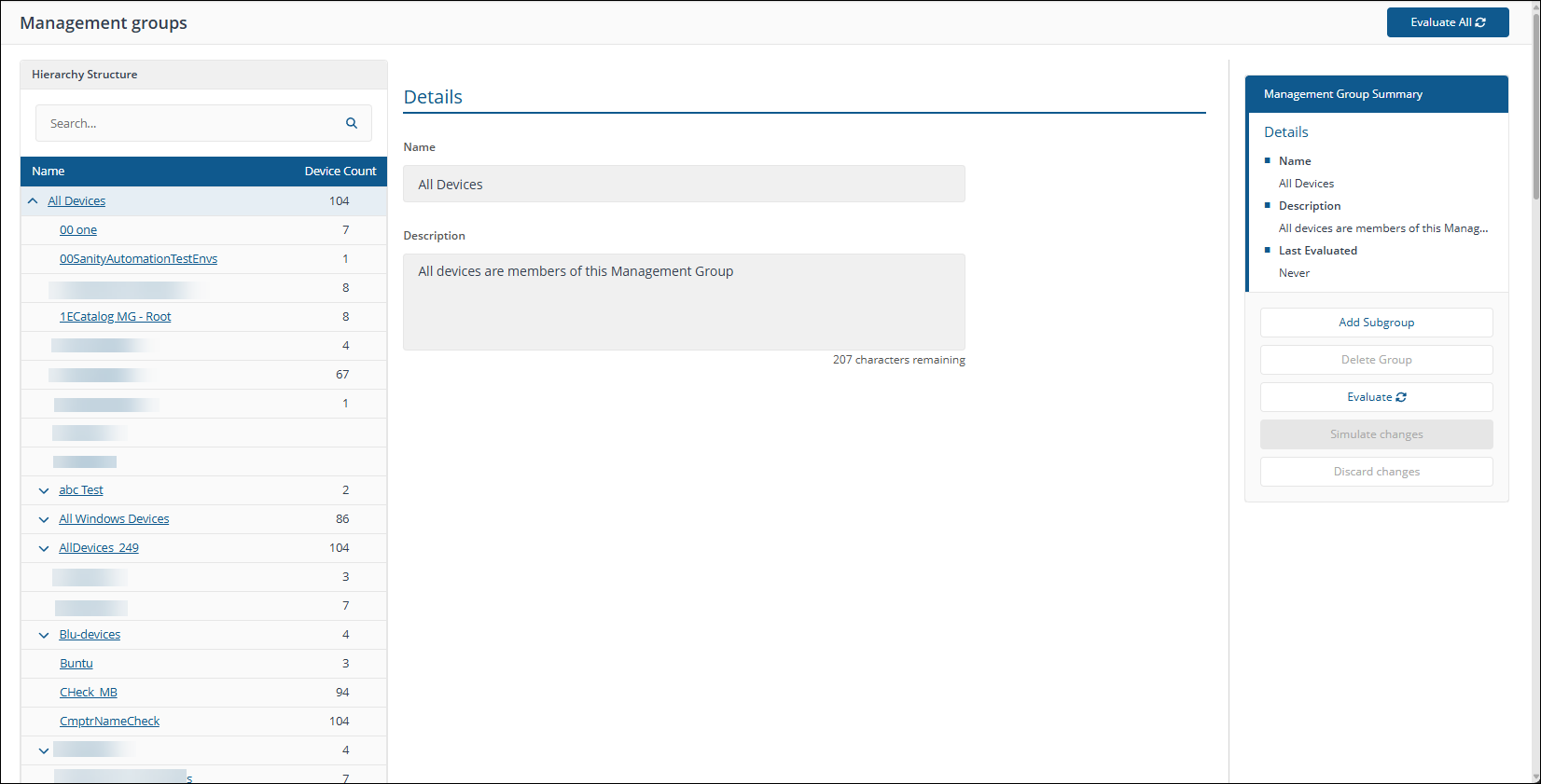
Management Groups are containers used to group devices and the software installed on those devices. Management Groups are defined using configurable rules that look at various properties of the devices and their installed software, these are then evaluated to determine the group membership. This means that Management Group membership adapts to changes to the devices and software in your environment. |
|||||||||||||||||||||||||||||||||||||||||||||||||||||||||||||||||||||||||||||||||||||||||||||||||||||||||||||||||||||
|
Management Groups selector |
Certain pages in AppClarity have a management groups selector. This drop-down lets you select the management group you are interested in. By default this is set to Global. |
|||||||||||||||||||||||||||||||||||||||||||||||||||||||||||||||||||||||||||||||||||||||||||||||||||||||||||||||||||||
|
Matched Title column |
On the reclaim policy pages, this displays the title for the product the reclaim policy will be aimed at. |
|||||||||||||||||||||||||||||||||||||||||||||||||||||||||||||||||||||||||||||||||||||||||||||||||||||||||||||||||||||
|
Matched Vendor column |
On the reclaim policy pages, this displays the vendor for the product the reclaim policy will be aimed at. |
|||||||||||||||||||||||||||||||||||||||||||||||||||||||||||||||||||||||||||||||||||||||||||||||||||||||||||||||||||||
|
Matching |
The process of taking software product, processor and device data and comparing that with the data held in the 1E Catalog to find a suitable canonical representation. If a completely suitable matching canonical representation is found the software product, processor and device data is said to be normalized. If a suitable matching canonical representation cannot be found the data will be tagged as unmatched and the 1E Catalog will make its best guess at what the canonical representation could be. You can then go through the curation process to either create a new canonical representation or matching rule or both until all the data you need has been normalized. |
|||||||||||||||||||||||||||||||||||||||||||||||||||||||||||||||||||||||||||||||||||||||||||||||||||||||||||||||||||||
|
Matching rules |
Matching rules are used to match raw and varied inventory data, which may be imprecise or incomplete, into normalized canonical representations. Software product, processor and device types each have their own canonical schema that enables them to be uniquely identified sufficient for the purposes of the 1E Catalog and its consumers. As a result each of them has a corresponding type of matching rule. |
|||||||||||||||||||||||||||||||||||||||||||||||||||||||||||||||||||||||||||||||||||||||||||||||||||||||||||||||||||||
|
Metric column |
The metric type for a license or maintenance entitlement. This may be one of:
|
|||||||||||||||||||||||||||||||||||||||||||||||||||||||||||||||||||||||||||||||||||||||||||||||||||||||||||||||||||||
|
Mnt Qty column |
The Mnt Qty column shows the number of maintenance licenses related to each Entitlement int the table. |
|||||||||||||||||||||||||||||||||||||||||||||||||||||||||||||||||||||||||||||||||||||||||||||||||||||||||||||||||||||
|
Non-Compliant column |
This column provides a count of the non-compliant installations for the product. |
|||||||||||||||||||||||||||||||||||||||||||||||||||||||||||||||||||||||||||||||||||||||||||||||||||||||||||||||||||||
|
Normalization |
The process of taking raw inventory data and successfully assigning canonical representations for the software products, processors and devices contained in that data by matching with the 1E Catalog. |
|||||||||||||||||||||||||||||||||||||||||||||||||||||||||||||||||||||||||||||||||||||||||||||||||||||||||||||||||||||
|
Other Metric |
A field in both the New License page and New Maintenance page. This field is only enabled if Other is selected in the Metric Type for entitlements and allows you to enter a metric that is not covered by the basic Metric Type options. |
|||||||||||||||||||||||||||||||||||||||||||||||||||||||||||||||||||||||||||||||||||||||||||||||||||||||||||||||||||||
|
Physical Host column |
The Physical Host, if any, where the software in the License Demand report is installed. |
|||||||||||||||||||||||||||||||||||||||||||||||||||||||||||||||||||||||||||||||||||||||||||||||||||||||||||||||||||||
|
Price per Unit (USD) column |
The Price per Unit (USD) shows the cost in USD for each license of a product. |
|||||||||||||||||||||||||||||||||||||||||||||||||||||||||||||||||||||||||||||||||||||||||||||||||||||||||||||||||||||
|
Primary User column |
This column displays the user name for the primary user on a device. |
|||||||||||||||||||||||||||||||||||||||||||||||||||||||||||||||||||||||||||||||||||||||||||||||||||||||||||||||||||||
|
Processor Value Unit (PVU) |
A license metric used for IBM products. This value is used by AppClarity to calculate license demand for IBM products. A Processor Value Unit (PVU) is a unit of measure used to differentiate licensing of software on distributed processor technologies (defined by Processor Vendor, Brand, Type and Model Number). IBM currently define a processor, for purposes of PVU-based licensing, to be each processor core on a chip (socket). |
|||||||||||||||||||||||||||||||||||||||||||||||||||||||||||||||||||||||||||||||||||||||||||||||||||||||||||||||||||||
|
Processors column |
Displays the number of processors available on the mainboard for the device where the software is installed. |
|||||||||||||||||||||||||||||||||||||||||||||||||||||||||||||||||||||||||||||||||||||||||||||||||||||||||||||||||||||
|
Product |
A product refers to an item that has a known vendor, title, version and edition (VTVE). In AppClarity this is restricted to software products. |
|||||||||||||||||||||||||||||||||||||||||||||||||||||||||||||||||||||||||||||||||||||||||||||||||||||||||||||||||||||
|
Product SKU column |
A SKU (pronounced 'skue') is an identification, usually alphanumeric, of a particular product that allows it to be tracked for inventory purposes. In AppClarity, via the 1E Catalog, a SKU is associated with the license metrics and use rights associated with a particular software product purchase. |
|||||||||||||||||||||||||||||||||||||||||||||||||||||||||||||||||||||||||||||||||||||||||||||||||||||||||||||||||||||
|
Quantity column |
The Quantity column displays the number of licenses covered by the entitlement. |
|||||||||||||||||||||||||||||||||||||||||||||||||||||||||||||||||||||||||||||||||||||||||||||||||||||||||||||||||||||
|
Rarely Used column |
The Rarely Used column shows the number of installations for each product that have been reported as being rarely used. |
|||||||||||||||||||||||||||||||||||||||||||||||||||||||||||||||||||||||||||||||||||||||||||||||||||||||||||||||||||||
|
Rarely Used Reclaim Action column |
Displays the action that will be taken by a reclaim policy for software with a usage category of rarely used. |
|||||||||||||||||||||||||||||||||||||||||||||||||||||||||||||||||||||||||||||||||||||||||||||||||||||||||||||||||||||
|
Reclaim Count column |
A count of the number of reclaims performed by applying this policy. |
|||||||||||||||||||||||||||||||||||||||||||||||||||||||||||||||||||||||||||||||||||||||||||||||||||||||||||||||||||||
|
Reclaim Policies column |
This column provides a count of the reclaim policies that have been associated with the product. If this number is greater than zero it becomes a link to the filtered to show the associated reclaim policies. |
|||||||||||||||||||||||||||||||||||||||||||||||||||||||||||||||||||||||||||||||||||||||||||||||||||||||||||||||||||||
|
Reclaim policy |
A reclaim policy is used to define how to reclaim specific software from specific devices under specific circumstances. There are two general types of reclaim possible: reclaims which are mandatory and reclaims where the user on the device can choose whether the reclaim goes ahead or not. Reclaim policies can also be tied to specific management groups to target specific devices. |
|||||||||||||||||||||||||||||||||||||||||||||||||||||||||||||||||||||||||||||||||||||||||||||||||||||||||||||||||||||
|
Reclaim Savings column |
The sum of the estimated savings made by applying this reclaim policy. |
|||||||||||||||||||||||||||||||||||||||||||||||||||||||||||||||||||||||||||||||||||||||||||||||||||||||||||||||||||||
|
Reclaimable toggle |
The Reclaimable toggle adds a filter when it's turned on that filters the table to only display the products that have a reclaim policy associated with them. |
|||||||||||||||||||||||||||||||||||||||||||||||||||||||||||||||||||||||||||||||||||||||||||||||||||||||||||||||||||||
|
Remaining column |
Shows the number of licenses remaining for a particular entitlement after subtracting the Consumed licenses consumed from the Total License Units. |
|||||||||||||||||||||||||||||||||||||||||||||||||||||||||||||||||||||||||||||||||||||||||||||||||||||||||||||||||||||
|
Renewal Due (In Days) chart |
This chart shows the number of entitlement renewals that are due within certain numbers of days in the selected Entitlements repository.
|
|||||||||||||||||||||||||||||||||||||||||||||||||||||||||||||||||||||||||||||||||||||||||||||||||||||||||||||||||||||
|
Report Refresh |
You can refresh reports from individual AppClarity screens as well as using the Settings App. Where this is available you can do this by using the refresh icon next to the Last Refreshed box:
|
|||||||||||||||||||||||||||||||||||||||||||||||||||||||||||||||||||||||||||||||||||||||||||||||||||||||||||||||||||||
|
Repository |
A repository is an SLA Platform term defining a container for specific types of data. There are three types of repository in AppClarity: Inventory (included with SLA Platform) Entitlement Compliance |
|||||||||||||||||||||||||||||||||||||||||||||||||||||||||||||||||||||||||||||||||||||||||||||||||||||||||||||||||||||
|
Risk (Unknown) column |
This column displays an indicator for the compliance risk associated with the product. This is based on whether there are certain aspects of the product that are unknown to AppClarity and therefore it cannot determine with certainty the product's compliance status. |
|||||||||||||||||||||||||||||||||||||||||||||||||||||||||||||||||||||||||||||||||||||||||||||||||||||||||||||||||||||
|
Selected Mgmt Grp Policies column |
The Selected Mgmt Grp Policies column shows the number of reclaim policies for a product in the currently selected Management Group. |
|||||||||||||||||||||||||||||||||||||||||||||||||||||||||||||||||||||||||||||||||||||||||||||||||||||||||||||||||||||
|
SAM manager |
The SAM manager ensures that the SAM team is properly managing their work priorities and creates, validates and distributes reports. |
|||||||||||||||||||||||||||||||||||||||||||||||||||||||||||||||||||||||||||||||||||||||||||||||||||||||||||||||||||||
|
SAM report viewer |
The SAM report viewer is a project manager, contract manager or team lead in the BU, who wants to know the costs of the entitlements used in their projects and to validate their compliance with licenses. |
|||||||||||||||||||||||||||||||||||||||||||||||||||||||||||||||||||||||||||||||||||||||||||||||||||||||||||||||||||||
|
SAM team |
The SAM team manage entitlement modifications as needed, based on the day-to-day business operations. |
|||||||||||||||||||||||||||||||||||||||||||||||||||||||||||||||||||||||||||||||||||||||||||||||||||||||||||||||||||||
|
SCALE |
The Agent Language. |
|||||||||||||||||||||||||||||||||||||||||||||||||||||||||||||||||||||||||||||||||||||||||||||||||||||||||||||||||||||
|
Software Asset Management (SAM) |
SAM is the process by which organizations collect data about entitlements, installation and usage of software and the devices the software runs on, how they use that data to ensure that the organization understands whether they are in compliance with their software licenses and if they are using their software assets efficiently. This data, and the tools used to manage the data, must be controlled and protected because the data is company confidential. |
|||||||||||||||||||||||||||||||||||||||||||||||||||||||||||||||||||||||||||||||||||||||||||||||||||||||||||||||||||||
|
Software with conflicting policies toggle |
The Software with conflicting policies toggle adds a filter when it's turned on that filters the table to only display the products that have reclaim policies that conflict. |
|||||||||||||||||||||||||||||||||||||||||||||||||||||||||||||||||||||||||||||||||||||||||||||||||||||||||||||||||||||
|
Select all button |
When AppClarity pages contain a Select all button this can be used to check all the checkboxes on the first column of a table, thereby selecting all the items currently displayed in the table. |
|||||||||||||||||||||||||||||||||||||||||||||||||||||||||||||||||||||||||||||||||||||||||||||||||||||||||||||||||||||
|
Site-defined entry |
Is an extension to the 1E catalog, which is a matching rule or canonical representation, added by a 1E Catalog curator using their on-site copy of the 1E Catalog. |
|||||||||||||||||||||||||||||||||||||||||||||||||||||||||||||||||||||||||||||||||||||||||||||||||||||||||||||||||||||
|
Sockets column |
Displays the number of processor sockets available on the mainboard for the device where the software is installed. |
|||||||||||||||||||||||||||||||||||||||||||||||||||||||||||||||||||||||||||||||||||||||||||||||||||||||||||||||||||||
|
Spend (%) column |
The Spend (%) column shows the percentage of the overall spend for each Entitlement in the selected Entitlement repository. The complete bar represents the overall spend, the blue bar indicates the % spend for this Entitlement and the grey bar shows the % remainder.
|
|||||||||||||||||||||||||||||||||||||||||||||||||||||||||||||||||||||||||||||||||||||||||||||||||||||||||||||||||||||
|
Start Date column |
The Start Date column shows the date the entitlement will start. |
|||||||||||||||||||||||||||||||||||||||||||||||||||||||||||||||||||||||||||||||||||||||||||||||||||||||||||||||||||||
|
Status column |
This displays the status for the reclaim policy.
|
|||||||||||||||||||||||||||||||||||||||||||||||||||||||||||||||||||||||||||||||||||||||||||||||||||||||||||||||||||||
|
Status filter |
The Status filters are displayed in the top-right of the page and let you filter the table according to the status of the items in the table.
Clicking on an icon filters the table to display only items with that status, as described in the following table.
|
|||||||||||||||||||||||||||||||||||||||||||||||||||||||||||||||||||||||||||||||||||||||||||||||||||||||||||||||||||||
|
Status icons |
The icon indicates the status of the entitlement or agreement:
|
|||||||||||||||||||||||||||||||||||||||||||||||||||||||||||||||||||||||||||||||||||||||||||||||||||||||||||||||||||||
|
Stock Keeping Unit (SKU) |
A SKU (pronounced 'skue') is an identification, usually alphanumeric, of a particular product that allows it to be tracked for inventory purposes. In AppClarity, via the 1E Catalog, a SKU is associated with the license metrics and use rights associated with a particular software product purchase. SKUs are in widespread use throughout the software industry, where publishers refer to their software using a SKU. The SKU gets added to most purchase orders to indicate the software or package being bought. Even small differences between two software titles are indicated by different SKUs. The SKU also indicates the license metrics and maintenance terms associated with the purchase and any additional use rights covered by the purchased license. AppClarity uses the SKU data to automatically: Prefill the settings in an entitlement with the product details, license metrics, and basic maintenance terms that are indicated by the SKU Set the additional use rights that are part of the license indicated by the SKU |
|||||||||||||||||||||||||||||||||||||||||||||||||||||||||||||||||||||||||||||||||||||||||||||||||||||||||||||||||||||
|
Title |
The title portion of the vendor, title, version and edition attributes that are used to identify software products. For example, Visio or Nomad. |
|||||||||||||||||||||||||||||||||||||||||||||||||||||||||||||||||||||||||||||||||||||||||||||||||||||||||||||||||||||
|
Title chart |
This chart shows the breakdown and numbers for the top 5 software Titles according to their total Entitlements costs in the selected Entitlements repository. |
|||||||||||||||||||||||||||||||||||||||||||||||||||||||||||||||||||||||||||||||||||||||||||||||||||||||||||||||||||||
|
Title column |
The Title column in AppClarity pages display information related to the vendor of a product. Depending on the context this may show different things: On entitlement pages this will show: The title portion of the vendor, title, version and edition attributes that are used to identify which software products the entitlement is for. For example, Visio or Nomad. |
|||||||||||||||||||||||||||||||||||||||||||||||||||||||||||||||||||||||||||||||||||||||||||||||||||||||||||||||||||||
|
Top 10 Saving Opportunities ($) chart |
This chart shows the top ten products that offer the best savings opportunities in USD. It is calculated by multiplying each product's unit price and the sum of unused and rarely used installations. The bar at the bottom shows the total opportunity in USD split into unused and rarely used installations. |
|||||||||||||||||||||||||||||||||||||||||||||||||||||||||||||||||||||||||||||||||||||||||||||||||||||||||||||||||||||
|
Top 5 Software Categories by Installs chart |
This chart shows the top five categories according to the numbers of installations. This chart disregards Operating Systems and Internet Browser categories. |
|||||||||||||||||||||||||||||||||||||||||||||||||||||||||||||||||||||||||||||||||||||||||||||||||||||||||||||||||||||
|
Total Consumed column |
Shows the number of licenses consumed by installations from the total available for this product. |
|||||||||||||||||||||||||||||||||||||||||||||||||||||||||||||||||||||||||||||||||||||||||||||||||||||||||||||||||||||
|
Total Cost column |
The Total Cost column displays the total cost for the number of licenses and maintenances covered by each entitlement in the table. |
|||||||||||||||||||||||||||||||||||||||||||||||||||||||||||||||||||||||||||||||||||||||||||||||||||||||||||||||||||||
|
Total Devices column |
This column provides a total count of the devices where the product is installed. This may be different from the Total Installs column as some software may be installed more than once on a device. |
|||||||||||||||||||||||||||||||||||||||||||||||||||||||||||||||||||||||||||||||||||||||||||||||||||||||||||||||||||||
|
Total Installs column |
This column provides a total count of the installations for the product. This may be different from the Total Devices column as some software, such as Microsoft SQL Server, may be installed more than once on a device. The Total Installs column shows the total number of installations for each product. |
|||||||||||||||||||||||||||||||||||||||||||||||||||||||||||||||||||||||||||||||||||||||||||||||||||||||||||||||||||||
|
Total License Available column |
Shows the total number of licenses available for this product from all the entitlements related to it. |
|||||||||||||||||||||||||||||||||||||||||||||||||||||||||||||||||||||||||||||||||||||||||||||||||||||||||||||||||||||
|
Total License Units column |
Shows the total number of licenses units available from an entitlement. |
|||||||||||||||||||||||||||||||||||||||||||||||||||||||||||||||||||||||||||||||||||||||||||||||||||||||||||||||||||||
|
Total Licensed Units column |
Shows the total number of license units available from entitlements related to the product. |
|||||||||||||||||||||||||||||||||||||||||||||||||||||||||||||||||||||||||||||||||||||||||||||||||||||||||||||||||||||
|
Total Units Consumed column |
Shows the total number of available license units that have been consumed by product installations. |
|||||||||||||||||||||||||||||||||||||||||||||||||||||||||||||||||||||||||||||||||||||||||||||||||||||||||||||||||||||
|
Total Users column |
This column provides the total users accessing the software across all these devices. |
|||||||||||||||||||||||||||||||||||||||||||||||||||||||||||||||||||||||||||||||||||||||||||||||||||||||||||||||||||||
|
Type column |
The Type column displays the type of the entitlement in the table. This can be either License or Maintenance. |
|||||||||||||||||||||||||||||||||||||||||||||||||||||||||||||||||||||||||||||||||||||||||||||||||||||||||||||||||||||
|
Underutilized Installs column |
This column provides a count of the installations for the product where the product is rarely used or unused. |
|||||||||||||||||||||||||||||||||||||||||||||||||||||||||||||||||||||||||||||||||||||||||||||||||||||||||||||||||||||
|
Unknown Installs column |
This column provides a count of the installations for the software titles that are part of the License Demand report where there are details that are unknown, thereby implying a risk for compliance calculation. |
|||||||||||||||||||||||||||||||||||||||||||||||||||||||||||||||||||||||||||||||||||||||||||||||||||||||||||||||||||||
|
Unreported column |
The Unreported column shows the number of installations for each product where no recent usage data has been reported. |
|||||||||||||||||||||||||||||||||||||||||||||||||||||||||||||||||||||||||||||||||||||||||||||||||||||||||||||||||||||
|
Unreported Reclaim Action column |
Displays the action that will be taken by a reclaim policy for software with a usage category of unreported. |
|||||||||||||||||||||||||||||||||||||||||||||||||||||||||||||||||||||||||||||||||||||||||||||||||||||||||||||||||||||
|
Unselect all button |
When AppClarity pages contain an Unselect all button this can be used to uncheck all the checkboxes on the first column of a table, thereby unselecting all the items currently displayed in the table. |
|||||||||||||||||||||||||||||||||||||||||||||||||||||||||||||||||||||||||||||||||||||||||||||||||||||||||||||||||||||
|
Unused column |
The Unused column shows the number of installations for each product that have been reported as not being used. |
|||||||||||||||||||||||||||||||||||||||||||||||||||||||||||||||||||||||||||||||||||||||||||||||||||||||||||||||||||||
|
Unused Reclaim Action column |
Displays the action that will be taken by a reclaim policy for software with a usage category of unused. |
|||||||||||||||||||||||||||||||||||||||||||||||||||||||||||||||||||||||||||||||||||||||||||||||||||||||||||||||||||||
|
Usage categories |
There are four usage categories: used, rarely used, unused and unreported. Usage categories: Device Inventory Date = maximum of device inventory dates for the consolidated device Last Usage Date = maximum of product usage date for the consolidated installation End of Sync Date = maximum of device inventory dates and maximum usage dates excluding dates in the future
|
|||||||||||||||||||||||||||||||||||||||||||||||||||||||||||||||||||||||||||||||||||||||||||||||||||||||||||||||||||||
|
Usage Category chart |
This chart shows the distribution of installations into the three usage categories: User, Rarely Used and Unused as a percentage of the total installations that reported usage. The bar at the bottom shows the number of installations with reported versus unreported usage as a percentage of the total number of installations. |
|||||||||||||||||||||||||||||||||||||||||||||||||||||||||||||||||||||||||||||||||||||||||||||||||||||||||||||||||||||
|
Used column |
The Used column shows the number of installations for each product that have been reported as being used. |
|||||||||||||||||||||||||||||||||||||||||||||||||||||||||||||||||||||||||||||||||||||||||||||||||||||||||||||||||||||
|
Used Reclaim Action column |
Displays the action that will be taken by a reclaim policy for software with a usage category of used. |
|||||||||||||||||||||||||||||||||||||||||||||||||||||||||||||||||||||||||||||||||||||||||||||||||||||||||||||||||||||
|
Vendor |
The vendor portion of the vendor, title, version and edition attributes that are used to identify software products. For example, Microsoft Corporation or 1E. |
|||||||||||||||||||||||||||||||||||||||||||||||||||||||||||||||||||||||||||||||||||||||||||||||||||||||||||||||||||||
|
Vendor chart |
This chart shows the breakdown and numbers for the top 5 Vendors according to their total Entitlements costs in the selected Entitlements repository. |
|||||||||||||||||||||||||||||||||||||||||||||||||||||||||||||||||||||||||||||||||||||||||||||||||||||||||||||||||||||
|
Vendor column |
The Vendor column in AppClarity pages display information related to the vendor of a product. |
|||||||||||||||||||||||||||||||||||||||||||||||||||||||||||||||||||||||||||||||||||||||||||||||||||||||||||||||||||||
|
Vendor, title, version and edition |
The vendor, title, version and edition attributes are used to identify software products and to determine whether specific installations are related to that product. |
|||||||||||||||||||||||||||||||||||||||||||||||||||||||||||||||||||||||||||||||||||||||||||||||||||||||||||||||||||||
|
Version |
The version portion of the vendor, title, version and edition attributes that are used to identify software products. For example, 11.0.3216.5614 or 6.3.100.0. See also Colloquial version. |
|||||||||||||||||||||||||||||||||||||||||||||||||||||||||||||||||||||||||||||||||||||||||||||||||||||||||||||||||||||
|
Version column |
The version column in AppClarity pages display information related to the version of a product. Depending on the context this may show different things: On reclaim policy pages this will show: On reclaim policy pages the version column shows the version string set for the policy. This may display a single version. On the Precedence page this will show: The version portion of the vendor, title, version and edition attributes for the product that the reclaim policy applies to. On the Reclaim History page this will show: The version portion of the vendor, title, version and edition attributes that are used to identify which software product the reclaim policy was applied to. |
|||||||||||||||||||||||||||||||||||||||||||||||||||||||||||||||||||||||||||||||||||||||||||||||||||||||||||||||||||||
|
VTVE |
An AppClarity abbreviation for the vendor, title, version and edition of a software product. |


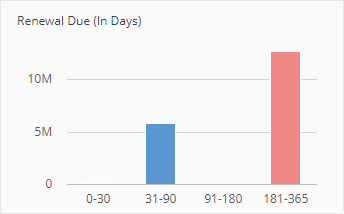




 Dashboards glossary
A glossary of Dashboards terminology.
|
Term |
Definition |
|---|---|
|
1E Labs |
1E Labs highlights preview applications of features that are cutting edge in this version, giving you the opportunity to experience the benefits they offer and shape their development for future releases. |
|
Actions |
Part of the Total Operations counted by the Exec Dashboard and also plotted on its Operations chart. These relate to issues that have been resolved by running an Action. Actions are issues identified and resolved manually or scheduled. These are action instructions that have been run through Explorer, or any other app, but exclude actions run by ServiceNow ITSM and Virtual Assistant, and 1E Shopping. The statistics reported by Exec Dashboard include the number of action instructions that have been run. They do not include the number of questions. Although questions can be used to confirm an issue has been resolved, or used to identify an issue, it is an action that usually resolves the issue. This means the dashboard does not report on issues that were resolved outside of 1E, even if a question was used to identify the issue. |
|
DEX |
DEX, or Digital Experience, provides a way of measuring the wellbeing of an organization's employees regarding their experience of the devices they use and their contact with their IT department. |
|
DEX Score |
The DEX score in Exec Dashboard is a combination of these Stability, Performance, Responsiveness, and Sentiment scores, obtained from 1E Experience. The Score Trend chart shows data for selected score over the selected month. The above scores are a weighted combination of Experience metrics. The What's Changed popup shows the top and bottom 5 metrics that most significantly affected the selected month's DEX score. |
|
The number of issues fixed by ITSM, Virtual Agent, and Self Service. These are sum of actions instructions that have been run by ServiceNow and/or Shopping.
The current version of Exec Dashboard does not differentiate between actions run by the three ServiceNow apps (ITSM Connect, Virtual Agent and Service Catalog Connect) because they all use the same ServiceNow consumer. |
|
|
Exec Dashboard |
The Exec Dashboard is an overview page in the 1E Portal, mainly aimed at CIO executives, showing the benefits that 1E is providing and highlighting how the company has been performing in terms of DEX over the past few months. |
|
The number of issues fixed, either manually or by automation, and is the sum of the following:
|
|
|
ITSM actions |
ITSM actions are action instructions run by 1E ServiceNow 1E ITSM Connect |
|
ITSM, Virtual Agent & Self Service |
ITSM, Virtual Agent & Self Service is a combined number of the following:
The current version of Exec Dashboard does not differentiate between actions run by the three ServiceNow apps (ITSM Connect, Virtual Agent and Service Catalog Connect) because they all use the same ServiceNow consumer. |
|
The stacked bar chart shows the following detail for the selected month.
The current version of Exec Dashboard does not differentiate between actions run by the three ServiceNow apps (ITSM Connect, Virtual Agent and Service Catalog Connect) because they all use the same ServiceNow consumer. |
|
|
A sentiment survey that is optionally deployed using the sentiment feature of 1E Experience. |
|
|
Performance |
Performance is a score provided by 1E Experience. Refer to Score reference. The Performance score is derived from the scores of disk performance, CPU performance, and memory performance. |
|
Policy Fixes |
Part of the Total Operations counted by Exec Dashboard and also plotted on the Operations chart. Policy Fixes are issues resolved automatically by Guaranteed State policies |
|
Responsiveness |
Responsiveness is a score provided by 1E Experience. Refer to Score reference. The Responsiveness score is derived from the scores of Windows internals, system startup, and Windows UI. |
|
The Score Trend chart shows a trend for the selected score over the selected month, showing how the company is doing from a DEX perspective. You can hover over the chart, to see the score for a specific day of the month. Clicking on the What's Changed in DEX link displays details on the metrics that are reported on by 1E Experience have gone up or down in terms of their largest impact on DEX. |
|
|
Self Service actions |
Self Service actions are self-service requests made by end-users of:
The current version of Exec Dashboard does not differentiate between actions run by the three ServiceNow apps (ITSM Connect, Virtual Agent and Service Catalog Connect) because they all use the same ServiceNow consumer. |
|
Sentiment |
Sentiment is a score provided by the 1E Experience app. Refer to Score reference. The User sentiment score is derived from the responses to user and metric surveys. The score for the Perception of IT survey is included in the Sentiment score. |
|
Stability |
Stability is a score provided by the 1E Experience app. Refer to Score reference. The Stability score is derived from four scores based on the number of crashes and hangs for software and for the Operating System itself. |
|
Tachyon Managed Devices |
The number of devices managed by 1E. These are the devices where the installed 1E Client has contacted 1E Platform. The number on the dashboard is cached, but the cache is updated in real-time. It increases when new clients come online, and decreases when inactive clients are purged from the Tachyon Master database. |
|
Total Operations |
The sum of IT Operations and Employee Requests for the selected month. That is, the number of issues fixed either manually, by automation, ITSM actions, Virtual Agent actions, and Self Service actions.
The current version of Exec Dashboard does not differentiate between actions run by the three ServiceNow apps (ITSM Connect, Virtual Agent and Service Catalog Connect) because they all use the same ServiceNow consumer. |
|
Virtual Agent actions |
Virtual Agent actions are action instructions run by chatbots, for example the 1E ServiceNow app 1E Virtual Assistant. |
|
What's Changed in DEX |
The Score Trend: DEX chart includes a link What's Changed in DEX. The link displays details on the metrics that are reported on by 1E Experience, showing 5 that have gone up, and 5 that have gone down, in terms of their largest impact on DEX. |
Experience glossary
A glossary of 1E Experience Analytics terminology.
|
Term |
Definition |
||||||||||||||||||
|---|---|---|---|---|---|---|---|---|---|---|---|---|---|---|---|---|---|---|---|
|
Algorithms |
1E Experience Analytics uses the following algorithms to derive a score for that metric.
|
||||||||||||||||||
|
Categories |
Experience uses four categories to calculate the overall Experience Score.
|
||||||||||||||||||
|
Categories page |
The Categories page shows a dashboard of the scores from each of the four categories: |
||||||||||||||||||
|
Daily Digest |
Some metrics for Experience are collected as daily summaries. These are sent to the Tachyon Switch each night at midnight. If the 1E Client cannot contact the server at midnight the daily digest data is saved at the device and is sent to the server the next time the server can be contacted. In this version, there is not the ability to force the 1E Client to send the information outside of the nightly cycle. The data that is collected in the daily digest is:
|
||||||||||||||||||
|
Device Criticality |
Using Device Criticality Assigning Criticality to devices according to their importance within your organization. |
||||||||||||||||||
|
Devices page |
The Devices page provides a list of all devices visible to Tachyon Experience. You can see all of their Experience, Stability, Performance and Responsiveness statistics and sort them accordingly. |
||||||||||||||||||
|
Experience Score |
The Experience Score is an overall number that represents the user experience of a given device. It is a total of weighted scores in the four categories - Performance, Stability, Responsiveness, and User Sentiment. The total possible score overall or in any given category is 100. |
||||||||||||||||||
|
Filters bar |
The Filters bar appears at the top of most of the pages in Experience. Each section in the Filters bar allows a user to quickly and easily filter based on different categories. When a filter is set it applies to all the tiles on the page. On the Stability, Responsiveness, Performance and Sentiment pages there is also a Break Down By selector that reconfigures the charts to show the data divided up into the selected category. On the Overview, Categories, Devices, and Software pages there is no option for Break Down By. On the Users and Surveys pages the Filters bar is not available. |
||||||||||||||||||
|
Grading |
Experience scores are divided into one of five gradings.
|
||||||||||||||||||
|
Location |
Tachyon Explorer allows you to use Location when defining coverage for an instruction. For example, you can choose to target an instruction to be sent only to devices whose location has been set. |
||||||||||||||||||
|
Metrics |
Metrics are the datasets that are collected by the 1E Client and sent up the Tachyon server daily. Metrics are either Raw or Aggregate. Raw metrics have a scoring algorithm applied to them to derive a score. |
||||||||||||||||||
|
Management Groups |
Management Groups page Management Groups are containers used to group devices and the software installed on those devices. Management Groups are defined using configurable rules that look at various properties of the devices and their installed software, these are then evaluated to determine the group membership. This means that Management Group membership adapts to changes to the devices and software in your environment.
|
||||||||||||||||||
|
Overview page |
The Overview page is the starting place for any Tachyon Experience journey. Here you can get immediate answers to how your enterprise is performing from an end-user perspective and you can drill-down to get details on specific problem areas and find routes to immediate resolutions. Your key indicator is the Experience - Latest Score chart, which gives your enterprise a score out of 100 based on a combination of measured events and user surveys. The closer you are to 100 the better the IT experience your end-users are having. The Experience - Latest Grading chart provides a breakdown of the experience score showing how many devices and users fall into each of the five experience grades - ranging from Very Good to Very Poor. This helps interpret the experience score and see how it maps onto end-user experiences. The Experience - What's Changed (last 7 days) chart provides an overview of the significant changes, good or bad, that have occurred during the past week. Finally you can use the Experience - Trend chart to check how well your enterprise is performing over time in terms of how your end-users see it. You could use this chart to help gauge progress on any improvement programs you might have put in place or act as an advanced warning that there are underlying issues that are affecting your end-users and need resolving. |
||||||||||||||||||
|
Performance page |
The performance score is derived by measuring the performance of the device using the Windows Performance Counters. These counters measure many data points on the device including CPU usage, disk usage, memory usage, and processes. The page allows you to drill into the Latest Score tile to see the different metrics that are collected. For information on the makeup of the score see below. |
||||||||||||||||||
|
Performance Score |
The Performance score is derived from the scores of disk performance, CPU performance, and memory performance. |
||||||||||||||||||
|
Responsiveness page |
The responsiveness score is derived by measuring how well Windows application perform during our "Synthetic micro-transactions". The successful and timely operation of Windows and Windows applications is key to a positive user experience on that device. The page allows you to drill into the Latest Score tile to see the different metrics that are collected. For information on the makeup of the score see Responsiveness Score below. |
||||||||||||||||||
|
The Responsiveness score is derived from the scores of Windows internals, system startup, and Windows UI. |
|||||||||||||||||||
|
Scores |
The Experience Score is an overall number that represents the user experience of a given device. It is a total of weighted scores in the four categories - Performance, Stability, Responsiveness, and User Sentiment. The total possible score overall or in any given category is 100. |
||||||||||||||||||
|
Software page |
The Software page provides a tabular listing of all the Software products that are installed in the environment (including executable, version, architecture). The second set of columns in the list provide additional metrics or event details associated with the Software products. |
||||||||||||||||||
|
Stability page |
The stability score is derived by measuring the "crashiness" of applications and the operating system of a device. The different types of crashes have a differing impact on the score, based on the amount of impact on the end-user. An application crash is annoying but the crash of the entire operating system could cause data loss so has more weight on the score. The page allows you to drill into the tiles to see the different metrics that are collected. For information on the makeup of the score see Stability Score below. |
||||||||||||||||||
|
The Stability score is derived from four scores based on the number of crashes and hangs for software and for the Operating System itself. |
|||||||||||||||||||
|
Tile buttons |
The Stability, Responsiveness, Performance, and User Experience pages all have a set of tiles that allow navigation or a change of view. |