OpenLM connector
 |
|  |
| 
The OpenLM connector connects to an OpenLM database server.
The OpenLM connector is a preview feature to demonstrate how 1E can collect license data from OpenLM. Currently, the collected data can be viewed only by using SQL queries and cannot be viewed in the 1E Platform or its consumer applications.
Prerequisites
Before adding this connector, you will need the following:
-
OpenLM Server version 21.12
-
OpenLM identity service enabled
-
Username and password with access to OpenLM
-
Client ID and secret pair
Adding the connector
-
Navigate to Settings > Configuration > Connectors.
-
Click Add.
-
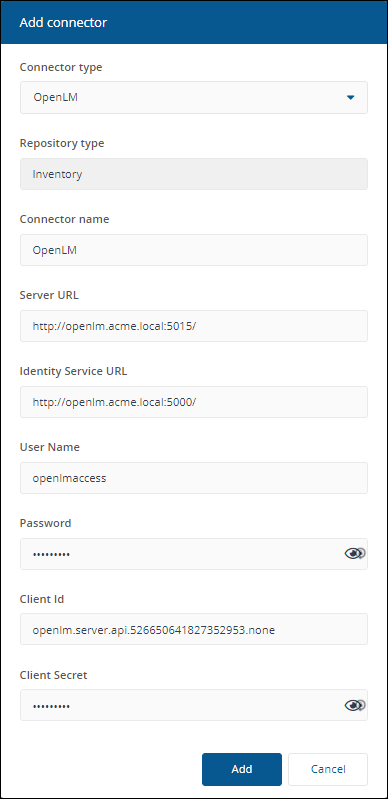
In the Add Connector pop-up window, select OpenLM as the connector type.
-
In Connector name, enter a logical name for this connector.
Use a naming convention for connector names, for example, <connector type> <scope> <RCR>. Scope describes where data is coming from or what it's being used for, for example, Demo, Test, Lab, Q2 Audit. Include RCR in the name if the Run Consolidation Reports option is available and you have enabled it.
-
In Server URL, enter the URL of the OpenLM Server, including port. For example, http://openlm.acme.local:5015/.
-
In Identity Service URL, enter the URL of the OpenLM Identity Service, including port. For example, http://openlm.acme.local:5000/.
-
In User Name, enter an OpenLM username that already exists in your OpenLM system.
-
In Password, enter the password associated with the OpenLM username.
-
In Client Id, enter the Client Id.
-
In Client Secret, enter the Client Secret.
-
Click Add.
For information on how to test or delete a connector, and how to sync data into a repository, refer to Connectors page.