Architectural requirements


Review architectural requirements for the TeamViewer DEX Platform, including infrastructure prerequisites, design considerations, and dependencies for a scalable deployment.
This documentation covers installation on-premises and on your own cloud-based servers. Alternatively, you use our SaaS solution and avoid having to install and maintain servers.
For assistance, contact your Professional Services representative or Customer Success contact.
You need to decide which architecture your Platform system will use, and which configuration options. Your architectural decisions will include the types of Platform servers you will need, and how many, as well as how you will provide SQL services. SQL Server can be local or remote from your Platform servers.
The Platform supports the following High Availability (HA) options for SQL Server:
-
AlwaysOn Availability Group (AG) using an AG Listener.
-
Failover Cluster Instance (FCI).
1E Server setup is a configuration wizard which must be run on each server in your architecture, to install the required components. Server Setup supports the following:
-
All components on a single server: A single-server installation comprises Master Stack and Response Stack, which is the most common choice for a system of any size supporting Platform real-time features.
-
Master Stack: You would install a Master Stack on its own if you do not require real-time features, or you want one or more remote Response Stacks.
-
Response Stack: This choice allows you to install a Response Stack after you have completed a single-server installation or installed a Master Stack, and is required to support Platform real-time features.
-
DMZ Server: This choice is used on when installing a DMZ Server to provide real-time features for Internet-facing clients. For design and configuration steps, refer to Implementing a 1E DMZ Server.
The Platform can be installed on-premises on physical and virtual servers, and also on AWS and Azure cloud servers.
The number of devices you need to support influences the number of Switches and Response Stacks you will need, and their server specifications. Each Switch can handle up to 50000 devices, and you can have up to five Switches on a single Response Stack server, handling a maximum of 250000 devices.
Multiple Response Stacks provide a degree of high availability, but are not intended for that purpose. Instead, Response Stacks are required for security, geographic or other network reasons. For example, because your organization covers multiple geographies and you do not want 1E Client traffic to go beyond the boundaries of each region, or because you have Internet-facing devices and need a DMZ Server on-premises.
 Platform Architecture
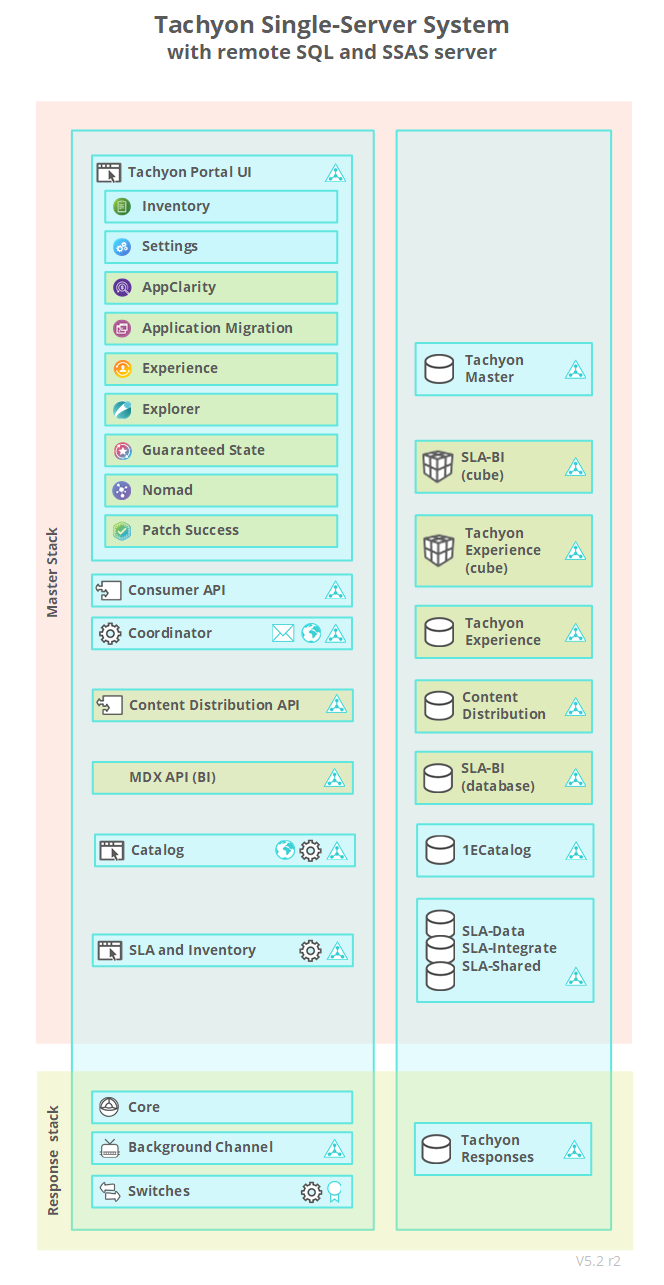
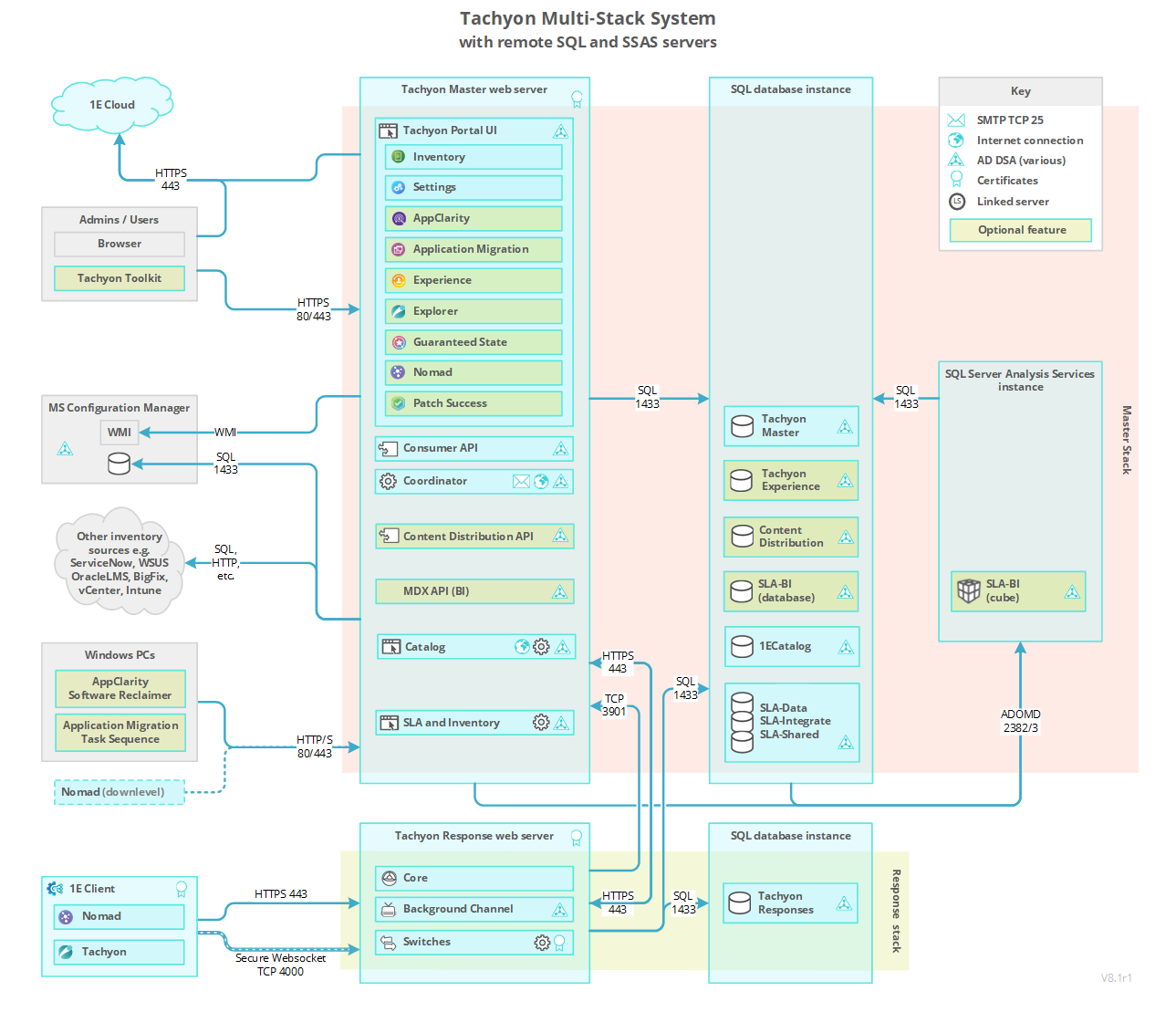
The pictures in the following sections show the most common architectural implementations of the Platform that are supported by Platform Setup. Organizations with less than 50000 devices will typically have a single-server system with one Switch, but there may be reasons why a more complex configuration would be required. Key factors are the location of servers and how devices and users will connect to them.
Every Platform system has a single Master Stack, which provides web services for Platform applications. Master Stack components are typically all installed on a single Master Server.
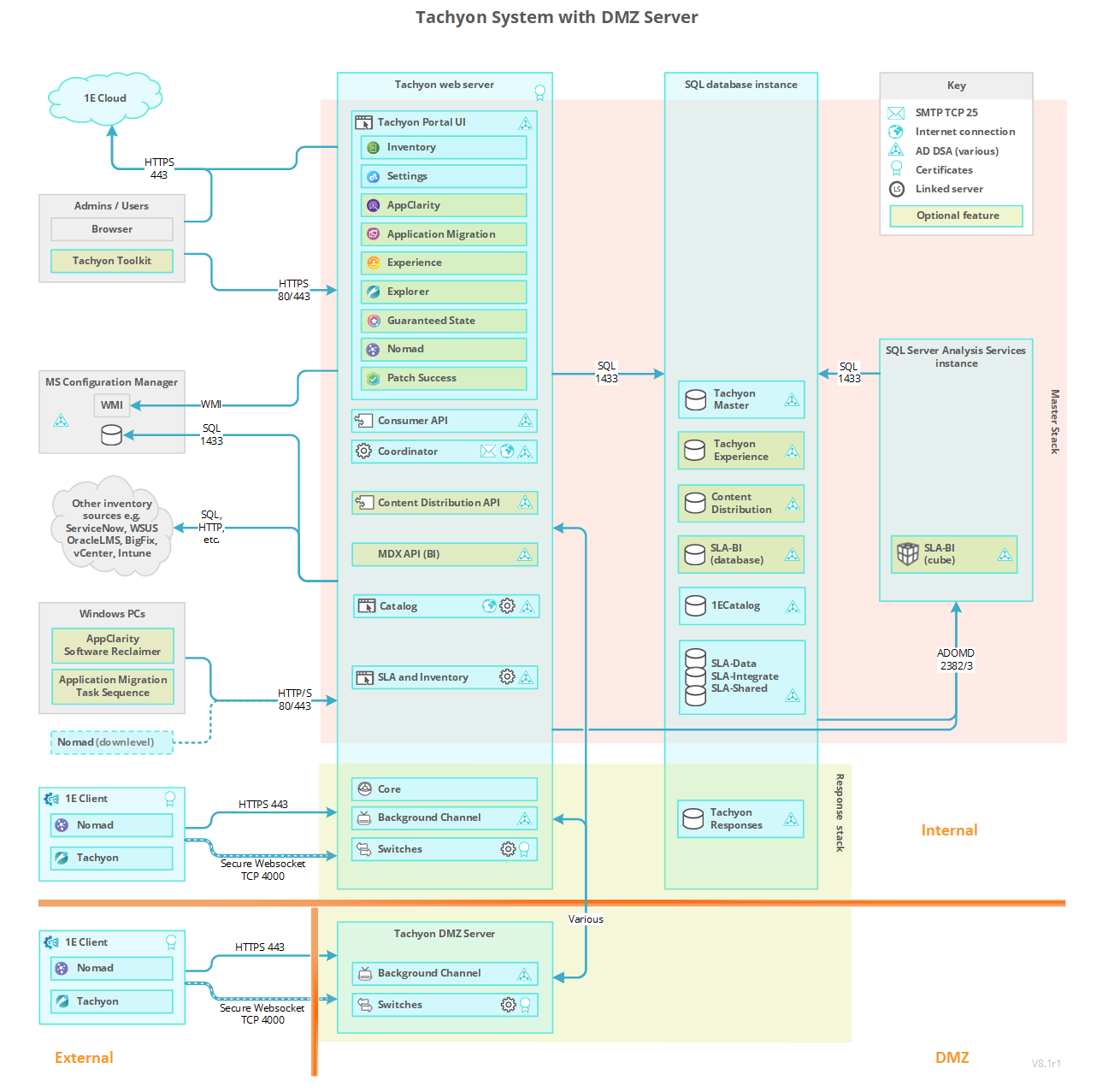
Platform real-time features require Response Stacks, which are made up of one or more Response Servers. A DMZ Server is an example of a Response Server. Each Response Stack has at least one Background Channel for sharing resources, and a single Core component that supports an associated set of up to five Switches. Switches are the primary mechanism for rapidly requesting and retrieving responses from the clients. As each Switch can handle up to 50,000 devices there is a limit of 250,000 devices per Response Stack. Higher numbers can be achieved if you contact your customer success representative for guidance. Switches may be local or remote to the other components in the Response Stack.
Databases for the Platform, Catalog, Content Distribution, Experience Analytics, SLA and BI, are installed on SQL Server database instance(s) that may also be local or remote to their respective Master and Response servers. It is also possible for multiple Response Stacks to share the same Responses database. The Cube used by Patch Success (SLA-BI) is installed on a local or remote SQL Server Analysis Services (SSAS) instance.
The pictures of the single-server and internet-facing configurations each show a system with a single Response Stack. The internet-facing system is special because the components of its Response Stack are split over two servers. Splitting a stack across multiple servers is not usually necessary except in special circumstances, for example the Switch and Background Channel on a DMZ Server is remote from its Core. The DMZ picture shows a dual firewall design, but single firewall is also supported.
The databases for Master and Response Stacks can exist on local or remote installations of SQL Server. Local is the simplest implementation. A local Responses database offers the best performance, whereas a remote Responses database requires an additional network interface and network routing explained in Network requirements. For an explanation, refer to Platform components.
Click on a link to take you to the relevant part of the Platform architecture page for more detail along with a description of the various components. Components colored green are optional when installing a Platform system.
Platform configuration options
1E Server setup has several standard options described above. There is also a custom installation option to support different configurations to those described. SQL Cluster and SQL Always On are supported, but require additional steps, refer to High Availability options for SQL Server.
For assistance, contact your Professional Services representative or Customer Success contact.
Platform architecture for Internet-facing devices
Business Intelligence
Business Intelligence is an optional component installed by Platform Setup on the Master Stack, and requires SQL Server Analysis Services (SSAS). Business Intelligence is a prerequisite for the Patch Success application to support efficient presentation of visualizations on a large scale.
Applications and tools
Platform applications and tools are consumers, and all consumers connect to the Platform Consumer API. The following consumer applications run on the Platform and are installed using 1E Server setup, refer to the License requirements page.
Applications are categorized as follows:
-
Configuration: Applications required to configure Platform and required by all other applications.
-
Client: Applications that communicate with devices in real-time.
-
Inventory: Applications that use inventory features.
Applications included in the Platform license:
|
Application |
Purpose |
Type |
|---|---|---|
|
|
|
Inventory, configuration |
|
Configuration |
|
|
Client |
|
|
Client |
Applications that require a license:
|
Application |
Purpose |
Type |
|---|---|---|
|
Inventory |
|
|
Inventory |
|
|
Client |
|
|
Inventory |
|
|
Client |
The following types of application require 1E Client (with Platform features enabled) to be deployed to all in-scope devices.
-
All Client applications.
-
Inventory applications if you intend using the Platform connector to populate your inventory.
Auto-curation
The AI Powered Auto-curation feature is optionally used by Inventory applications to provide automatic curation of new products. This avoids having to manually add products to the Catalog, or wait for it be updated. This optional feature requires additional memory on the Platform Server (Master Stack), refer to Memory requirements table.
Some benefits of using AI Powered Auto-curation are that you can:
-
Achieve significantly more normalized software from the first sync.
-
Reduce the manual effort required to normalize software.
-
Get an expanded SAM offering as more data is available for AppClarity.
-
Get additional coverage for Application Migration.
-
Identify more software to review for security threats.
Platform tools
The following are tools included in the Platform. These tools are not installed using Platform Setup. They have either their own installers or are included in download zips.
-
1E ConfigMgr UI Extensions: Installed as part of the Platform Toolkit, this is a right-click extension for the Configuration Manager console that provides the option to browse and run an instruction on devices in a specified Collection, refer to Preparing ConfigMgr extensions for Endpoint Troubleshooting.
-
1E Run Instruction command-line too: Installed as part of the Platform Toolkit, it is used for sending instructions to the Platform server from a script or from a command prompt.
-
1E product pack deployment tool: Included in the Platform zip.
-
TIMS: Used for the development of instructions using the SDK, refer to Writing instructions > Getting started with TIMS > About TIMS in the PDF version of the SDK documentation.
A typical Platform license allows the use of all these tools.
Telemetry
Telemetry helps to continually improve your experience with the Platform. Only summarized statistical information is collected, which enables TeamViewer to see how customers use features of the application. No personally identifiable data is collected. This information is used to:
-
Understand how the product is being used to influence future development decisions.
-
Plan supported platforms (OS, SQL etc. versions) over time.
-
Deliver a smooth upgrade experience as we can focus testing on implemented scenarios.
-
Improve system performance.
-
Identify early warning signs of potential issues such as excessive growth of database tables, instruction failures etc. so we can pro-actively address them.
Server telemetry reports how the platform is used and data is compressed, encrypted and sent through email on a configurable schedule. Full details of the Server telemetry data sent is provided in Server telemetry data. User Interface telemetry reports how the user interface is used, and data is sent directly from administrator browsers to the Platform Cloud, refer to Whitelisting connections to 1E Cloud
Telemetry features are configurable using Platform Server Setup during installation or upgrade, and can be enabled or disabled as a post-installation task. TeamViewer encourages customers to enable sending telemetry, refer to Enabling or disabling Telemetry features.
Server sizing requirements
There are many possible hardware server configurations, or cloud instance types and storage options, that customers can choose from, but the aim of this document is to recommend prescriptive guidance, and detailed configuration of the best performant implementation that customers, of varying client count sizes, should use to implement the Platform. This document focuses heavily on the SQL Server implementation and required storage, as this is singly the most performance demanding component of the system.
The default configuration assumes, and recommends, a single server and a separate remote SQL Server in a standard two server setup. There are sections for additional and complex implementations for separate Switch and Background Channels servers (DMZ), plus the extreme scenario where multiple servers in a split, Response and Master Stack server configurations could be deployed, depending on the specific requirements for larger customers, for reasons of scale and higher availability.
Assumptions
The key assumption in this document for sizing guidelines is that the customer is using all components of the Platform, that is, Endpoint Troubleshooting, Endpoint Automation, Experience Analytics, Patch Insights, Inventory Insights, and Content Distribution. The sizing guidelines are based on extensive testing of all components of the Platform, at different client count scales, using representative test data to simulate typical customer environments and their administrative and reporting usage.
Therefore, the following sizing guidelines should be used as the minimum hardware requirements for the specific numbers of managed clients in the respective size environments:
-
In terms of CPUs, the test environment used Intel Xeon E5-2687 v3 @3.1Hz, though any server-level CPU from 2016 should meet the performance needs for the cores specified in the following tables. Additional or newer and faster speed CPUs will improve performance, and the Platform will SQL Server will utilize all the CPU resources available.
-
In terms of data sizing, actual customer data and individual requirements will vary greatly. The data sizing is provided only as general guidance and assumes that some amount of storage will remain as free space, most of the time, when not at peak loads.
Performance load modelling
To simulate 100,000s of actual 1E Clients, TeamViewer developed a Load Generation tool (loadgen) that maintains the same number of persistent connections and can respond with the same data responses as would actual real-world clients.
In reality, loadgen generates more data and creates greater data storms at the Platform servers than, offline and latent 1E Client responses would generate, so can be considered as producing a more extreme and worst-case scenario performance loads on the Platform servers.
Assumptions used when creating the sizing guide:
|
Component |
Feature |
Assumptions |
|---|---|---|
|
Endpoint Troubleshooting |
Instructions |
|
|
Endpoint Automation |
Policies |
|
|
Experience Analytics |
Events and metrics |
|
|
Inventory Insights (also known as SLA) |
Hardware and software inventory |
|
|
Patch Insights |
Patch data |
|
|
Content Distribution |
Downloads |
|
An overall assumption is that long duration and high impact batch processing operations, such as SLA inventory sync consolidations and Experience Analytics sync processing, are run primarily out of business hours (typically overnight) when there would be little potential impact on other traffic and administrative interactive query and analytical reporting.
Using AI Powered Auto Curation with SLA Inventory Sync
Additional RAM is required if this feature is enabled, based on the total number of distinct software titles found in a specific customer environment, refer to AI Powered Auto-curation, which explains how to calculate the memory requirements. You must then add this to the figures in the following sizing tables.
On-premises installation
The Platform is recommended to be installed on a dedicated server, with a separate dedicated SQL Server, and can be installed on either virtual server or physical hardware.
For every 50,000 clients, the Platform requires a separate instance of the Switch component, which requires a dedicated Network Interface (NIC) for each switch instance. In a virtualized environment, this should a dedicated vNIC that preferably maps to a dedicated physical NIC, on the host.
The Platform is a high-intensity database application and so requires a highly performant Microsoft SQL Server setup, with fast storage, and this is the most important component to size correctly. Storage could be presented locally, but it is expected that the more likely scenario is that this is presented from a customer Enterprise Storage Area Network (SAN), or cloud-based managed storage.
As per Microsoft SQL Server best practice, it is recommended to provision at least three separate disk volumes for SQL Data, Logs, and TempDB. These volumes may be made up from multiple dedicated disks, striped in a RAID Volume for both resilience and performance, for example RAID 10, depending on the standard operational configuration of the customer’s on-premises storage sub-systems.
Data and log drives disk volumes should be formatted to use 64 KB allocation unit size. It is assumed the customer is using fast SSD based storage to achieve the necessary disk throughput in MB/s and IOPS, at least 6Gb/s SATA, but preferably 12Gb/s SAS or NVMe drives at higher scale.
Microsoft SQL Server should be configured according to the Microsoft best practice documentation. The default installation of SQL Server 2017 or later, will make automatic configuration settings for memory, TempDB, and processing parallelism. However, the best single index to overall Microsoft recommendations for SQL Server can be found at Performance Center for SQL Server Database Engine and Azure SQL Database.
One setting to make over and above the SQL Server installation defaults is to set Maximum SQL Server Memory to a value that reserves some memory at the server for the Operating System itself, and any additional running processes. A reasonable rule of thumb to use, for a dedicated SQL Server configuration as defined in the following server tables, would be to set Maximum SQL Server Memory to 85% of total memory of the server.
Cloud based SQL Database deployment templates, may configure most, but not all, memory optimizations automatically, but some of the key recommendations to note, are as follows.
-
Server memory configuration options, refer to Server memory configuration options.
-
Configure the max degree of parallelism Server Configuration Option, refer to Server configuration: max degree of parallelism.
-
optimize for ad hoc workloads server configuration option, refer to optimize for ad hoc workloads (server configuration option)
In addition, it is essential that a Backup and Maintenance strategy of SQL server must be defined, and backup and maintenance jobs configured accordingly. These must be run during low peak hours or when server is not in use (such as over-night or weekends) and should include the following.
-
At least weekly full backups and then daily differentials, as required.
-
Daily Update statistics job and weekly Rebuild index followed by DBCC Checkdb.
Small server sizing (<10K clients, on-premises and cloud)
For small systems with less than 10,000 seat counts and Proof-of-Concept installations, it is allowable for simplicity for all the server components and SQL Server to be installed onto a single server - though it should be noted that this may mean higher SQL per core licensing costs than a split two server installation. In a single server, as per Microsoft SQL Server best practice, it is still recommended to have a minimum of 3 separate disks (OS Drive, SQL DB and Logs, and TempDB) to gain optimum disk performance.
VM and storage sizing for both on-premises and cloud platforms:
|
Platform |
On-Premises |
Microsoft Azure |
Amazon AWS |
|---|---|---|---|
|
Devices |
Up to 10,000 |
Up to 10,000 |
Up to 10,000 |
|
Server Type |
Physical or Virtual |
Standard E4ds v4 |
R5.xlarge |
|
CPU Cores |
4 |
4 |
4 |
|
RAM |
32 GB |
32 GB |
32 GB |
|
Switches |
1 |
1 |
1 |
|
NICs |
1 |
1 |
1 |
|
Disks |
|
|
|
|
OS Drive disk size |
64 GB |
64 GB |
64 GB |
|
DB and Logs disk size |
500 GB |
500 GB |
500 GB |
|
MBs/IOPS |
250/15,000 |
170/3,500 |
250/16,000 |
|
TempDB disk size |
150 GB |
150 GB |
180 GB |
|
MBs/IOPS |
250/15,000 |
242/38,500 |
250/16,000 |
For a combined single-server installation, Maximum SQL Server Memory max memory should be capped at 50% of available memory, to ensure the set of databases has its own, dedicated pool of memory.
IOPS is calculated at standard 16k Block Size, although SQL Data volumes/disks should be formatted in Windows at 64k allocation units, according to Microsoft SQL Server best practice guidance.
For Cloud implementations, to achieve the required disk throughput, the above assumes using premium storage SSD based disks. For example, for Azure use Premium SSDs, and for AWS use EBS gp3 volumes.
Medium and large on-premises design patterns
On-premises VM and storage sizing for different customer sizes:
|
|
Medium 1 |
Medium 2 |
Large 1 |
Large 2 |
Large 3 |
|---|---|---|---|---|---|
|
Devices |
25,000 |
50,000 |
100,000 |
200,000 |
500,000 |
|
Platform server |
|
|
|
|
|
|
CPU Cores |
4 |
8 |
16 |
32 |
63 |
|
RAM |
16 GB |
32 GB |
64 GB |
128 GB |
256 GB |
|
Switches |
1 |
1 |
2 |
4 |
10 |
|
NICs |
2 |
2 |
3 |
5 |
11 |
|
Remote SQL Server |
|
|
|
|
|
|
CPU Cores |
4 |
8 |
16 |
24 |
64 |
|
RAM |
32 GB |
64 GB |
128 GB |
256 GB |
512 GB |
|
Disks |
|
|
|
|
|
|
DB Size |
500 GB |
1,000 GB |
2,000 GB |
4,000 GB |
8,000 GB |
|
MBs/IOPS |
250/15,000 |
500/30,000 |
1,000/60,000 |
2,000/120,000 |
4,000/240,000 |
|
Logs Size |
100 GB |
200 GB |
500 GB |
1,000 GB |
2,000 GB |
|
MBs/IOPS |
170/10,000 |
250/15,000 |
500/30,000 |
1,000/60,000 |
2,000/120,000 |
|
TempDB Size |
150 GB |
300 GB |
600 GB |
1,200 GB |
2,000 GB |
|
MBs/IOPS |
250/15,000 |
500/30,000 |
1,000/60,000 |
2,000/120,000 |
4,000/240,000 |
Customers with intervening seat counts should choose the closest higher number. For example, a 150,000-seat implementation should be treated as Large 2 rather than Large 1.
IOPS is calculated at standard 16k Block Size, although SQL Volumes should have a 64k block size, and disks/volumes should be formatted in Windows at 64k allocation units, according to Microsoft best practice guidance.
Network considerations
A server hosting a Response Stack requires a dedicated network interface for each Switch, and for the connection to the remote SQL Server, to keep incoming traffic from clients separate from the outgoing traffic to the Response and other SQL databases. It is expected that this Server-to-Server network traffic, would be over a Data Center backbone network of 10Gb or more.
Accelerated Networking which provides enhanced NIC performance, using Receive Side Scaling (RSS) should be enabled on all NICs, refer to Introduction to Receive Side Scaling. It is better performant to increase the transmit (TX) and receive (RX) buffer sizes to their maximum under the Windows network adaptor advanced properties.
Microsoft Azure
Azure out of scope
This document only focuses on implementing Platform components and SQL Server on individual Azure VMs, and configurations using Azure Premium storage.It doesn't consider using Microsoft SQL as part of Azure Platform as a Service (PAAS) offerings, either SQL Server Managed Instances or Native Azure SQL (What is Azure SQL?) as these solutions are not currently supported as a means to implement SQL Server for the Platform.
In addition, it does not consider using Azure instances that do not rely on Azure premium storage, but have local NVMe drives, like the Lsv2-series. Although these instance types have very high performing storage and data transfer bandwidth, the NVMe disks are ephemeral or non-persistent, so only practical for single SQL Server instance for TempDB.
In the future, it is planned to provide guidance in using non-persistent storage solutions or SQL Business Critical Managed Instances, as part of a SQL Server Always on Availability Group cluster, that would provide storage resilience and redundancy as described in What is an Always On availability group?. However, since these solutions require a cluster of minimum 3 nodes, it should be noted that these solutions would be much more expensive to implement than individual VMs.
Azure VM selection
This document should be read in conjunction with the Azure documentation, especially with the guidance on Maximizing Microsoft SQL Server Performance with on Azure VMs Checklist: Best practices for SQL Server on Azure VMs. Azure Premium storage recommendations for SQL Server workloads are also detailed more completely in Azure premium storage: Design for high performance. Based on these factors, it is recommended using Azure Dsv4 VMs for the Platform server and Edsv4-series VMs for SQL Server, to achieve the optimum ratio of vCPU and memory count for the separate requirements.
Dsv4 and Edsv4-series sizes run on the Intel® Xeon® Platinum 8000 series (Cascade Lake) processors. In addition, the Edsv4 virtual machine sizes feature up to 504 GiB of RAM, in addition to fast and large local SSD storage (up to 2,400 GiB). These virtual machines are ideal for memory-intensive enterprise applications and applications that benefit from low latency, high-speed local storage in the following specifications.
Azure Dsv4 VMs for the Platform server:
|
Size |
vCPU |
Memory: GiB |
Temp storage (SSD) GiB |
Max data disks |
Max uncached disk throughput: IOPS/MBps |
Max NICs |
Expected Network bandwidth (Mbps) |
|---|---|---|---|---|---|---|---|
|
Standard_D2s_v4 |
2 |
8 |
0 |
4 |
3200/48 |
2 |
1000 |
|
Standard_D4s_v4 |
4 |
16 |
0 |
8 |
6400/96 |
2 |
2000 |
|
Standard_D8s_v4 |
8 |
32 |
0 |
16 |
12800/192 |
4 |
4000 |
|
Standard_D16s_v4 |
16 |
64 |
0 |
32 |
25600/384 |
8 |
8000 |
|
Standard_D32s_v4 |
32 |
128 |
0 |
32 |
51200/768 |
8 |
16000 |
|
Standard_D48s_v4 |
48 |
192 |
0 |
32 |
76800/1152 |
8 |
24000 |
|
Standard_D64s_v4 |
64 |
256 |
0 |
32 |
80000/1200 |
8 |
30000 |
Azure VM constrained core CPU options
At some VM sizes, it is possible to reduce the CPU count to therefore lower SQL license requirements, whilst maintaining the higher storage throughput of the VM. Selecting constrained core SQL VMs, specifically to get the higher required storage throughput, although with the same VM and OS license pricing, will provide half the actual presented vCPU core count, but therefore minimise SQL Server license costs. Refer to Constrained vCPU sizes for database workloads.
Azure Premium storage selection
For any solution based on Microsoft SQL Server, storage throughput is normally the major bottleneck to performance, and the Platform is no exception to this. The maximum storage throughput in terms of MB/s and IOPS for specific Azure EdsV4 VMs is detailed in the table below, and this will determine the maximum equivalent MBs/IOPS for the selected Azure Premium storage volumes. For example, if you attach a two P30 disks volume (200MB/s provisioned throughput each) to an E16ds_v4 VM, you reach the instance limit of 384 MB/s before you reach the volume limit of 400 MB/s total throughput.
Azure EdsV4 VMs for the Platform SQL Server:
|
VM Size |
Temp storage (SSD) GiB |
Max data disks |
Max cached and temp storage throughput: IOPS/MBs (cache size in GiB) |
Max un-cached disk throughput: IOPS/MBs |
|---|---|---|---|---|
|
Standard_E2ds_v4 |
75 |
4 |
19000/120(50) |
3200/48 |
|
Standard_E4ds_v4 |
150 |
8 |
38500/242(100) |
6400/96 |
|
Standard_E8ds_v4 |
300 |
16 |
77000/485(200) |
12800/192 |
|
Standard_E16ds_v4 |
600 |
32 |
154000/968(400) |
25600/384 |
|
Standard_E20ds_v4 |
750 |
32 |
193000/1211(500) |
32000/480 |
|
Standard_E32ds_v4 |
1200 |
32 |
308000/1936(800) |
51200/768 |
|
Standard_E48ds_v4 |
1800 |
32 |
462000/2904(1200) |
76800/1152 |
|
Standard_E64ds_v4 1 |
2400 |
32 |
615000/3872(1600) |
80000/1200 |
The recommended Azure Premium storage type are Premium SSDs as these deliver the best high-performance and low-latency disk support for virtual machines at the lowest storage cost. Refer to Azure managed disk types.
Another option would be to use Azure Ultra disks, but these are much more expensive and do not benefit from read caching. Though, some additional benefits of Ultra disks include the ability to dynamically change the performance of the disk, without the need to restart the VM. As per Microsoft SQL Server best practice, it is recommended to provision at least three separate Azure disk volumes for SQL Data, Logs and TempDB. In the Azure Edsv4 virtual machine, it is possible to use the fast and large local SSD storage for TempDB, as this does not need to be persistent and is re-created automatically every time SQL Server starts.
The Data volumes may be made up from multiple Premium disks (in the higher spec Configurations), striped in a Basic Array using Windows Storage Spaces. This configuration allows for the local NVMe SSDs to act as a read-ahead cache for these striped volumes and gain better read performance. Refer to Storage: Performance best practices for SQL Server on Azure VMs.
If the VM is created using the Azure SQL VM template, then the relevant disks will be automatically created as Windows Storage space volumes, with read-ahead caching enabled.
Overall, these storage volumes should have the combined MBs throughput, equal to or above the total MBs supported by the given VM size, to gain maximum storage performance.
Increasing Azure SQL Server Performance
The latest Azure Ev5 series VMs provides up to three times an increase in remote storage performance compared with previous generations, refer to Increase remote storage performance with Azure Ebsv5 VMs. For larger scale Platform environments, achieving the best storage throughput provides the best performance for long running data consolidation operations. In addition, the latest Ev5 Series VMs support disk busting which provides the ability to boost disk storage IOPS and MB/s performance, refer to Managed disk bursting.
On-demand disk bursting in Azure is only available for premium disks of 1TB in size or greater (P30), but by enabling this on SQL data disk(s), allows you to achieve the maximum storage throughput available to the VM on high-intensity operations, refer to Enable on-demand bursting.
Azure prescriptive design patterns
Azure VM and storage sizing for different customer sizes:
|
|
Medium 1 |
Medium 2 |
Large 1 |
Large 2 |
Large 3 |
|---|---|---|---|---|---|
|
Devices |
25,000 |
50,000 |
100,000 |
200,000 |
500,000 |
|
Platform server |
|
|
|
|
|
|
VM type |
Std_D4s_v4 |
Std_D8s_v4 |
Std_D16s_v4 |
Std_D32s_v4 |
Std_D64s_v4 |
|
CPU Cores |
4 |
8 |
16 |
32 |
64 |
|
RAM |
16 GB |
32 GB |
64 GB |
128 GB |
256 GB |
|
Switches |
1 |
1 |
2 |
4 |
10 |
|
NICs |
2 |
2 |
3 |
5 |
11* |
|
Remote SQL Server |
|
|
|
|
|
|
VM Type |
Std E4ds v4 |
Std_E8ds v4 |
Std E16ds v4 |
Std_E20ds_v4 |
Std_E64ds_v4 |
|
CPU Cores |
4 |
8 |
16 |
20 |
64 |
|
RAM |
32 GB |
64 GB |
128 GB |
160 GB |
504 GB |
|
Max MB/s |
96 |
192 |
384 |
480 |
1,200 |
|
Max IOPS |
6,400 |
12,800 |
25,600 |
32,000 |
80,00 |
|
DB Size |
500 GB |
1,000 GB |
2,000 GB |
4,000 GB |
8,000 GB |
|
MBs/IOPS |
170/3,500 |
340/7,000 |
400/10,000 |
800/20,000 |
1,600/40,000 |
|
Logs Size |
128 GB |
256 GB |
500 GB |
1,000 GB |
2,000 GB |
|
MBs/IOPS |
170/3,500 |
170/3,500 |
170/3,500 |
200/5,000 |
250/7,500 |
|
TempDB Size |
150 GB |
300 GB |
600 GB |
750 GB |
2,000 GB |
|
MBs/IOPS |
242/38,500 |
485/77,000 |
968/154,000 |
1,211/193,000 |
3,872/615,000 |
For customers with inter-meaning seats count, they should choose the closest higher number. For example, a 150,000-seat implementation should be treated as Large 2 rather than Large 1.
As noted above, to reach the required throughput in MBs, for the data drive especially, multiple P20, P30 or P40 Premium disks should be used and these disks, striped using Windows Storage space to present a single volume. The high MBs/IOPS for the TempDB drives is because they are using the built-in high throughput of the fast, local SSD based (non-persistent) storage that the Edsv4-series provides.
Azure network considerations
A server hosting a Response Stack requires a dedicated network interface for each of its Switches, and for the connection to the remote SQL Server instance used for the Responses database to keep incoming traffic from clients separate from the outgoing traffic to the Response database.
Accelerated Networking which provides enhanced NIC performance using SR-IOV should be enabled on the SQL VM Network Interface and Platform VM Network Interface that communicates with it. Detailed steps on how to configure this are given here Create an Azure Virtual Machine with Accelerated Networking. Also increase the transmit (TX) and receive (RX) buffer sizes to their maximum under the network adaptor advanced properties.
If connecting to an Azure based Switch via external public Azure IP addresses or Azure Load Balancers you will need to extend the default TCP timeout from 4 minutes to 15 minutes. Detailed steps on how to do this can be found here New: Configurable Idle Timeout for Azure Load Balancer.
Amazon AWS
Amazon AWS out of scope
This document only focuses on AWS elastic cloud (EC2) instances and configurations using AWS Elastic Block Storage (EBS). It does not consider using Microsoft SQL as part of AWS Platform as a Service (PAAS) offerings such as Amazon Relational Database Service as this not currently supported as a means to implement SQL Server for the Platform.
In addition, it does not consider using AWS instances that do not use the EBS platform but have local NVMe based storage such as I3en and R5d instance types. Although these instance Types have very high performing storage and data transfer bandwidth, the NVMe disks are ephemeral or non-persistent, so only practical for SQL Server use for TempDB.
In the future, it is planned to provide guidance in using non-persistent storage solutions as part of a SQL Server Always on Availability Group cluster, that provides storage resilience and redundancy as described in What is an Always On availability group? However, since these solutions require a cluster of minimum 3 nodes, it should be noted these solutions would be much more expensive to implement.
AWS instance selection
This document should be read in conjunction with the AWS documentation, especially with guidance on Maximizing Microsoft SQL Server Performance with Amazon EBS, refer to Maximizing Microsoft SQL Server Performance with Amazon EBS. In recommending the desired AWS instance type and size, consider the following guidance:
-
Instances are based on the latest AWS Nitro Systems AWS Nitro System.
-
Amazon EBS Optimized systems were selected, so that these can have the best possible storage throughput performance in terms of MB/s and IOPS, refer to Amazon EBS-optimized instance types.
Based on these factors it is recommended using the EC2 M5 instances for the Platform server and R5 instances for the SQL server, to get the optimum ratio of vCPU and memory count. EC2 M5/R5 instances have 3.1 GHz Intel Xeon® Platinum 8000 series processors with new Intel Advanced Vector Extension (AVX-512) instruction set and following specifications.
AWS EC2 M5 instances for the Platform server:
|
Instance Size |
vCPU |
Memory (GiB) |
Instance Storage(GiB) |
Network Bandwidth (Gbps) |
EBS Bandwidth (Mbps) |
|---|---|---|---|---|---|
|
m5.xlarge |
4 |
16 |
EBS-Only |
Up to 10 |
Up to 4,750 |
|
m5.2xlarge |
8 |
32 |
EBS-Only |
Up to 10 |
Up to 4,750 |
|
m5.4xlarge |
16 |
64 |
EBS-Only |
Up to 10 |
4,750 |
|
m5.8xlarge |
32 |
128 |
EBS Only |
10 |
6,800 |
|
m5.12xlarge |
48 |
192 |
EBS-Only |
12 |
9,500 |
|
m5.16xlarge |
64 |
256 |
EBS Only |
20 |
13,600 |
|
m5.24xlarge |
96 |
384 |
EBS-Only |
25 |
19,000 |
AWS instance CPU options
The table above shows the default number of vCPUs provisioned for a specific AWS instance type at creation time.
Amazon EC2 instances support multi-threading, which enables multiple threads to run concurrently on a single CPU core. By disabling hyper-threading, it is possible to get less vCPUs (and therefore lower SQL license requirements) whilst maintaining the higher storage throughput, refer to CPU options for Amazon EC2 instances.
AWS EBS storage selection
For any solution based on Microsoft SQL Server, storage throughput is normally the major bottleneck to performance, and the Platform is no exception to this. The maximum storage throughput in terms of MB/s and IOPS for specific AWS M5 instances is detailed in the table below and this will determine the maximum equivalent IOPS for the selected AWS storage volumes. For example, if you attach a single 20,000-IOPS volume to an r5.4xlarge instance, you reach the instance limit of 18,750 IOPS before you reach the volume limit of 20,000 IOPS.
AWS EC2 R5 instances for the Platform SQL Server:
|
Instance size |
Maximum storage bandwidth (Mbps) |
Maximum throughput (MB/s, 128 KiB I/O) |
Maximum IOPS (16 KiB I/O) |
|---|---|---|---|
|
r5.xlarge |
4,750 |
593.75 |
18,750 |
|
r5.2xlarge |
4,750 |
593.75 |
18,750 |
|
r5.4xlarge |
4,750 |
593.75 |
18,750 |
|
r5.8xlarge |
6,800 |
850 |
30,000 |
|
r5.12xlarge |
9,500 |
1,187.5 |
40,000 |
|
r5.16xlarge |
13,600 |
1,700 |
60,000 |
|
r5.24xlarge |
19,000 |
2,375 |
80,000 |
The recommended AWS EBS storage type is Provisioned IOPS SSD (io1 and io2) volumes. These (io1 and io2) SSD volumes are designed to meet the needs of I/O-intensive workloads, particularly database workloads, that are sensitive to storage performance and consistency.
Unlike General Purpose EBS Storage (gp2), which uses a bucket and credit model to calculate performance, io1 and io2 volumes allow you to specify a consistent IOPS rate when you create volumes, and Amazon EBS delivers the provisioned performance 99.9 percent of the time, refer to Amazon EBS volume types.
As per Microsoft SQL Server best practice, it is recommended to provision at least three separate AWS disk volumes for SQL Data, Logs and TempDB. These volumes may be made up from multiple Io1 disks, striped in a Basic Array using Windows Storage Spaces to create a single higher performance volume, with the combined IOPS of all individual disks in the Storage Pool. For an example of this, refer to Maximizing Microsoft SQL Server Performance using Amazon EC2 NVMe Instance Store.
The configured volumes should have the combined MBs/IOPS throughput, equal to or above, the total MBs/IOPS supported by the given instance type, to gain maximum storage throughput performance possible for the given instance type.
Increasing AWS SQL Server performance
The latest AWS R5b EC2 instances are specifically designed for larger SQL Server deployments that require higher EBS performance per instance. R5b instances deliver up to 60 Gbps bandwidth and 260K IOPS of EBS performance, the fastest block storage performance on EC2, refer to Better performance for less: AWS continues to beat Azure on SQL Server price/performance. For larger scale Platform environments, achieving the best storage throughput provides the best performance for long running data consolidation operations.
In addition, the latest Amazon EC2 R5b Instances benefit from the highest block storage performance with a single storage volume using io2 Block Express, refer to Amazon EBS Provisioned IOPS Volumes. AWS R5b instances and block express EBS storage allows you to achieve the maximum storage throughput available to the VM for high-intensity SQL Server operations.
AWS EC2 prescriptive design patterns
AWS Instance and storage sizing for different customer sizes:
|
|
Medium 1 |
Medium 2 |
Large 1 |
Large 2 |
Large 3 |
|---|---|---|---|---|---|
|
Max devices |
25,000 |
50,000 |
100,000 |
200,000 |
500,000 |
|
Platform server |
|
|
|
|
|
|
AWS Instance |
M5.xLarge |
M5.2xlarge |
M5.4xlarge |
M5.8xlarge |
M5.16xLarge |
|
CPU Cores |
4 |
8 |
16 |
32 |
64 |
|
RAM |
16 GB |
32 GB |
64 GB |
128 GB |
256 GB |
|
Switches |
1 |
1 |
2 |
4 |
10 |
|
NICs |
2 |
2 |
3 |
5 |
11 |
|
Remote SQL Server |
|
|
|
|
|
|
AWS Instance |
R5.xlarge |
R5.2xlarge |
R5.4xlarge |
R5.12xlarge |
R5.16xLarge |
|
CPU Cores |
4 |
8 |
16 |
24* |
64 |
|
RAM |
32 GB |
64 GB |
128 GB |
384 GB |
512 GB |
|
Max MB/s |
593.75 |
593.75 |
593.75 |
1,187.5 |
1,700 |
|
Max IOPS |
18,750 |
18,750 |
18,750 |
40,000 |
60,000 |
|
DB Disk Size |
500 GB |
1,000 GB |
2,000 GB |
4,000 GB |
8,000 GB |
|
DB Disk IOPS |
10,000 |
10,000 |
12,000 |
24,000 |
48,000 |
|
Logs Disk Size |
150 GB |
300 GB |
600 GB |
1,200 GB |
2,000 GB |
|
Log Disk IOPS |
5,000 |
5,000 |
6,000 |
8,000 |
16,000 |
|
TempDB Size |
150 GB |
300 GB |
600 GB |
1,200 GB |
2,000 GB |
|
TempDB IOPS |
6,000 |
6,000 |
8,000 |
10,000 |
20,000 |
Customers with intervening seats count, should choose the closest higher number. For example, a 150,000-seat implementation should be treated as Large 2 rather than Large 1. The Large 2 sizing (*) uses a larger Instance size to get the necessary storage throughput but assumes disabling hyper-threading in the instance to reduce the vCPU count, and therefore, SQL license costs.
AWS network considerations
A server hosting a Response Stack requires a dedicated network interface for each of its Switches, and for the connection to the remote SQL Server instance used for the Responses database to keep incoming traffic from clients separate from the outgoing traffic to the Response database.
Enhanced networking (SR-IOV) must be enabled on both NICs which should be the default. Also increase the transmit (TX) and receive (RX) buffer sizes to their maximum under the network adaptor advanced properties. Refer to Networking in Amazon EC2.
Additional and complex configurations
Switch and Background Channel servers (DMZ)
In some customer environments, with network segmentation, it may be beneficial to separate the Switch infrastructure servers from other Platform component servers so that clients connect to a more network local server, whilst the platform and SQL Servers reside in a more central datacenter subnet. This same model is true for a DMZ environment, where remote clients only connect to Switch and Background Channel components in an intentionally separated DMZ environment and subnet.
Server Setup (DMZ installation) can be used to install Platform components for required for client connectivity only, that is, the Switch and Background Channel (BGC). Servers with only Switch and BGC components will have lesser memory, CPU core and storage requirements than a full Platform server, but the following requirements should be noted:
-
As stated above, a new instance of the Switch is required for every 50k clients with a dedicated NIC of at least 1GBps speed. This network IP may be shared with the BGC.
-
To support additional client connection count numbers, for every 50k clients, a separate dedicated NIC and additional instance of the Switch and separate IP address will be required.
-
An additional internal facing interface is required for outgoing response traffic from Switch(s) on the Switch/DMZ Server to the internal Response Stack. This also should have a minimum speed of 1Gbps, or higher if hosting multiple switch instances.
On-premises and cloud specifications for a Switch and BGC (DMZ) server:
|
Platform |
On-premises |
Microsoft Azure |
Amazon AWS |
|---|---|---|---|
|
Devices |
Up to 50,000 |
Up to 50,000 |
Up to 50,000 |
|
Server Type |
Physical or Virtual |
Std_D4s_v4 |
M5.xlarge |
|
CPU Cores |
4 |
4 |
4 |
|
RAM |
16 GB |
16 GB |
16 GB |
|
Switches |
1 |
1 |
1 |
|
NICs |
2 |
2 |
2 |
|
Devices |
Up to 100,000 |
Up to 100,000 |
Up to 100,000 |
|
Server Type |
Physical or Virtual |
Std_D8s_v4 |
M5.2xlarge |
|
CPU Cores |
8 |
8 |
8 |
|
RAM |
32 GB |
32 GB |
32 GB |
|
Switches |
2 |
2 |
2 |
|
NICs |
3 |
3 |
3 |
|
Devices |
Up to 200,000 |
Up to 200,000 |
Up to 200,000 |
|
Server Type |
Physical or Virtual |
Std_D16s_v4 |
M5.4xlarge |
|
CPU Cores |
16 |
16 |
16 |
|
RAM |
64 GB |
64 GB |
64 GB |
|
Switches |
4 |
4 |
4 |
|
NICs |
5 |
5 |
5 |
Separate Master and Response Stacks
The standard Platform installation assumes all components are installed on a single server, with databases hosted on a remote dedicated SQL Server.
However, it is also supported to split some Platform components between multiple servers - in this configuration creating a Master Stack server (Coordinator Service, Consumer API, Experience and SLA Inventory components) and one or more Response Stack servers (Switch, Background Channel and Core components).
Server Setup has different configuration options, to support these installation types, installing first a Master Stack and then separate Response Stack servers.
A split-server configuration would only really be practical in large scale environments, but does have a couple of advantages over installing all components on a single server:
-
Spread the H/W requirements into multiple, smaller servers: If the required VM sizes (CPU and Memory or of NICs) is greater than the capabilities of the virtual host, then multiple smaller sized VMs may be more practical in some environments.
-
Provide some Resilience and fault-tolerance for the Platform: Multiple and redundant Response Stack servers, would allow for the failure of a single Response Server VM, where all clients fall over to the remaining server and it's Switch instances in single VM failure.
Multiple Response Stacks can provide higher performance throughput than a single server, but at the cost of increased total vCPU and Ram for the platform, across multiple VMs. To achieve resilience, it would assume the number of Switches configured and total capacity of a single Response server, is matched to the total load of all required client connections. This may mean at least three response server installations are required, so that two remaining response servers can handle all the required number of active connections, if one VM fails.
In terms of resilience, it should be noted that multiple redundant Response Servers only provide resilience in the failure of one of the redundant Response server VMs – if the separate and single Master Stack VM (or SQL Server) fails, then the entire Platform solution would be unavailable. Overall resilience and high-availability would best be enabled using the standard high-availability features built-in to the chosen virtualization platform and at the storage system level (on-premises), or if in the cloud, through their specific high-availability and disaster recovery options.
The rule that for every 50,000 clients, the Platform requires a separate instance of the Switch component, which requires a dedicated Network Interface (NIC), still applies for Response Servers, as they will host switch instance(s) alongside the Core component. If deploying separate Response and Master Stack servers, it is still recommended installing all Platform databases on a separate and dedicated SQL Server, so as not to mix a SQL Server installation with IIS other and web server components, as per Microsoft best practice. Therefore, the VM sizing guidelines, disk throughput and storage requirements for SQL Server VM will be identical, if either a single or split platform server configuration. Refer to the above sections for SQL Server sizing, using specific total client counts required for the environment.
Response Stack server design patterns
With Response Stack servers, there are various configuration sizes that could be used to support the required maximum number of active clients, depending on required resilience or redundancy. The basic formula for sizing a separate Response server is to allocate at least 8x vCPU cores and 16GB of memory for a maximum of 50,000 active clients reporting to that server.
Response Stack server sizing for different customer sizes:
|
Response Servers |
|
|
|
|
|---|---|---|---|---|
|
Maximum Clients |
25,000 |
50,000 |
100,000 |
200,000 |
|
CPU Cores |
4 |
8 |
16 |
32 |
|
RAM |
12 GB |
24 GB |
48 GB |
96 GB |
|
Switches |
1 |
1 |
2 |
4 |
|
NICs |
2 |
2 |
3 |
5 |
When planning for resiliency, there should be enough capacity in the individual Response Stack servers to allow for at least 1 VM server to fail, but the remaining VMs to have the capacity to support the total number of required connections.
Master Stack server design patterns
The basic formula for sizing a separate Master Stack server is to allocate at least 2x vCPU cores and 16GB of memory for every 50,000 active clients in the environment. The following table details the VM CPU, Memory and NIC requirements for example individual Response servers, supporting a max total number of active clients in the environment.
Master Stack server sizing for different customer sizes:
|
Master Stack Servers |
|
|
|
|
|---|---|---|---|---|
|
Maximum Clients |
50,000 |
100,000 |
200,000 |
400,000 |
|
CPU Cores |
2 |
4 |
8 |
16 |
|
RAM |
16 GB |
32 GB |
64 GB |
128 GB |
|
NICs |
1 |
1 |
1 |
1 |
Although the multiple (and potentially redundant) Response Stack servers can support more clients, the total number of active clients across all the Response Stack servers will always stay the same.
How we measure disk performance
There are a number of third party tools to measure disk and storage performance but the most commonly used and referenced by various hardware providers, is CrystalDiskMark. An example of the output from CrystalDiskMark is shown below, where the drives consist of an array of Samsung Pro 850, 6 Gb/s SATA SSDs.
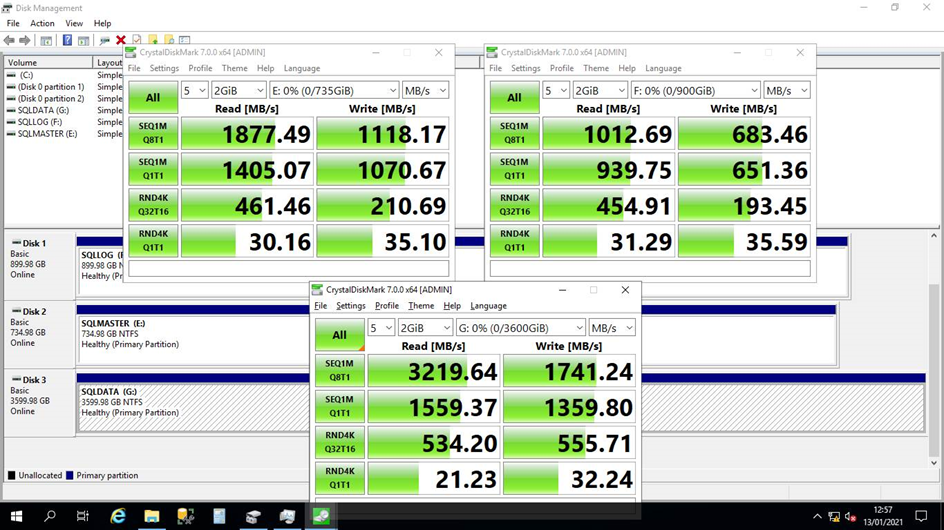
Under the hood, CrystalDiskMark uses the Microsoft tool Diskspd (DISKSPD 2.2) which can be useful to run on its own to get a simple and reproducible way to measure different server and VM disk subsystem performance. Use the following command line to test each of the relevant SQL volumes, by drive letter, in turn.
Diskspd -b64k –d120 –o32 –t4 –h –r –w25 –L –c2G G:\TestLoad.dat > GDisk_resultdetails.txtOnce complete, review the output in the created results file GDisk_resultdetails.txt for the Total IO thread section. In the following example, the total throughput in MiB/s is measured at 931.58.
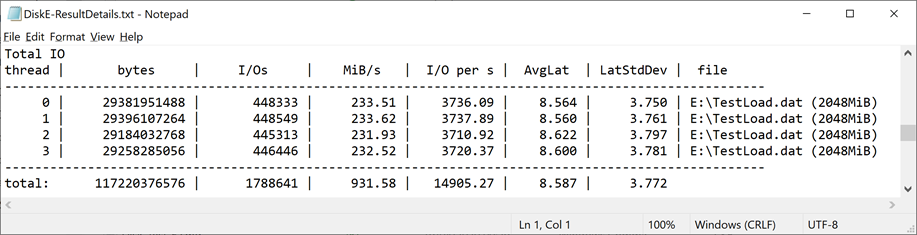
The Platform is more akin to a Data Warehouse type SQL Application (large sequential Writes and Reads) and not an OLTP type system (millions of small random IO requests). Therefore, overall throughput (MB/s) is more important than just IO alone. Also, when comparing IOPS in the sizing tables above (16k), and Diskspd at 64K block size, x4 to equate the values.
Table of references
External reference documents mentioned in the above sections:
|
Section |
Topic |
Reference |
|---|---|---|
|
General |
SQL Server Performance |
Performance Center for SQL Server Database Engine and Azure SQL Database |
|
|
SSAS performance guide |
Analysis Services Performance Guide for SQL Server 2012 and SQL Server 2014. |
|
|
Network performance (RSS) |
|
|
|
What is an Always On availability group? |
|
|
|
CrystalDiskMark and Diskspd |
|
|
Azure |
What is Azure SQL? |
|
|
|
Best practices for SQL Server on Azure VMs |
|
|
|
Increasing Azure SQL Server Performance |
Increase remote storage performance with Azure Ebsv5 VMs—now generally available |
|
|
Azure Storage for SQL VMs |
|
|
|
Azure Constrained Core VMs |
|
|
|
Azure managed disk types |
|
|
|
Azure Premium Storage |
|
|
|
Windows Storage Spaces |
Storage: Performance best practices for SQL Server on Azure VMs |
|
|
Azure Accelerated Networking |
|
|
|
Azure Load Balancer |
|
|
AWS |
AWS SQL Server Best Practices |
|
|
|
AWS Nitro Systems |
|
|
|
AWS Storage optimized instances |
Amazon EBS-optimized instance types and Maximizing Microsoft SQL Server Performance using Amazon EC2 NVMe Instance Store |
|
|
Increasing AWS SQL Server Performance |
Better performance for less: AWS continues to beat Azure on SQL Server price/performance |
|
|
AWS Constrained core Instances |
|
|
|
AWS EBS volume types |
|
|
|
AWS Accelerated Networking |