DEX Platform and Solutions 26.1 release notes
 Schedule
The schedule is subject to change. When changes are made to the original schedule, they are indicated in red. Please check the TeamViewer Status Page for regular updates.
DEX Platform
|
Region |
Date |
Time from (UTC) |
Time to (UTC) |
|---|---|---|---|
|
CanadaCentral1 |
Monday, January 26, 2026 |
9 AM |
12 PM |
|
NorthEurope1 |
Tuesday, January 27, 2026 |
12 PM |
3 PM |
|
WestUS1 |
Wednesday, January 28, 2026 |
9 AM |
12 PM |
|
UKSouth1 |
Wednesday, January 28, 2026 |
7 PM |
10 PM |
|
EastUS1 |
Thursday, January 29, 2026 |
9 AM |
12 PM |
|
WestEurope1 |
Thursday, January 29, 2026 |
6 PM |
9 PM |
Solutions
|
Region |
Date |
Time from (UTC) |
Time to (UTC) |
|---|---|---|---|
|
CA-Central-1 |
Tuesday, January 27, 2026 |
10 AM |
12 PM |
|
EU-West-1 |
Wednesday, January 28, 2026 |
4:30 AM |
6:30 AM |
|
US-East-1 |
Thursday, January 29, 2026 |
10 AM |
12 PM |
TeamViewer DEX Hub
TeamViewer DEX Hub is a comprehensive, platform‑integrated collection of automations and instructions built on the Simple Cross‑platform Agent Language for Extensibility (SCALE). This enhancement accelerates time to value by surfacing installed Exchange content, notifying administrators when updates are available, and providing seamless access to new content, all within the same console.
The Hub organizes content into DEX Packs that help organizations improve their digital employee experience, strengthen endpoint security, and deliver measurable business value. By leveraging these proven, pre‑tested automation workflows, customers can speed implementation and easily integrate them across their existing environments.
Refer to TeamViewer DEX Hub.
Key features
-
Access all existing Exchange content through the Hub.
-
View installed DEX Packs and identify packs that require updates.
-
View SCALE code for instructions, rules, and fragments directly within the TeamViewer DEX Hub.
-
Deploy DEX Packs seamlessly from the TeamViewer DEX Hub.
-
Retain fragment parameter values after deploying packs through the TeamViewer DEX Hub.
-
Explore Your Hub to see all instructions and fragments currently installed on your DEX Platform.
-
Compare your existing instructions with the latest versions available in the TeamViewer DEX Hub.
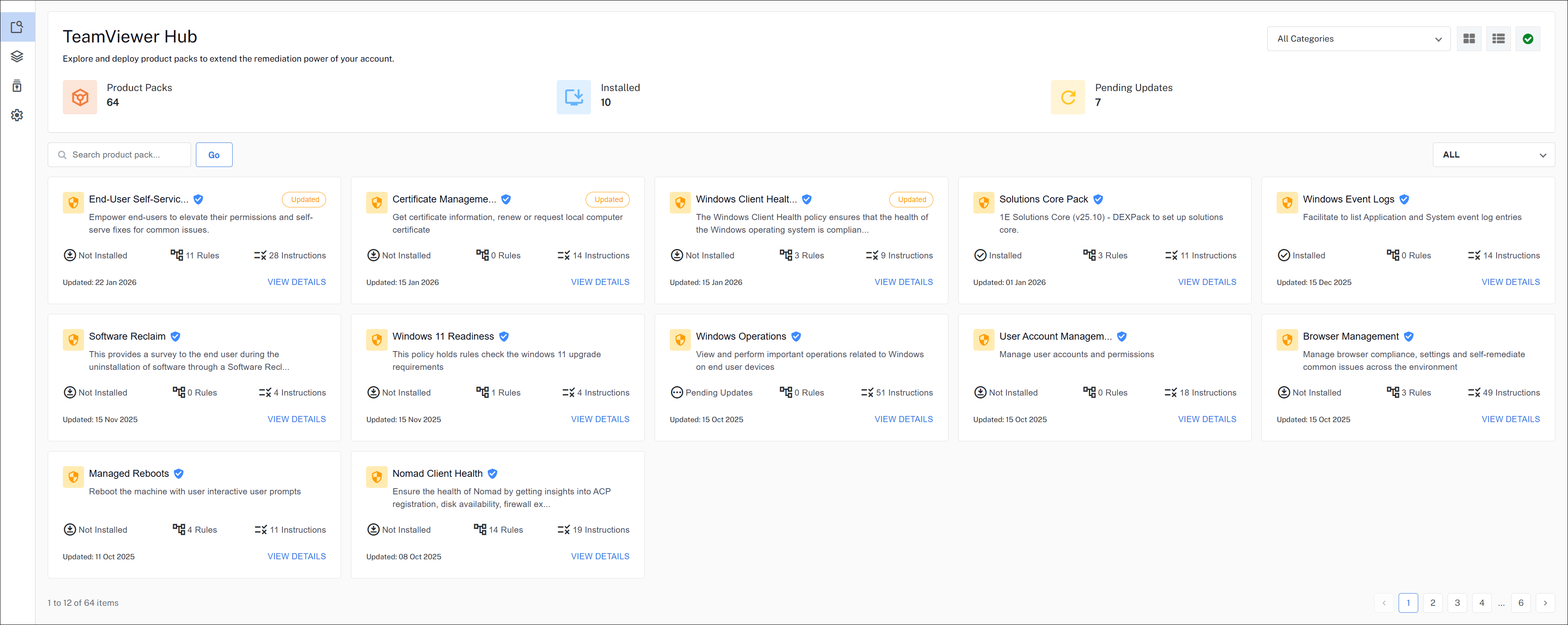
TeamViewer DEX Hub is accessible through Solutions but is not enabled by default. To activate it, contact your Customer Success Manager (CSM).
Monitor GPU and NPU performance via Diagnostics
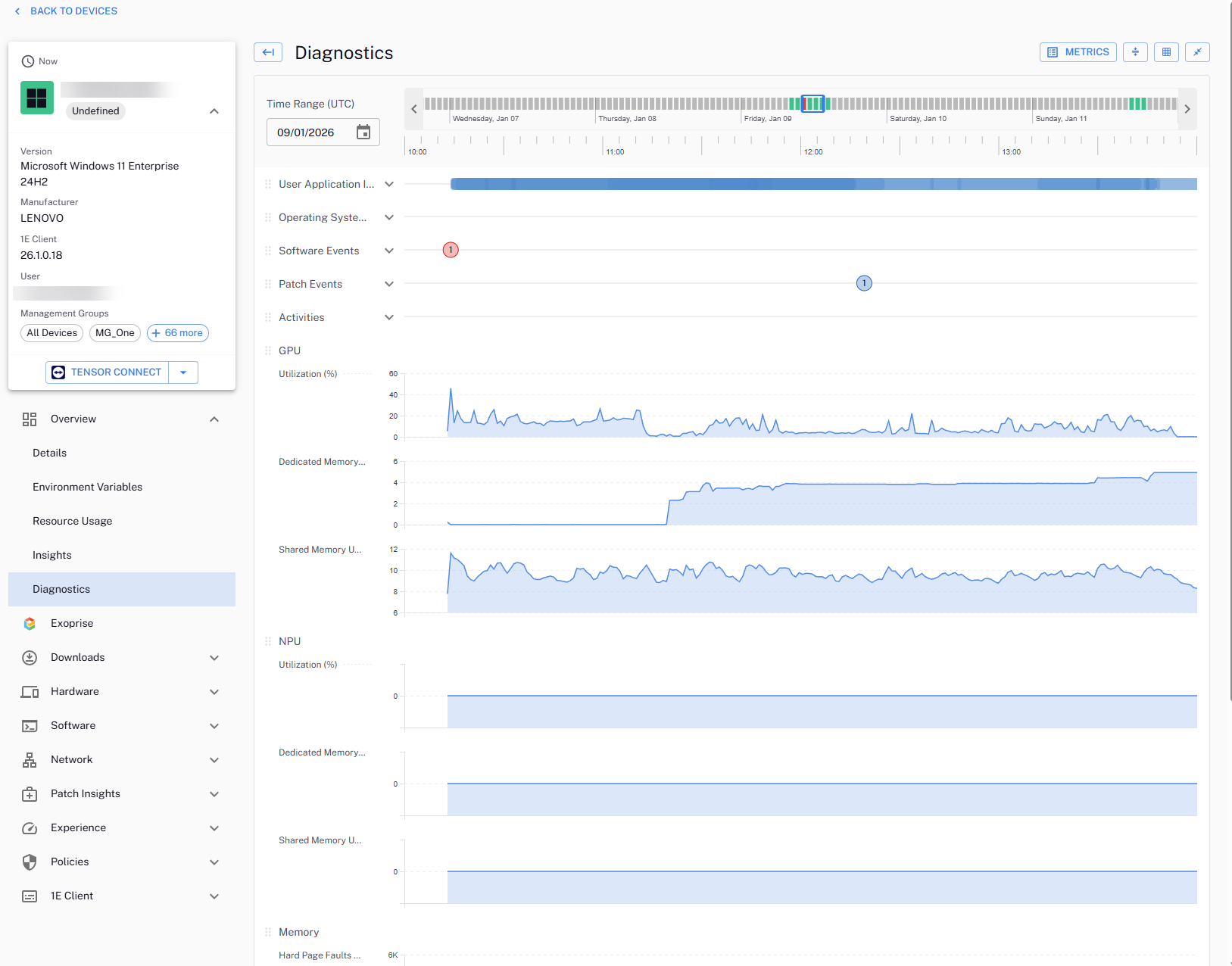
We’ve extended the DEX platform to help you monitor modern AI‑ and graphics‑driven workloads. You can now track NPU (Neural Processing Unit) and GPU (Graphics Processing Unit) metrics directly in Diagnostics.
Refer to Diagnostics.
You can now do the following:
-
Collect GPU and NPU hardware metrics from devices that have compatible hardware installed.
-
View real-time and historical GPU and NPU data in the Diagnostics Dashboard.
-
Use these insights to do the following:
-
Validate that AI-accelerated and graphics-intensive endpoints are correctly provisioned.
-
Proactively troubleshoot performance issues related to GPU/NPU utilization.
-
Support capacity planning for AI and high-performance workloads.
-
26.1 Diagnostics Performance Optimization: An updated 1E Diagnostics product pack will be available with this release in the Portal.
We recommend all customers install this update to take advantage of performance enhancements delivered through an optimized 1E‑TachyonPlatform‑Diagnostics‑DeviceMetrics instruction set.
What’s coming?
Platform logo branding update - February release
The portal branding logo will change from 1E to TeamViewer with the next (26.2) release. This is purely a logo update at this time and will not impact custom or 1E Client branding.
Versions and support
Client
The Client has been updated in this release. The table below shows the supported operating systems and corresponding Client build versions.
|
Operating system |
1E Client build version |
|---|---|
|
Windows |
26.1.0.35 |
|
macOS |
26.1.0.35 |
|
Linux:
|
26.1.0.35 |
MSVCRT version is 14.44.35208.0 for this 1E Client release.
Applications and tools
Please review the list of supporting applications and tools, as it may change with each release. Associated resources can be downloaded from the TeamViewer Support Portal.
|
Applications and tools |
Updated with this release |
Versions supported with this release |
|---|---|---|
|
Client Deployment Assistant |
|
26.1.0.3 |
|
TIMS |
|
26.1.0.35 |
|
Content Distribution Tools |
|
26.1.0.8 |
|
PXE Everywhere |
|
26.1.0.4 |
|
1E SDK |
|
26.1.0.11695 |
|
1E Toolkit |
|
24.7.0.2 |
|
Product Pack Deployment Tool |
|
24.12.0.12256 |
|
1E PowerShell Toolkit |
|
1.2.32.0 |
|
DataSync Agent |
|
1.3.0.28 |

Other improvements and fixes
For a new instance, DEX packs are pre‑loaded. If you are using an upgraded instance, you must download the latest DEX packs from the Exchange.
|
Type |
Product/Client |
Issue ID |
Summary |
|---|---|---|---|
|
Enhancement |
Business Impact |
DEXSOL-1701 |
The Business Impact dashboard now allows users to select/deselect a policy and retain the filters on navigation. |
|
Enhancement |
Experience Analytics |
PLAT-23155 |
Custom Measurement now scores late events from offline devices using the threshold valid on each event’s original date. This aligns historical scoring with online behavior, ensuring consistent DEX scores around threshold changes and improving accuracy of trend analysis in Experience Analytics. |
|
Enhancement |
Experience Analytics |
PLAT-23010 |
The ability to reset custom measurements to their default settings allows users the flexibility to return to the original options. |
|
Enhancement |
Diagnostics |
PLAT-23456 |
Diagnostics now ingests GPU and NPU metrics from cold storage into the middle layer, making them available for advanced troubleshooting and analysis. This update standardizes data contracts for UI consumption and ensures default metric configurations are ready for future GPU/NPU-based diagnostic capabilities. |
|
Fix |
Platform |
PLAT-23763 |
We fixed an issue within Instructions, where follow-up questions failed to retain their original coverage scope. |
|
Fix |
Async Export |
PLAT-22714 |
We fixed an issue so that the Async Export API now exports all data in the event of a bookmark response from the API. |
|
Fix |
Platform |
PLAT-15471 |
We fixed an issue so that once a Scheduled Instruction is deleted, it is removed from the client so that no future instances are executed. |
|
Fix |
Software Reclaim |
DEXSOL-1708 |
We fixed an issue so that Windows and Windows Server are excluded from the list of non-relevant software in Software Reclaim. |
|
Fix |
Software Reclaim |
DEXSOL-1632 |
We fixed an issue so that Software Reclaim no longer needs to be expanded to full-screen to ensure that all data is visible. |
|
Fix |
Device Refresh |
DEXSOL-1734 |
We fixed an issue that made improvements to Business Impact ROI Dashboard load time. |
|
Fix |
Software Reclaim |
DEXSOL-1742 |
We fixed an issue so that the vendor dropdown in the Reclaim dashboard is now sorted in alphabetical order. |
|
Fix |
Platform |
PLAT-15433 |
We fixed an issue where duplicate Scheduled Instructions were being displayed in the UI, after existing Scheduled Instructions were updated. |
|
Fix |
Platform |
PLAT-23286 |
We fixed an issue that prevented a custom logo and banner branding from being updated from the Branding page. |
|
Fix |
Platform |
PLAT-21511 |
We fixed an issue that caused content copy to fail at 0.000% from System Center Configuration Manager (SCCM) Cloud Management Gateway (CMG) in Nomad. |