Platform architecture


Learn how the TeamViewer DEX Platform architecture organizes server stacks, components, and clients to enable real-time device management and scalable deployment.
 Platform deployment architecture
At the top-most level, Platform architecture consists of Platform Server components, grouped into Stacks, and clients that are deployed onto the devices that you want to manage.
Platform Server Stacks
Every Platform system has a single Master Stack, which provides web services for Platform applications. Master Stack components are typically all installed on a single Master Server.
Platform real-time features require Response Stacks, which are made up of one or more Response Servers. A DMZ Server is an example of a Response Server. Each Response Stack has at least one Background Channel for sharing resources and a single Core component that supports an associated set of up to five Switches. Switches are the primary mechanism for rapidly requesting and retrieving responses from the 1E Client. As each Switch can handle up to 50,000 devices there is a limit of 250,000 devices per Response Stack. Higher numbers can be achieved if you contact Platform for guidance. Switches may be local or remote to the other components in the Response Stack.
Databases for Platform, Catalog, Content Distribution, and Experience Analytics are installed on SQL Server database instance(s) that may also be local or remote to their respective Master and Response servers. It is also possible for multiple Response Stacks to share the same Responses database. Refer to the:
-
Architectural requirements section for guidance on which architecture to choose
-
Communication ports reference page for connection details between components and ports necessary for firewalls.
Platform Single-Server system
In the most basic setup, there is a single server that hosts both a Master Stack and a Response Stack and this can be deployed by selecting the default settings in 1E Server setup.
The following table shows the Platform components, including Master and Response Stacks, and also shows the DMZ Server discussed in Platform architecture for Internet-facing devices.
Platform components
|
Subsystem |
Component |
Web application |
Master Stack |
Response Stack |
DMZ Server |
|---|---|---|---|---|---|
|
Master Server |
Platform portal UI and applications |
Platform |
1 |
|
|
|
Consumer API |
Consumer |
1 |
|
|
|
|
Coordinator service |
|
1 |
|
|
|
|
Master database |
|
1 (optionally Remote) |
|
|
|
|
Experience Analytics |
Experience Analytics API |
Experience Analytics |
1 |
|
|
|
Experience Analytics database |
|
1 (optionally Remote) |
|
|
|
|
Content Distribution |
Content Distribution API |
Content Distribution |
1 (optional) |
|
|
|
Content Distribution database |
|
1 (optionally Remote) |
|
|
|
|
Catalog |
1E Catalog UI |
CatalogWeb |
1 |
|
|
|
Catalog API |
CatalogWeb |
|
|
|
|
|
Catalog Update Service |
|
|
|
|
|
|
Catalog database |
|
1 (optionally Remote) |
|
|
|
|
SLA and Inventory |
SLA Platform UI and SLA applications |
Platform |
1 |
|
|
|
SLA Admin |
Admin |
1 |
|
|
|
|
SLA Engine |
|
1 |
|
|
|
|
SLA Integrate services:
|
|
1 |
|
|
|
|
SLA Operations Provider API |
CoreExternal |
1 |
|
|
|
|
SLA databases (Data, Integrate, Shared) |
|
1 (optionally remote) |
|
|
|
|
Response Server |
Core |
Core |
|
1 |
|
|
Background Channel |
Background |
|
1 |
1 |
|
|
Switch(es) (also includes a single Switch Host service) |
|
|
up to 5 (optionally Remote) |
up to 5 |
|
|
Responses database |
|
|
1 (optionally Remote) |
|
|
The picture shows a Platform Single-Server System with databases optionally installed locally or on remote SQL Server instance(s). Components colored green are optional in a Platform system.
The Response Stack can be installed on the same server as the Master Stack, and on remote servers.
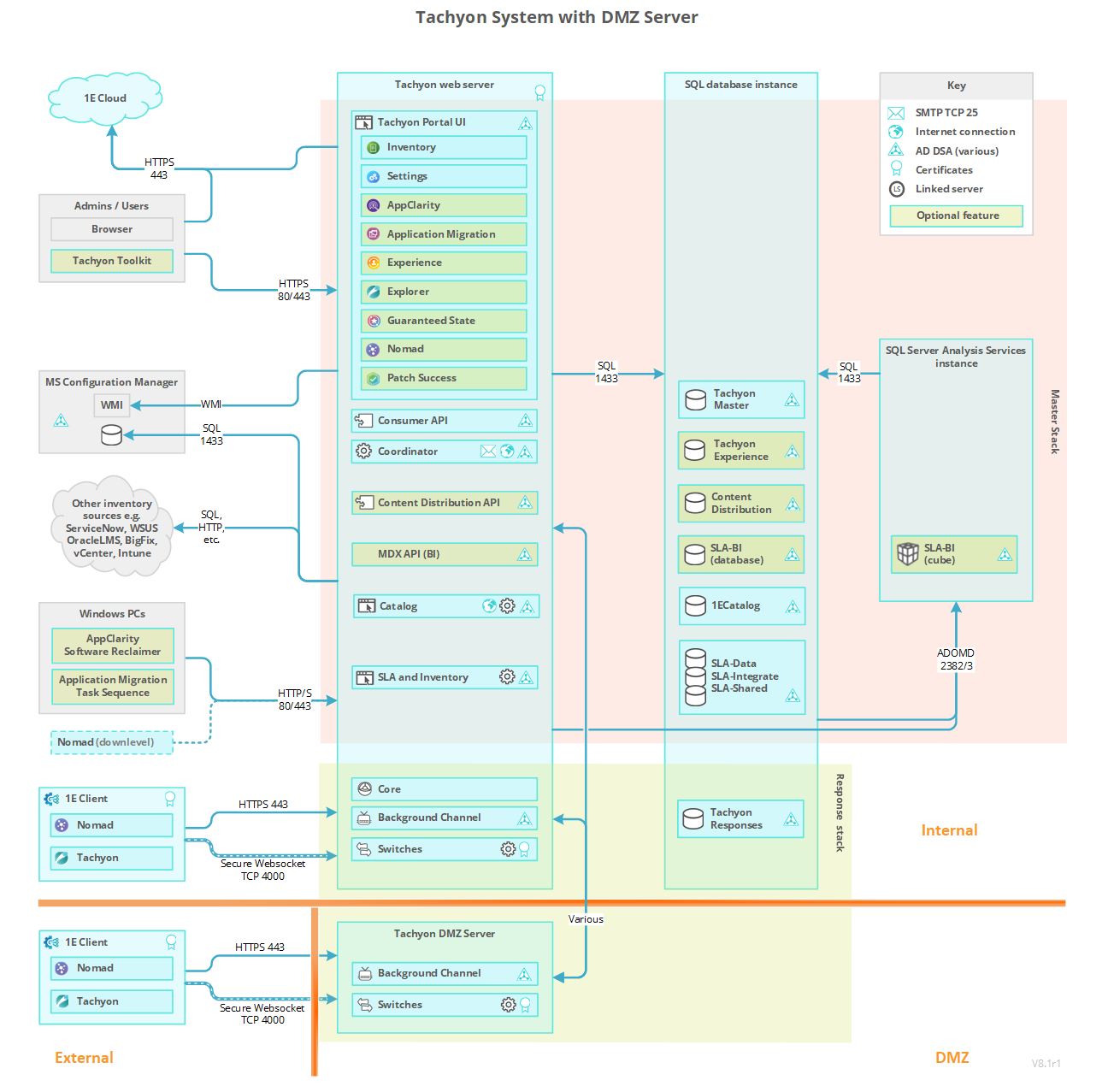
The DMZ Server has only the Platform client-facing components of the Response Stack: the Background Channel and Switches.
Applications and Tools
Platform applications and tools are consumers, and all consumers connect to the Consumer API.
The following consumer applications run on the Platform and are installed using 1E Server setup, refer to License requirements.
Applications are categorized as follows:
-
Configuration - applications required to configure the Platform and required by all other applications.
-
Client - applications that communicate with devices in real-time.
-
Inventory – applications that use inventory features.
Applications that are included in the Platform license
|
Application |
Purpose |
Type |
|---|---|---|
|
|
|
Inventory, configuration |
|
Configuration |
|
|
Client |
|
|
Client |
Applications that require a license
|
Application |
Purpose |
Type |
|---|---|---|
|
|
|
Inventory |
|
|
|
Inventory |
Content Distribution uses the following features:
|
Client |
|
|
Client |
|
|
Client |
The following types of application require 1E Client (with Platform features enabled) to be deployed to all in-scope devices.
-
All Client applications.
-
Inventory applications if you intend using the Platform connector to populate your inventory.
The AI Powered Auto-curation feature is optionally used by Inventory applications to provide automatic curation of new products. This avoids having to manually add products to the Catalog, or wait for it be updated. This optional feature requires additional memory on the Platform Server (Master Stack).
Some benefits of using AI Powered Auto-curation are that you can:
-
Achieve significantly more normalized software from the first sync
-
Reduce the manual effort required to normalize software
-
Get an expanded SAM offering as more data is available for AppClarity
-
Get additional coverage for Application Migration
-
Identify more software to review for security threats.
Platform Tools
The following are tools included in Platform. These tools are not installed using Platform Setup. They have either their own installers or are included in download zips.
-
ConfigMgr UI Extensions - installed as part of the Platform Toolkit, this is a right-click extension for the Configuration Manager console that provides the option to browse and run an instruction on devices in a specified Collection, refer to Preparing ConfigMgr extensions for Endpoint Troubleshooting for details.
-
Run Instruction command-line tool - installed as part of the Platform Toolkit, it is used for sending instructions to the Platform server from a script or from a command prompt.
-
Platform product pack deployment tool - included in the Platform zip ProductPacks folder.
-
TIMS - used for the development of instructions using the SDK.
A typical license allows the use of all these tools.
Platform Multi-Stack system
The picture shows a Multi-Stack System. Here the Master Stack communicates with one or more Response Stacks. A local Response Stack is not mandatory. Components colored green are optional in a Platform system.
As with a single-server system, the databases are optionally installed locally or on remote SQL Server instances(s).
Platform components
Let's take a look at each of the Platform components in slightly more detail.
|
Component |
Description |
||||
|---|---|---|---|---|---|
|
IIS Components |
The following components are IIS Web Applications that reside on a single-server. Other configurations - such as Response Stack and DMZ Server - have a subset of these. Under the Platform website:
|
||||
|
Core |
The Core is a Response Stack component which provides internal API and data processing. Core does the following:
|
||||
|
Background Channel |
The Background Channel is a Response Stack component which provides a means for the 1E Clients to retrieve large data items from the Platform without loading the Switch:
|
||||
|
Switch |
The Switch is a Response Stack component which provides the following:
The Switch Host service is responsible for starting local Switches. |
||||
|
Platform Portal UI |
Platform users browse to the portal to access Platform applications. Applications that are Platform built-in applications:
Applications that are optional:
|
||||
|
Consumer API |
The Consumer API provides the following:
|
||||
|
Platform Coordinator |
The Coordinator service is the coordinating service used by Platform components. It has two modules, Workflow and Instrumentation. The Workflow module provides the following:
The Instrumentation module processes Instrumentation data from the following components:
And responds to requests for Instrumentation data from the Consumer API. Supports the two-factor authentication feature, with email. |
||||
|
Content Distribution |
Content Distribution replaces the related features of ActiveEfficiency Server, which is deprecated. Legacy clients continue to be supported by direct communication with the Content Distribution API, whereas Content Distribution 8.x clients communicate with the Content Distribution API via the proxy feature on Response Servers. Platform Setup is used to install Content Distribution and the Content Distribution app, and no longer installs ActiveEfficiency. Content Distribution includes the following features:
|
||||
|
Catalog UI |
The website is used to view and interact with the Catalog. Platform Setup supports the installation of Catalog on the Master Stack server. For customers that want to continue using an existing installation of Catalog 2.0 then Platform Setup supports using a remote Catalog server as a custom setup option. Contact your customer representative for details on how to use custom setup options. |
||||
|
Catalog Update Service |
Service is used to connect to the Cloud Catalog in order to download the latest catalog entries. |
||||
|
Catalog API |
Consumer API is used to manage and update the Catalog. |
||||
|
SLA Admin |
Internal API used to manage SLA components. |
||||
|
SLA Platform UI |
The website is used to view and interact with the Inventory. |
||||
|
SLA Engine |
The Engine service is the coordinating service used by SLA components. This includes processing of Management Groups. |
||||
|
SLA Integrate Services |
The SLA Integrate Agent sevice performs Connector functions by connecting to data sources and importing data into repositories. The SLA Integrate Manager service manages Agent operations including repository action schedules. |
||||
|
SLA Inventory |
The inventory repositories. Each instance of a repository is stored in SLA-Data database, and is based on a template defined in the SLA-Data database. |
||||
|
SLA Operation Provider API |
Consumer API and functions used by SLA clients, including Application Migration task sequence steps and AppClarity Software Reclaimer. |
||||
|
MDX(BI) |
Internal API used by Patch Success application. Business Intelligence is an optional component installed by Platform Setup on the Master Stack, and requires SQL Server Analysis Services (SSAS). Business Intelligence is a prerequisite for the Patch Success application to support efficient presentation of visualizations on a large scale. |
||||
|
Consumer applications |
The following Consumer applications are licensed:
The following Consumer applications are included with the Platform:
Other consumers are Configuration Manager Console extensions and other toolkit features. |
||||
|
SQL Server (Database Engine and Analysis Services) |
The Platform has two databases:
Experience Analytics has one database:
Catalog has one database:
SLA has three databases:
SLA BI has two databases:
Content Distribution has one database:
|
||||
|
1E Client |
1E Client includes clients for the Platform, Content Distribution, PXE Everywhere Agent, Shopping/WSA, and WakeUp. All the above are supported on Windows devices, client features (excluding Experience Analytics and User Interaction) are also available on non-Windows devices. 1E Clients communicate with the Switches and the Background Channel to provide responses to instructions (questions and actions) and subscribe to policy events for Experience Analytics and Endpoint Automation. Content Distribution clients use Switches and the Background Channel as a proxy for communicating with the Content Distribution. |
Platform architecture for Internet-facing devices
Enabling the Platform to support devices that are external to your company network is done by slightly extending the default single-server architecture.
To enable external 1E Client devices to interact with the Platform the DMZ requires at least one Background Channel and at least one Switch.
The Responses Stack handles communications between Master Stack and the platform clients. The Background Channel and Switch components handle the direct communication with the platform clients, the Core processes the information in both directions between the Master Stack and the Switches.
First, you need a working Platform system on the internal network, with a Response Stack that will provide the Core for the DMZ Server. The picture shows a Response Stack and Master Stack on the same server, located on the internal network. This serves clients when they are connected to the internal network.
Then configure the internal firewall to allow two-way communication between each of the following:
-
The Core on the Internal Response Stack and the Switch(es) in the DMZ.
-
The Coordinator on the internal Response Stack and the Switch(es) in the DMZ.
-
The Consumer API on the internal Master Stack and the Background Channel in the DMZ.
Configure the external firewall to allow incoming connections for:
-
The external platform clients and the Background Channel in the DMZ.
-
The external platform clients and the Switch(es) in the DMZ.
After you have provisioned a server in the DMZ, you need to make the following changes to the existing Platform system:
-
Run Platform Setup on the Response Stack to tell it about the DMZ Server, which will do the following:
-
Prepare the Master database with relevant details of the DMZ Background Channel and Switch(es).
-
Raise the security level of the Core and Switch communications.
-
Produce a configuration file for the DMZ Server.
-
-
Run Platform Setup on the DMZ Server using the pre-prepared configuration file, to complete the installation of DMZ Background Channel and Switch(es).
Detailed steps for the above process can be found on the Implementing a 1E DMZ Server page.
The DMZ picture shows a dual firewall design, but a single firewall is also supported.
In the picture, components colored green are optional in a Platform system.