TeamViewer DEX 26.5 release notes
 Schedule
The schedule is subject to change. When changes are made to the original schedule, they are indicated in red. Please check the TeamViewer Status Page for regular updates.
DEX Platform
|
Region |
Date |
Time from (UTC) |
Time to (UTC) |
|---|---|---|---|
|
CanadaCentral1 |
Monday, May 18, 2026 |
8 AM |
12 PM |
|
NorthEurope1 |
Tuesday, May 19, 2026 |
3 PM |
6 PM |
|
WestUS1 |
Wednesday, May 20, 2026 |
8 AM |
11 AM |
|
UKSouth1 |
Wednesday, May 20, 2026 |
6 PM |
9 PM |
|
EastUS1 |
Thursday, May 21, 2026 |
8 AM |
11 AM |
|
WestEurope1 |
Thursday, May 21, 2026 |
5 PM |
8 PM |
Solutions
|
Region |
Date |
Time from (UTC) |
Time to (UTC) |
|---|---|---|---|
|
CA-Central-1 |
Monday, May 18, 2026 |
9 AM |
11 AM |
|
EU-West-1 |
Tuesday, May 19, 2026 |
3.30 AM |
5.30 AM |
|
US-East-1 |
Wednesday, May 20, 2026 |
9 AM |
11 AM |
This release includes enhancements and fixes for the Platform, Solutions and Client.
Localized Client RTCC UI
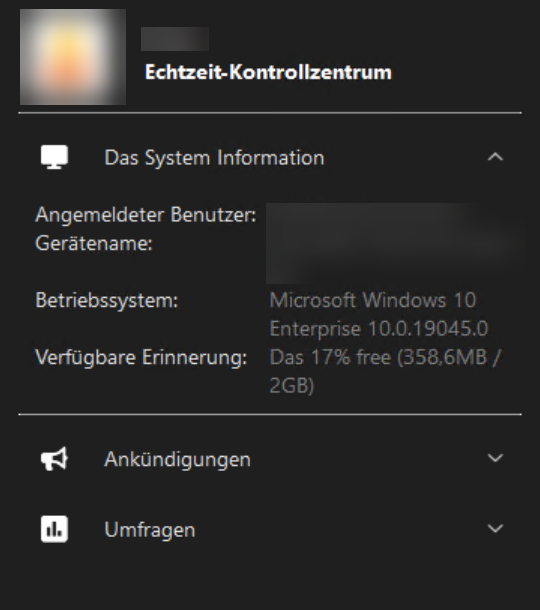
The Client Real-Time Control Center user interface (RTCC UI) is now localized into 9 supported languages out of the box with no manual file deployment required. The language displayed is determined by the device locale. Refer to Localized Client Real Time Control Centre (RTCC).
Supported languages
|
Code |
Language |
|---|---|
|
zh |
Chinese |
|
en |
English |
|
fr |
French |
|
de |
German |
|
ja |
Japanese |
|
ko |
Korean |
|
pt |
Portuguese |
|
ru |
Russian |
|
es |
Spanish |
What's new
-
Built-in translations for the Client RTCC UI: The client installer now ships with language-specific .xml configuration files for both macOS and Windows, covering all 9 supported languages. Previously, the Client UI was English-only unless customers manually provided translation files.
-
Locale-driven language selection: The client automatically detects the device locale and renders the UI in the matching language. No additional configuration is needed.
-
Automatic fallback to English: If the device locale does not match any of the 9 supported languages, the UI falls back to English.
-
Localization config flag: A new configuration flag controls whether the new localization behavior is active. By default, this flag is set to false, preserving existing custom translation files and current locale handling. When set to true, the client switches to the new locale-driven translation files and fallback logic, giving administrators the flexibility to enable the new localization experience on their own schedule without impacting existing deployments.
Custom files and backward compatibility
Customer-provided translation files are still honored. If you have already deployed your own .xml translation files for the Client UI, the client continues to prefer those over the new installer defaults. Existing customizations are not overwritten. If no custom files are present, the installer-provided defaults are used automatically.
The localization config flag defaults to false, so existing deployments are unaffected until an administrator explicitly opts in.
Normalized Insights
Normalized Insights is a new capability within DEX Intelligence that simplifies how recurring issues are surfaced and managed.
Normalized Insights consolidates repeated occurrences of the same issue into a single aggregated insight, giving IT teams a clearer, more actionable view of digital experience problems. Instead of multiple duplicate alerts, the Insights dashboard displays one unified entry per unique issue, covering occurrences within a rolling 14-day window.
The result is a cleaner insights feed, reduced noise, and improved ability to identify and resolve recurring issues at scale. Refer to Insights.
What's new
-
Aggregated insights for recurring issues: Repeated issues are automatically grouped into a single consolidated insight, with each insight representing a unique problem across all affected devices and users. This eliminates duplicate entries across the Insights dashboard.
-
Holistic issue timeline: Each Normalized Insight includes a chronological view of all occurrences, providing visibility into when the issue started and its frequency and recurrence patterns. This helps teams better understand issue progression and root causes.
-
Visibility into historical automation runs: Users can now view past run instructions as part of the investigation associated with an insight. This provides transparency into what remediation actions were triggered and when they were executed, helping teams understand prior resolution attempts, avoid duplicate or ineffective actions, and accelerate root cause analysis.
-
Commenting on insights: Users can now add comments directly to a Normalized Insight, enabling teams to collaborate during investigation, share context and findings, and document decisions or actions taken. This improves cross-team visibility and knowledge sharing throughout the insight lifecycle.
Removal of Insight Status Management: The ability to manually set or update insight status (open, in-progress, archived) has been removed from Normalized Insights. Users will no longer be able to modify insight status directly.
Tia Scripting
Tia Scripting is now generally available (GA) and production-ready.
Tia Scripting enables users to generate SCALE code by describing their requirements in plain language. Tia translates the input into SCALE code that meets those requirements. Refer to Tia Scripting.
Exchange rebranded to TeamViewer DEX Hub
The Exchange has been rebranded to TeamViewer DEX Hub. All existing references to 1E Exchange have been updated to align with TeamViewer branding. This is a branding update only and does not impact existing functionality.
User views
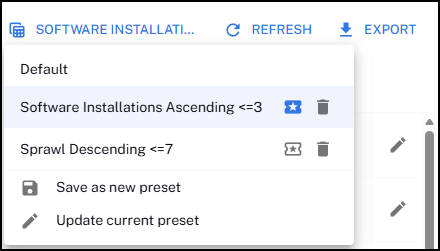
The DEX platform now includes a user preferences management system that persists and applies view settings consistently across all tables and screens in the platform UI.
Users can create, switch, update, and delete views, and save a specific view as the default to be applied each time a data table is loaded. Refer to Page toolbar search, filters, columns, delete, export.
Notification badge for exports
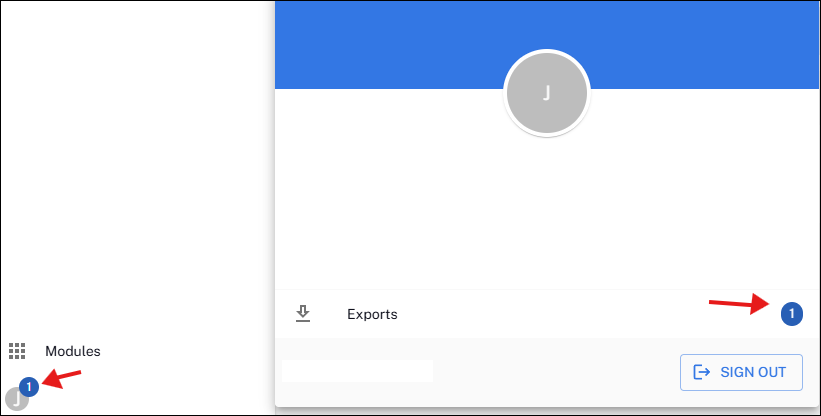
When running an export on a data table within the new UI, you are now notified with a badge that the export is ready to be opened. Refer to Page toolbar search, filters, columns, delete, export.
Long-Term Service Branch (LTSB) update
The next Long-Term Service Branch (LTSB) version of the 1E Windows Client is released with the May 2026 (26.5) release.
Each LTSB version is supported for 18 months, during which critical security and stability fixes are provided. No new feature updates are included in an LTSB version. All new features introduced during the year are bundled into the next annual LTSB release.
Customers who prefer continuous feature enhancements can remain on the regular bi-monthly release cadence. Refer to Long-Term Service Branch (LTSB).
Versions and support
Client
The Client has been updated in this release. The table below shows the supported operating systems and corresponding Client build versions.
|
Operating system |
1E Client build version |
|---|---|
|
Windows |
26.5.0.24 |
|
macOS |
26.5.0.24 |
|
Linux:
|
26.5.0.24 |
MSVCRT version is 14.42.34438.0 for this 1E Client release.
Applications and tools
Please review the list of supporting applications and tools, as it may change with each release. Associated resources can be downloaded from the TeamViewer Support Portal.
|
Applications and tools |
Updated with this release |
Versions supported with this release |
|---|---|---|
|
Client Deployment Assistant |
|
26.5.0.2 |
|
TIMS |
|
26.5.0.24 |
|
Content Distribution Tools |
|
26.3.0.11 |
|
PXE Everywhere |
|
26.1.0.4 |
|
1E SDK |
|
26.1.0.11695 |
|
1E Toolkit |
|
24.7.0.2 |
|
Product Pack Deployment Tool |
|
24.12.0.12256 |
|
1E PowerShell Toolkit |
|
1.2.33 |
|
DataSync Agent |
|
1.3.0.28 |

Other improvements and fixes
|
Type |
Product/Client |
Issue ID |
Summary |
|---|---|---|---|
|
Enhancement |
Platform |
PLAT-27961 |
The IdP certificate expiry and Data Access token expiry notification emails now include a tenant identifier in the email body to assist administrators in multi-tenant environments. |
|
Enhancement |
Data Access |
PLAT-27636 |
Data Access now supports non-normalized software by device inventory data. Refer to Data Access in the TeamViewer Support Portal and Inventory Insights data dictionary for more information. |
|
Fix |
Platform |
PLAT-27375 |
We fixed an issue where exported CSV files contained all rows regardless of the applied filter. Exported CSV files now contain only the filtered rows that match the applied filter, regardless of whether the filtered column is visible or hidden. |
|
Fix |
Tia |
PLAT-27185 |
We fixed an issue where parameters were not visible in the Tia formula body when using dark mode. Parameters in the Tia formula body are now visible when using dark mode |
|
Fix |
Client |
PLAT-26023 |
We fixed an issue where Diagnostics data in DEX was displaying incorrectly when a device lid was closed. This has been resolved, and data is now displayed. |